DBA Hub

📋Steps in this guide1/2

Administrative Privileges and Job Role Separation in Oracle Database 12c Release 1 (12.1)

Oracle 12c includes additional administrative privileges to allow a greater level of job role separation if that is necessary in your organisation.

oracle 12cconfigurationintermediate
by OracleDba
14 views
1

Using Administrative Privileges

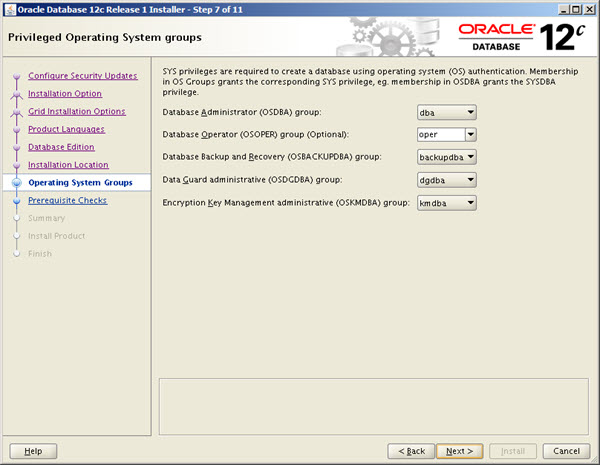
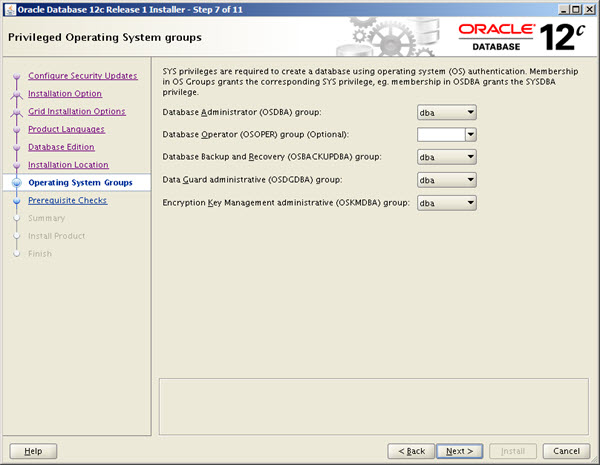
Oracle 12c includes additional administrative privileges to allow a greater level of job role separation if that is necessary in your organisation. Oracle 12c Release 2 (12.2) has added an extra group called , which will be included in the following sections. If you are using Oracle 12.1, remember this group is not supported. The documentation discusses the following groups. Remember, if DBAs are the only people in your organisation that are allowed to manage Oracle functionality (databases, ASM, grid infrastructure etc.), these admin privileges are not needed. The only mandatory OS groups are "oinstall" and "dba". If you have used a preinstall package, like "oracle-rdbms-server-12cR1-preinstall", to perform the prerequisites on Oracle Linux, the "oinstall", "dba" and "oper" groups will be created already. The other groups can be created manually as follows. With the groups in place, you can create the "oracle" user with the command. If the "oracle" user already exists, it can be amended using the command. The command shows the current settings for the user. When you install the database software the "Privileged Operating System groups" screen gives you the ability to associate these groups withe the relevant privilege. Remember, this is optional. There is nothing wrong with using something like the following if it suits your organisation.
Step 1
2

Identify Users with Administrative Privileges (V$PWFILE_USERS)

To allow a database user to connect using these admin privileges, you need to grant the relevant admin privilege to them. You can't grant to a database user. The users will then be able to connect using the their admin privileges. The view allows you to quickly identify users with with admin privileges. For more information see: - Configuring Users, Groups and Environments for Oracle Database Hope this helps. Regards Tim...
Step 2

Comments (0)

Please to add comments

No comments yet. Be the first to comment!