HTTPS Reverse Proxy
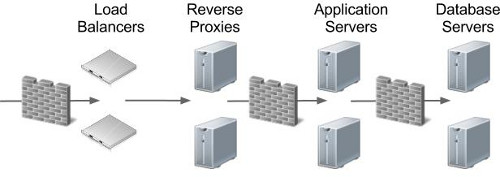
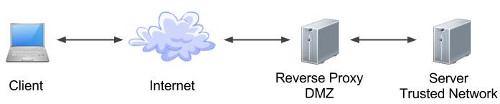
Reverse proxies provide a number of benefits in terms of security and maintenance, including the following.
- The obvious point is none of your application or database servers are exposed to external networks directly, which is a good starting point when trying to build a secure solution.
- URLs presented to users can be "pretty", rather than containing specific machine names, ports and long paths. A simple redirect would still expose the true URL, while a reverse proxy completely hides it from the user.
- Following on from the previous point, users bookmark URLs. If that bookmark contains a specific machine name, then no matter how resilient you try to make your solution, they will go to their bookmark and think your site it down. Separating them from the physical implementation of your services make your apparent availability better.
- From a security perspective, the less architectural information you expose to the outside world, the better. If hackers are presented the actual machine names and ports that are running a service, it makes it significantly easier for them to attack those services.
- The fact the URLs no longer point directly to actual machines enables dramatic architecture changes to be hidden from users. A simple configuration change within the reverse proxy can direct all the workload to a new set of servers.
The "ProxyPass" and "ProxyPassReverse" parameters are used to tell Apache how to proxy requests. They require the "mod_proxy.so" and "mod_proxy_http.so" Apache modules, which are loaded by default in RHEL5 and RHEL6, but check the following lines are uncommented in the "/etc/httpd/conf/httpd.conf" file to make sure.
In the following example, the "my-app-1.example.com" and "my-app-2.example.com" URLs resolve to the IP address of the reverse proxy server. The "/etc/httpd/conf/httpd.conf" entries below use named virtual hosts to proxy the two URLs to the appropriate internal server(s).
Changes to the "/etc/httpd/conf/httpd.conf" file will not take effect until the httpd service is reloaded or restarted.
Remember, for named virtual hosts to work, the URL must contain the correct name, so to test this you will either need the appropriate DNS entries, or "/etc/hosts" entries. In my case the reverse proxy is running on a server with an IP address of "192.168.0.190", so the hosts file would look like this.
The two applications are now being proxied using the following URLs.
In order to define a HTTPS reverse proxy you will need to configure Apache to handle HTTPS requests. You can see how to do this here . The following examples rely on this configuration.
The HTTPS reverse proxy definitions are similar to those seen previously, with the addition of the SSL related parameters. The following example also includes redirects to make sure any HTTP requests are redirected to HTTPS.
Notice the "SSLCACertificateFile" entry is commented out. If you are using a real certificate, you will probably need to download the intermediate bundle from the CA and reference it using this tag.
After a restart of the httpd service, the following URLs will be proxied appropriately.
The following is a HTTPS equivalent of the sub-directory reverse proxy shown in the previous section.
The after a restart of the httpd service, the following URLs will be proxied appropriately.
For more information see:
- Linux HTTP Server Configuration
- Apache Tomcat Installation on Linux
- Apache Monitoring using mod_status (server-status)
- NGINX : Reverse Proxy Configuration
- Let's Encrypt - Free Certificates on Oracle Linux (CertBot)
- Server Icon
- Cloud Icon
Hope this helps. Regards Tim...