Miscellaneous
This article is based on MOS Note:340009.1 and presents some basic steps to increase the security of your Oracle database servers.
- Default Oracle Passwords
- Password Management Lock Unused Accounts Lock SYS and SYSTEM Accounts Password Aging, Expiration and History Password Verification : Enforcing Password Complexity Case Sensitive Passwords
- Lock Unused Accounts
- Lock SYS and SYSTEM Accounts
- Password Aging, Expiration and History
- Password Verification : Enforcing Password Complexity
- Case Sensitive Passwords
- Revoke Job-Related Privileges
- Revoke Unnecessary Privileges
- Securing the Listener
- Restrict Schema Access to Specific IP Address
- Miscellaneous
- Lock Unused Accounts
- Lock SYS and SYSTEM Accounts
- Password Aging, Expiration and History
- Password Verification : Enforcing Password Complexity
- Case Sensitive Passwords
Related articles.
By default Oracle creates a number of schemas, each with a default password. Although many of these users are locked, it is still good practice to switch to non-default passwords in case the are unlocked by mistake. In addition, regular users often switch their passwords to match their username. Both of these situations represent a security risk.
Pete Finnigan has an Oracle Default Password Auditing Tool that checks for default passwords, and users whose passwords match their usernames. This is pretty handy to pick up any loose ends. To use this tool, download and extract the zip file. Run the osp_install.sql script to install the password checker and the ops_exec.sql file to run it.
Oracle 11g includes a new view called , which displays all users which have a default password set.
The Oracle database includes a range of functionality to help secure database users. Unused accounts should be locked,
while accounts that are used intermittently should be unlocked as needed.
The vast majority of the time there is no need to access the SYS and SYSTEM accounts, since you should be using a DBA account to do your day-to-day work. As a result, these should be locked and only unlocked when needed. So for example, I might do the following.
Once this is done, all DBA work would be performed using the TIM_HALL users. If SYS or SYSTEM were needed, they could be unlocked, then locked again.
Notes.
- Locking the SYS account doesn't prevent connections from the database server using "/ AS SYSDBA".
- Do you DBAs really need DBA access? The DBA role has a lot of privileges you may never need. It might be a good idea to create a custom DBA role that only has the privileges necessary to do your job.
Password aging, expiration and history is managed via profiles, as shown below.
The and parameters work in conjunction. If either one is set to unlimited and the other set to an integer value, password reuse is prevented.
Notes.
- Password expiration is an outdated concept. It was originally based on the approximate time it takes a computer to crack a strong password.
- Password expiration can lead to less secure practices. Forcing users to change passwords regularly increases the likelihood of them writing down passwords or using predictable patterns.
- Password expiry can be useful if you don't have a proper policy for removing users from the system, but really you should fix the root cause of your problem, which is to have a proper leavers policy.
Password complexity is enforced using a verification function. Oracle provide an example password verification function in the "$ORACLE_HOME/rdbms/admin/utlpwdmg.sql" file, but you can code a custom one if you prefer. The function must accept three parameters (username, password and old_password) and return a boolean value, where the value TRUE signifies the password is valid. The simple example below just forces the password to be at least 8 characters long.
Once the function is compiled under the SYS schema it can be referenced by the parameter of a profile.
The code below assigns the completed profile to a user and tests it.
A more complete example of a password verification function is provided by the "$ORACLE_HOME/rdbms/admin/utlpwdmg.sql" script.
If you have trouble thinking of strong passwords, try using a password generator like RandPass.com . It creates random strong passwords with a phonetic sound, making them easier to remember.
In Oracle 11g the "$ORACLE_HOME/rdbms/admin/utlpwdmg.sql" script has been updated to improve the default password verification function. It also applies the function to the DEFAULT profile, enabling it for all users.
Notes.
- Password complexity policies are often flawed. For example a policy of "Upper, Lower, Numeric, Special with 8 or more characters" will find a password of "Passw0rd!" acceptable, but clearly it is flawed.
- It's better to encourage users to make up long passwords using unrelated words that evoke a strong image, like "SmellyTreeDonkey", and are easy to type. Remember, it's about improving habits, rather than looking for the perfect solution.
From Oracle 11g onward, passwords can be case sensitive. You can read more about how to configure this here .
Prior to Oracle 10g, every user with access to the package had the ability to schedule database jobs. In these versions this does not represent an obvious security risk, but it allows users to schedule untuned and intensive operations that can reduce database performance. For this reason I suggest removing public access to the package, and the package, which can also schedule jobs.
Oracle 10g Release 1 (10.1.0) introduced a new scheduler, along with the concept of external jobs. This scheduler is secured with two new privileges ( and ), neither of which are granted by default. At first this seems like an improvement, but the ability to create a job as any user allows the grantee full access to the SYS user and its privileges. I see no reason to ever grant a user the privilege, and I would avoid granting the privilege if possible.
External jobs present an equally large threat as they allow access to the full power of the underlying operating system, including OS authentication connections to the database. In Oracle 10g Release 1 there is no distinction between an internal job and an external job as far as privileges are concerned, so even the privilege represents a massive security breach. In Oracle 10g Release 2 (10.2.0) this situation is improved by the addition of the privilege, allowing access to internal and external jobs to be granted separately. Even so, access to the scheduler should be guarded very carefully.
As a rule of thumb, you should grant users the smallest number of privileges necessary to do their job.
MOS Note:340009.1 discusses the Oracle Voyager Worm and suggests that removal of excessive privileges may prevent attacks from happening in the first place, or spreading from a compromised system.
In the same way, granting excessive numbers of roles may be dangerous. Instead create you own roles that contain only necessary privileges.
In versions prior to 10g Release 1, the TNS listener should be password protected using the utility or the GUI. When using the utility, the command is used to set the password for the first time, or to change an existing password.
The "Old password:" value should be left blank if the password is being set for the first time. Once the new password is set, the configuration should be saved using the command.
Once the password is set, subsequent attempts to perform privileged operations such as and will fail unless the password is set using the command.
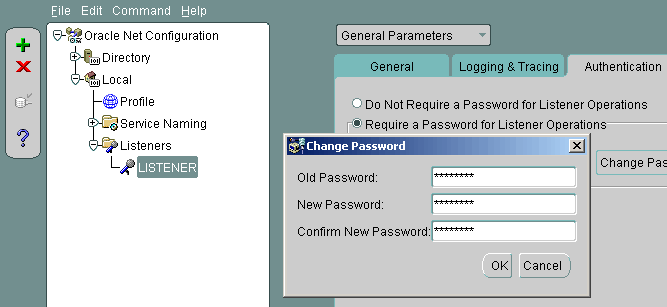
The image below shows the same operation being performed by the Oracle Net Manager (netmgr) GUI.
In addition to password protection, MOS Note:340009.1 suggests changing the TNS listener default port from 1521 to a different port. This will certainly help prevent generic attacks where worms are specifically targeting port 1521, but will only cause a minor delay for a targeted hack where open ports are scanned.
The TNS listener port settings are configured by editing the "$ORACLE_HOME/network/admin/listener.ora" file and restarting, or reloading, the listener. In addition, the LDAP entries or local "$ORACLE_HOME/network/admin/tnsnames.ora" file entries of any clients must be modified to reflect the changes.
Client access to the server can be restricted by adding the following entries to the "$ORACLE_HOME/network/admin/sqlnet.ora" file from 11g onward, or in the "$ORACLE_HOME/network/admin/protocol.ora" file for versions prior to 11g.
This may work OK in a 3-tier architecture where only a small number of applicaton servers connect to the database.
An trigger can be used to lock down access to specific schemas. The trigger below only allows access to USER1 and USER2 when the connection is made from the IP addresses "192.168.0.101" and "192.168.0.102".
You can make this sort of trigger as complex or simple as you like. Just remember the following points:
- The trigger must use , as making it schema specific would prevent the from preventing the logon.
- The trigger will fire for all connection attempts, so make sure you restrict which users it affects carefully to reduce the overhead.
- Protecting systems involves layers of protection. The database is only one layer.
- Traditionally we have recommended on installation and database creation, only install the options you are going use. Some options such as the HTTP Server and XML DB are open for attack unless they are properly patched and secured. Many addition features require their own schemas, which must be secured. In recent years Oracle have encouraged us to install everything, so it's harder to take this approach without crippling the databases.
- Secure the operating system of the database server. There is little point securing your Oracle installation if you have weak operating system security. Things to consider include the following. Make sure all servers are in secure network zones behind a firewall. You can also used the local firewall on the server to provide an extra layer of security. Reduce the number of people with access to the servers. Prevent direct access to system users like "root" and "oracle". Instead force users to log in with their own server and switch to these users with "sudo su - oracle" for example. Make sure strong passwords are used in all cases. Protect sensitive areas of the file system.
- Make sure all servers are in secure network zones behind a firewall. You can also used the local firewall on the server to provide an extra layer of security.
- Reduce the number of people with access to the servers.
- Prevent direct access to system users like "root" and "oracle". Instead force users to log in with their own server and switch to these users with "sudo su - oracle" for example.
- Make sure strong passwords are used in all cases.
- Protect sensitive areas of the file system.
- Apply security patches as soon as possible.
- Consider enabling data dictionary protection by setting the initialization parameter to FALSE. The prevents users with -type system privileges modifying the data dictionary, unless they are a DBA-privileged account.
- Make sure all servers are in secure network zones behind a firewall. You can also used the local firewall on the server to provide an extra layer of security.
- Reduce the number of people with access to the servers.
- Prevent direct access to system users like "root" and "oracle". Instead force users to log in with their own server and switch to these users with "sudo su - oracle" for example.
- Make sure strong passwords are used in all cases.
- Protect sensitive areas of the file system.
For more information see:
Hope this helps. Regards Tim...