DBA Hub

📋Steps in this guide1/2

Database Security Assessment Tool (DBSAT)

The Database Security Assessment Tool (DBSAT) is provided by Oracle as a utility to help you check for common database security issues, as well as helping to identify sensitive data stored in the database.

oracle miscconfigurationintermediate
by OracleDba
16 views
1

Report

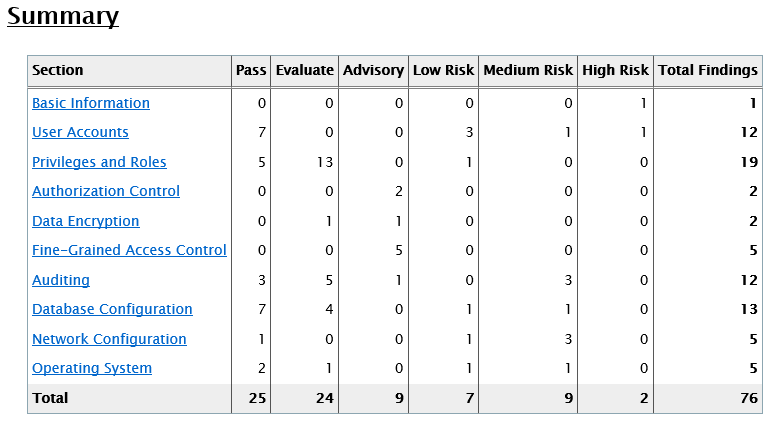
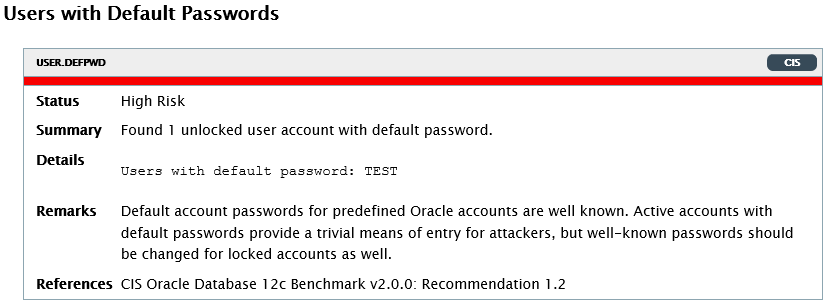
The Database Security Assessment Tool (DBSAT) is provided by Oracle as a utility to help you check for common database security issues, as well as helping to identify sensitive data stored in the database. Remember, it's just a tool, not a guarantee of security. - Documentation and Downloads - Prerequisites - Installation - Basic Usage - Collect - Report - Discover - Issues Related articles. - Basic Security Measures for Oracle There are two main sources of information regarding the DBSAT tool. - Oracle Database Security Assessment Tool (DBSAT) (Doc ID 2138254.1) : The software is downloaded from a link in this MOS note. You should check for new versions on a regular basis. It also gives a description of the and utilities. - Database Security Assessment Tool User Guide : This is the main documentation for the DBSAT utility. You need to have zip, unzip and python on the server. Check you have Python installed on the server. You can check for zip and unzip using the following commands. If you are planning on running discoverer, you will need a Java 8 JDK, with the environment variable set. On my test box I did the following. You will need suitable database credentials to connect to the database. When I ran this against some real databases I just used my DBA user and it worked fine. The documentation gives an example of the privileges needed if you want to create a user specifically for running this utility. In a clean instance I created a test user with a password matching the username to give me an obvious failure. All you need to do is unzip the tool into a location on the server. Some tools can be run on the client, but I find it easier to keep it on the server. You can add this location to the path if you like, but I don't bother with that. Running the utility with no parameters will display the basic usage. We can see there three main actions (collect, report and discover). Running the collector gathers information from the database and generates a JSON file containing all the information. The collector should be run on the database server. It will prompt you for the database password, then when the password to protect the resulting zip file. The "-n" option means you are not prompted for a zip file encryption password, but from a security perspective you should probably use one. The reporter takes the output file from the collector and converts it into HTML, Excel, JSON, and Text formats. The reporter doesn't need to be run on the database server, but since you have to run the collector there it probably makes sense to run this on the server too. Notice we've used the same file name prefix to call the reporter as we did when running the collector. You are prompted for the password of the source zip file, and the password for the destination zip file. Looking at the resulting HTML file we can see a summary of the findings. Each test results in output indicating the risk level. Here is an example of a high risk we created intentionally.
Step 1
2

Issues

The discoverer is essentially a separate Java-based tool, not reliant on the collector and reporter, that checks for sensitive data in the database. First you need to create a file. You can call it anything you want as you will be referencing it explicitly later. You will need to edit the contents of the "Discover/conf/dbsat.config" file. At a minimum you will need to set the following. The "Discover/conf/sensitive_en.ini" file contains a list of potentially sensitive categories of data, each with an associated pattern for column names. You should review this file and consider adding extra sections or patterns as necessary. Once the config is complete you can run the discoverer, specifying the config file and the output file name. You are prompted for the database credentials and the password for the resulting zip file. I experienced some issues with the current version (2.0.2). For more information see: - Oracle Database Security Assessment Tool (DBSAT) (Doc ID 2138254.1) - Database Security Assessment Tool User Guide - Basic Security Measures for Oracle Hope this helps. Regards Tim...
Step 2

Comments (0)

Please to add comments

No comments yet. Be the first to comment!