DEMO
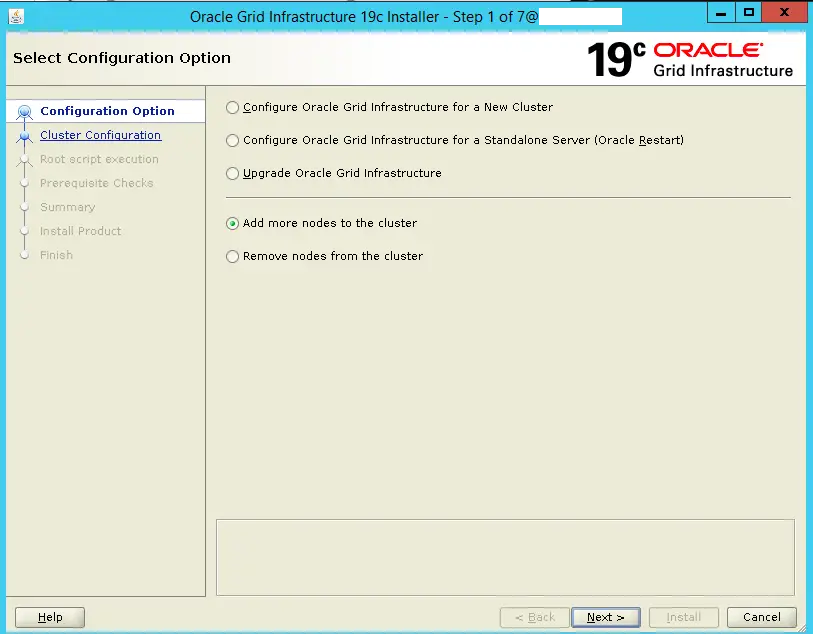
Steps for How to add a node in oracle RAC 19c. Run gridSetup.sh script from GRID_HOME t , then run addnode.sh script to extend the database oracle home
oracle clusteringintermediate
by OracleDba
17 views
Steps for How to add a node in oracle RAC 19c. Run gridSetup.sh script from GRID_HOME t , then run addnode.sh script to extend the database oracle home
1234567891011121314151617181920212223242526272829303132333435363738394041424344454647484950515253
[root@DBHOST04 /]# <span style="color: #ff0000;"><strong>/crsapp/app/oracle/product/19c/root.sh</strong></span>
Performing root user operation.

The following environment variables are set as:
    ORACLE_OWNER= oracle
    ORACLE_HOME=  /crsapp/app/oracle/product/19c

Enter the full pathname of the local bin directory: [/usr/local/bin]:
The contents of "dbhome" have not changed. No need to overwrite.
The contents of "oraenv" have not changed. No need to overwrite.
The contents of "coraenv" have not changed. No need to overwrite.


Creating /etc/oratab file...
Entries will be added to the /etc/oratab file as needed by
Database Configuration Assistant when a database is created
Finished running generic part of root script.
Now product-specific root actions will be performed.
Relinking oracle with rac_on option
Using configuration parameter file: /crsapp/app/oracle/product/19c/crs/install/crsconfig_params
The log of current session can be found at:
  /crsapp/app/oracle_base/crsdata/DBHOST04/crsconfig/rootcrs_DBHOST04_2021-06-22_12-39-53AM.log
2021/06/22 12:39:56 CLSRSC-594: Executing installation step 1 of 19: 'SetupTFA'.
2021/06/22 12:39:56 CLSRSC-594: Executing installation step 2 of 19: 'ValidateEnv'.
2021/06/22 12:39:56 CLSRSC-363: User ignored prerequisites during installation
2021/06/22 12:39:56 CLSRSC-594: Executing installation step 3 of 19: 'CheckFirstNode'.
2021/06/22 12:39:57 CLSRSC-594: Executing installation step 4 of 19: 'GenSiteGUIDs'.
2021/06/22 12:40:03 CLSRSC-594: Executing installation step 5 of 19: 'SetupOSD'.
Redirecting to /bin/systemctl restart rsyslog.service
2021/06/22 12:40:03 CLSRSC-594: Executing installation step 6 of 19: 'CheckCRSConfig'.
2021/06/22 12:40:05 CLSRSC-594: Executing installation step 7 of 19: 'SetupLocalGPNP'.
2021/06/22 12:40:06 CLSRSC-594: Executing installation step 8 of 19: 'CreateRootCert'.
2021/06/22 12:40:06 CLSRSC-594: Executing installation step 9 of 19: 'ConfigOLR'.
2021/06/22 12:40:17 CLSRSC-594: Executing installation step 10 of 19: 'ConfigCHMOS'.
2021/06/22 12:40:17 CLSRSC-594: Executing installation step 11 of 19: 'CreateOHASD'.
2021/06/22 12:40:18 CLSRSC-594: Executing installation step 12 of 19: 'ConfigOHASD'.
2021/06/22 12:40:19 CLSRSC-330: Adding Clusterware entries to file 'oracle-ohasd.service'
2021/06/22 12:41:08 CLSRSC-4002: Successfully installed Oracle Trace File Analyzer (TFA) Collector.
2021/06/22 12:41:35 CLSRSC-594: Executing installation step 13 of 19: 'InstallAFD'.
2021/06/22 12:41:35 CLSRSC-594: Executing installation step 14 of 19: 'InstallACFS'.
2021/06/22 12:43:15 CLSRSC-594: Executing installation step 15 of 19: 'InstallKA'.
2021/06/22 12:43:17 CLSRSC-594: Executing installation step 16 of 19: 'InitConfig'.
2021/06/22 12:43:25 CLSRSC-594: Executing installation step 17 of 19: 'StartCluster'.
2021/06/22 12:44:31 CLSRSC-343: Successfully started Oracle Clusterware stack
2021/06/22 12:44:31 CLSRSC-594: Executing installation step 18 of 19: 'ConfigNode'.
clscfg: EXISTING configuration version 19 detected.
Successfully accumulated necessary OCR keys.
Creating OCR keys for user 'root', privgrp 'root'..
Operation successful.
2021/06/22 12:44:50 CLSRSC-594: Executing installation step 19 of 19: 'PostConfig'.
2021/06/22 12:44:58 CLSRSC-325: Configure Oracle Grid Infrastructure for a Cluster ... succeeded

crsctl stat res -t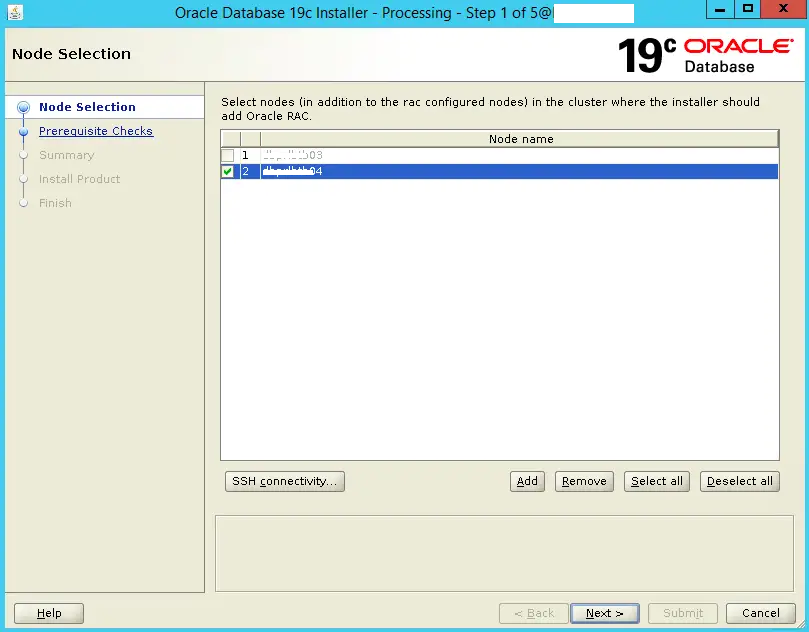
1234567891011121314151617
-- Run on new node DBHOST04
[root@DBHOST04 /]# <span style="color: #ff0000;"><strong>/oracle/app/oracle/product/19.3.0/dbhome_1/root.sh</strong></span>
Performing root user operation.

The following environment variables are set as:
    ORACLE_OWNER= oracle
    ORACLE_HOME=  /oracle/app/oracle/product/19.3.0/dbhome_1

Enter the full pathname of the local bin directory: [/usr/local/bin]:
The contents of "dbhome" have not changed. No need to overwrite.
The contents of "oraenv" have not changed. No need to overwrite.
The contents of "coraenv" have not changed. No need to overwrite.

Entries will be added to the /etc/oratab file as needed by
Database Configuration Assistant when a database is created
Finished running generic part of root script.
Now product-specific root actions will be performed.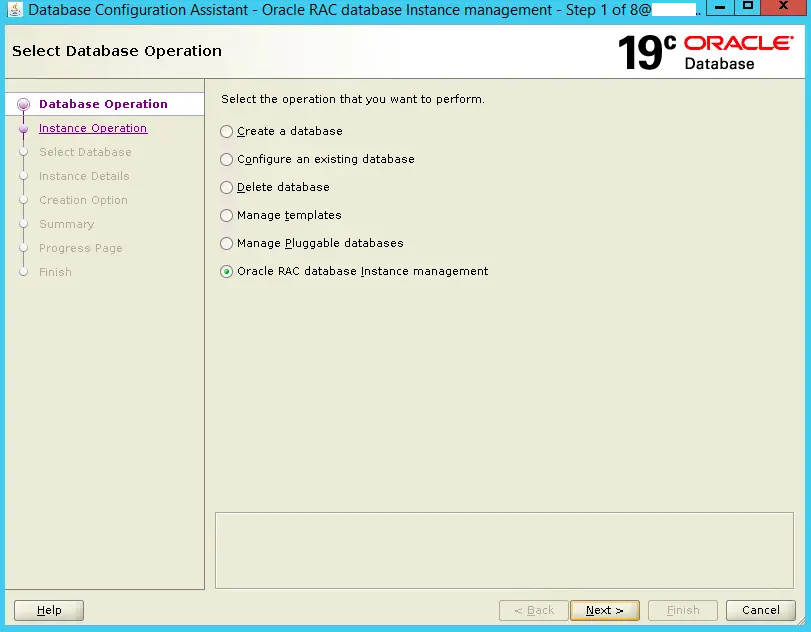
123456789101112131415
[oracle@DBHOST03]$ <span style="color: #ff0000;"><strong>crsctl status resource -w "TYPE = ora.database.type" -t</strong></span>
--------------------------------------------------------------------------------
Name           Target  State        Server                   State details
--------------------------------------------------------------------------------
Cluster Resources
--------------------------------------------------------------------------------
ora.dbprod.db
      1        ONLINE  ONLINE       DBHOST03               Open,HOME=/oracle/ap
                                                             p/oracle/product/19.
                                                             3.0/dbhome_1,STABLE
      2        ONLINE  ONLINE       DBHOST04               Open,HOME=/oracle/ap
                                                             p/oracle/product/19.
                                                             3.0/dbhome_1,STABLE
--------------------------------------------------------------------------------
[oracle@DBHOST03]$Please to add comments
No comments yet. Be the first to comment!