DBA Hub

📋Steps in this guide1/2

Emergency Monitoring in Oracle Enterprise Manager Cloud Control 12c

Get diagnostics information from hung databases using the Emergency Monitoring feature of Oracle Enterprise Manager Cloud Control 12c.

oracle 12cconfigurationintermediate
by OracleDba
12 views
1

Emergency Monitoring

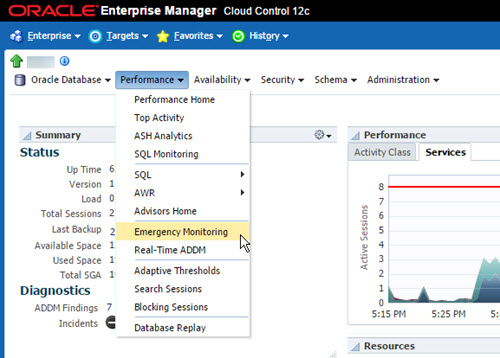
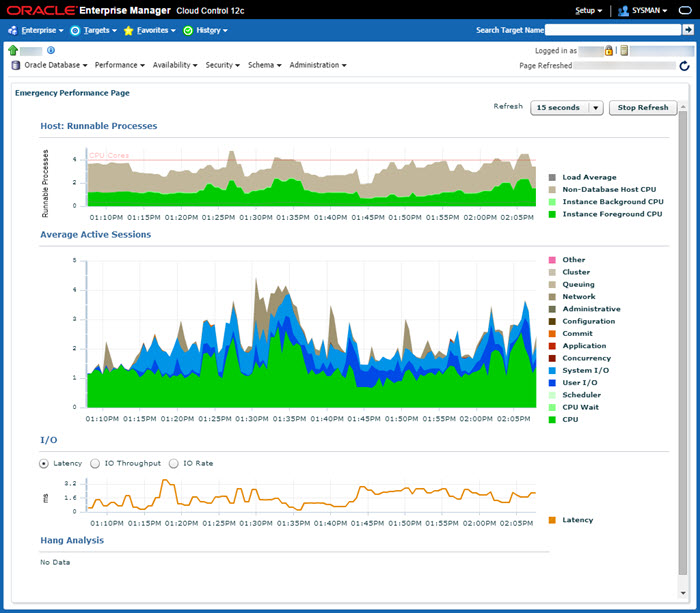
The Emergency Monitoring feature of Enterprise Manager Cloud Control 12c is an evolution of Memory Access Mode from Grid Control 11g, allowing you to access in-memory statistics. In EM12c you no longer need to explicitly enable memory access mode. Just navigate to the page and wait while it makes a diagnostic connection to the database and performs lightweight analysis. The screen contains information that will help analyze performance issues, even if the database is hung and you can't connect to the normal performance pages. Emergency Monitoring is listed as requirement for the 1Z0-060 "Upgrade to Oracle Database 12c" OCP upgrade exam, hence this short overview for those who don't use Cloud Control. - Emergency Monitoring - Command Line If you are struggling to connect to the main performance pages for the target database, you can use emergency monitoring. The "Emergency Monitoring" menu option is available under the "Performance" section once you've navigated to the target database. The resulting screen shows "Host : Runnable Processes", "Average Active Sessions", "I/O" and "Hang Analysis".
Step 1
2

Command Line

Use this information to determine your next course of action. You don't need Cloud Control to perform emergency monitoring. Once connected to the database, you can query views such as , , , , , etc. Hang analysis can be performed using oradebug hanganalyze, as described here . On versions prior to 11g, you can run from a preliminary connection, which may help if you are trying to connect to a hung database, so a normal connection is not possible. From 11g onward, this method of will still appear to work, but the resulting trace file will include an error message, as documented here . Tanel Poder discussed a workaround for this here . Use the to connect to an existing process and let that run the for you by including the keyword. Thanks to Martin Bach for pointing this out. For more information see: - How to Collect Diagnostics for Database Hanging Issues (Doc ID 452358.1) - Oradebug hanganalyze with a prelim connection and “ERROR: Can not perform hang analysis dump without a process state object and a session state object.” Hope this helps. Regards Tim...
Step 2

Comments (0)

Please to add comments

No comments yet. Be the first to comment!