DBA Hub

📋Steps in this guide1/4

How to drop a database in postgres - DBACLASS DBACLASS

There are multiple ways to drop a database in postgres . drop database sql command,dropdb executable and pgadmin method. DBACLASS db will be droppped by this

postgresql configurationintermediate
by PostgreSQL
11 views
1

DEMO:

In this article, we will drop the database named: DBACLASS.

Code/Command (click line numbers to comment):

1
2
3
4
5
6
7
8
9
10
11
postgres=# \list
                             List of databases
   Name    |  Owner   | Encoding | Collate | Ctype |   Access privileges   
-----------+----------+----------+---------+-------+-----------------------
 DBACLASS  | postgres | UTF8     | C       | C     |                       --- >>>>>>> THIS ONE 
 postgres  | postgres | UTF8     | C       | C     | 
 template0 | postgres | UTF8     | C       | C     | =c/postgres          +
           |          |          |         |       | postgres=CTc/postgres
 template1 | postgres | UTF8     | C       | C     | =c/postgres          +
           |          |          |         |       | postgres=CTc/postgres
(4 rows)
2

Method 1: ( using drop database command).

Drop command failed, because the some sessions are already connected to the database. Lets clear them. Now no sessions are present on the database, So we can proceed with drop command.

Code/Command (click line numbers to comment):

1
2
3
4
5
6
7
8
9
10
11
12
13
14
15
16
17
18
19
20
21
22
23
24
25
26
27
28
29
30
31
32
33
34
35
36
37
38
39
40
41
42
43
44
45
46
47
48
49
50
51
52
53
54
55
56
57
58
59
60
$psql -d postgres
password: 


postgres=# drop database "DBACLASS";;

ERROR:  database "DBACLASS" is being accessed by other users
DETAIL:  There is 1 other session using the database.

postgres=# select application_name,client_hostname,pid,usename from pg_stat_activity where datname='DBACLASS';

    application_name     | client_hostname |  pid  | usename  
-------------------------+-----------------+-------+----------
 pgAdmin 4 - DB:DBACLASS |                 | 12755 | postgres
(1 row)


postgres=# select pg_terminate_backend(pid) from pg_stat_activity where pid='12755';
 pg_terminate_backend 
----------------------
 t
(1 row)

postgres=# 
postgres=# 
postgres=# select application_name,client_hostname,pid,usename from pg_stat_activity where datname='DBACLASS';
 application_name | client_hostname | pid | usename 
------------------+-----------------+-----+---------
(0 rows)

postgres=# \conninfo
You are connected to database "postgres" as user "postgres" on host "localhost" at port "5432".

postgres=# \list
                             List of databases
   Name    |  Owner   | Encoding | Collate | Ctype |   Access privileges   
-----------+----------+----------+---------+-------+-----------------------
 DBACLASS  | postgres | UTF8     | C       | C     | 
 postgres  | postgres | UTF8     | C       | C     | 
 template0 | postgres | UTF8     | C       | C     | =c/postgres          +
           |          |          |         |       | postgres=CTc/postgres
 template1 | postgres | UTF8     | C       | C     | =c/postgres          +
           |          |          |         |       | postgres=CTc/postgres
(4 rows)

postgres=# drop database "DBACLASS";
DROP DATABASE


postgres=# \list
                             List of databases
   Name    |  Owner   | Encoding | Collate | Ctype |   Access privileges   
-----------+----------+----------+---------+-------+-----------------------
 postgres  | postgres | UTF8     | C       | C     | 
 template0 | postgres | UTF8     | C       | C     | =c/postgres          +
           |          |          |         |       | postgres=CTc/postgres
 template1 | postgres | UTF8     | C       | C     | =c/postgres          +
           |          |          |         |       | postgres=CTc/postgres
(3 rows)
3

Method 2: (using dropdb executable command)

Go to bin location of the postgres home_location at os level and run dropdb command.

Code/Command (click line numbers to comment):

1
2
3
4
5
6
7
postgres$ pwd
/Library/PostgreSQL/10/bin

postgres$ ./dropdb -e  "DBACLASS"
Password: 
SELECT pg_catalog.set_config('search_path', '', false)
DROP DATABASE "DBACLASS";
4

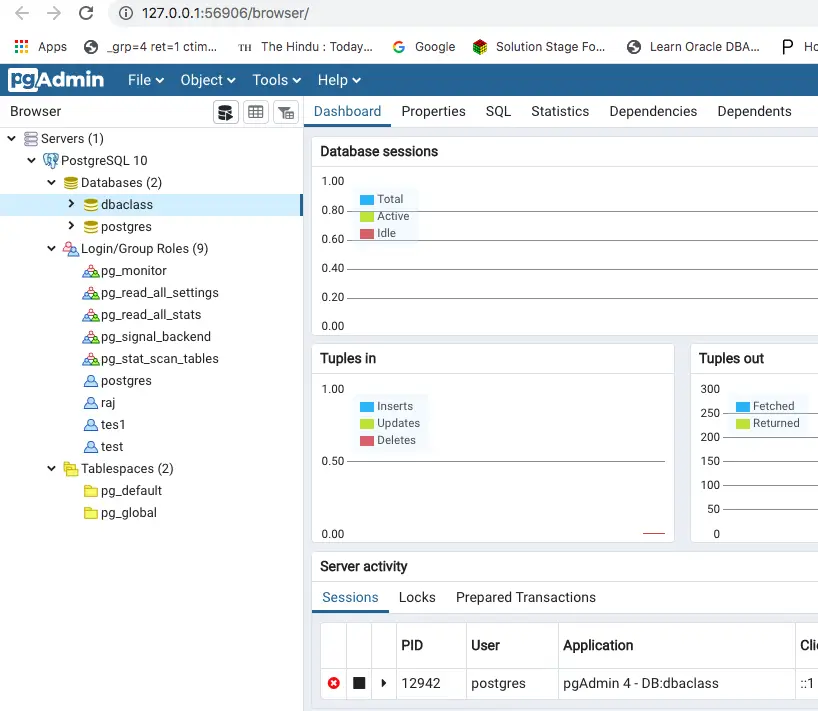
Method 3 : (Using pgadmin tool)

In this method, we will drop the database using pgadmin gui tool.
Step 4

Comments (0)

Please to add comments

No comments yet. Be the first to comment!