DBA Hub

📋Steps in this guide1/14

How to replicate tables in postgres using EDB replication server - DBACLASS DBACLASS

EDB replication server tool can be used to replicate tables between databases. Below topologies are supported by this tool. Between postgres to postgres Between oracle to postgres and vice versa Between sql sever and postgres and vice versa In this article, we will explain steps for replicating tables between postgres to postgres database. Publication server […]

postgresql configurationintermediate
by PostgreSQL
12 views
1

1.Install edb replication server tool: ( both  source and target server)

Code/Command (click line numbers to comment):

1
2
3
4
5
6
7
8
9
10
11
12
13
14
15
16
17
18
19
20
21
22
23
24
25
26
27
28
29
30
31
32
33
34
35
36
37
38
39
40
41
42
43
44
45
46
47
48
49
50
51
52
53
54
55
56
57
58
59
60
61
62
63
64
65
66
67
68
69
70
[root@ ~]# yum install edb-xdb
Loaded plugins: langpacks, product-id, search-disabled-repos, subscription-manager
edb1                                                                                                                      | 2.5 kB  00:00:00
rhel-7-server-extras-rpms                                                                                                 | 3.4 kB  00:00:00
rhel-7-server-optional-rpms                                                                                               | 3.2 kB  00:00:00
rhel-7-server-rpms                                                                                                        | 3.5 kB  00:00:00
(1/4): rhel-7-server-optional-rpms/7Server/x86_64/updateinfo                                                              | 3.0 MB  00:00:01
(2/4): rhel-7-server-rpms/7Server/x86_64/updateinfo                                                                       | 4.2 MB  00:00:01
(3/4): rhel-7-server-optional-rpms/7Server/x86_64/primary_db                                                              |  10 MB  00:00:03
(4/4): rhel-7-server-rpms/7Server/x86_64/primary_db                                                                       |  89 MB  00:00:21
Resolving Dependencies
--> Running transaction check
---> Package edb-xdb.x86_64 0:7.0.1-1.rhel7 will be installed
--> Processing Dependency: edb-xdb-subscriber = 7.0.1-1.rhel7 for package: edb-xdb-7.0.1-1.rhel7.x86_64
--> Processing Dependency: edb-xdb-publisher = 7.0.1-1.rhel7 for package: edb-xdb-7.0.1-1.rhel7.x86_64
--> Processing Dependency: edb-xdb-libs = 7.0.1-1.rhel7 for package: edb-xdb-7.0.1-1.rhel7.x86_64
--> Processing Dependency: edb-xdb-console = 7.0.1-1.rhel7 for package: edb-xdb-7.0.1-1.rhel7.x86_64
--> Running transaction check
---> Package edb-xdb-console.x86_64 0:7.0.1-1.rhel7 will be installed
---> Package edb-xdb-libs.x86_64 0:7.0.1-1.rhel7 will be installed
---> Package edb-xdb-publisher.x86_64 0:7.0.1-1.rhel7 will be installed
---> Package edb-xdb-subscriber.x86_64 0:7.0.1-1.rhel7 will be installed
--> Finished Dependency Resolution

Dependencies Resolved

=================================================================================================================================================
 Package                                   Arch                          Version                               Repository                   Size
=================================================================================================================================================
Installing:
 edb-xdb                                   x86_64                        7.0.1-1.rhel7                         edb1                        9.6 k
Installing for dependencies:
 edb-xdb-console                           x86_64                        7.0.1-1.rhel7                         edb1                        1.6 M
 edb-xdb-libs                              x86_64                        7.0.1-1.rhel7                         edb1                         13 M
 edb-xdb-publisher                         x86_64                        7.0.1-1.rhel7                         edb1                         41 k
 edb-xdb-subscriber                        x86_64                        7.0.1-1.rhel7                         edb1                         11 k

Transaction Summary
=================================================================================================================================================
Install  1 Package (+4 Dependent packages)

Total download size: 15 M
Installed size: 18 M
Is this ok [y/d/N]: y
Downloading packages:
-------------------------------------------------------------------------------------------------------------------------------------------------
Total                                                                                                            400 MB/s |  15 MB  00:00:00
Running transaction check
Running transaction test
Transaction test succeeded
Running transaction
  Installing : edb-xdb-libs-7.0.1-1.rhel7.x86_64                                                                                             1/5
  Installing : edb-xdb-subscriber-7.0.1-1.rhel7.x86_64                                                                                       2/5
  Installing : edb-xdb-publisher-7.0.1-1.rhel7.x86_64                                                                                        3/5
  Installing : edb-xdb-console-7.0.1-1.rhel7.x86_64                                                                                          4/5
  Installing : edb-xdb-7.0.1-1.rhel7.x86_64                                                                                                  5/5
  Verifying  : edb-xdb-libs-7.0.1-1.rhel7.x86_64                                                                                             1/5
  Verifying  : edb-xdb-subscriber-7.0.1-1.rhel7.x86_64                                                                                       2/5
  Verifying  : edb-xdb-publisher-7.0.1-1.rhel7.x86_64                                                                                        3/5
  Verifying  : edb-xdb-console-7.0.1-1.rhel7.x86_64                                                                                          4/5
  Verifying  : edb-xdb-7.0.1-1.rhel7.x86_64                                                                                                  5/5

Installed:
  edb-xdb.x86_64 0:7.0.1-1.rhel7

Dependency Installed:
  edb-xdb-console.x86_64 0:7.0.1-1.rhel7            edb-xdb-libs.x86_64 0:7.0.1-1.rhel7         edb-xdb-publisher.x86_64 0:7.0.1-1.rhel7
  edb-xdb-subscriber.x86_64 0:7.0.1-1.rhel7

Complete!
2

2.Create encrypted password for admin :

Code/Command (click line numbers to comment):

1
2
3
4
5
6
7
8
[root@bin]# cat rep_passfile
edb#123


[root@bin]#  java -jar edb-repcli.jar -encrypt -input /usr/edb/xdb/bin/rep_passfile -output /usr/edb/xdb/bin/encrypted_pwd

[root@bin]# cat /usr/edb/xdb/bin/encrypted_pwd
YGskFD33GfU=
3

3. Update the edb-repl.conf file with encrypted password

Code/Command (click line numbers to comment):

1
2
3
[root@xdb]# cat /etc/edb-repl.conf
admin_user=admin
admin_password=YGskFD33GfU=
4

4. Verify the replication server configuration :

Repeat step 1 to 4 on the target server also.

Code/Command (click line numbers to comment):

1
2
3
4
5
6
7
8
9
10
11
[root@sysconfig]# pwd
/usr/edb/xdb/etc/sysconfig
[root@sysconfig]# cat xdbReplicationServer-70.config
#!/bin/sh

JAVA_EXECUTABLE_PATH=`which java`
JAVA_MINIMUM_VERSION=1.8
JAVA_BITNESS_REQUIRED=64
JAVA_HEAP_SIZE="-Xms256m -Xmx1536m"
PUBPORT=9051
SUBPORT=9052
5

5. Create required user/role on both source and target:

Code/Command (click line numbers to comment):

1
2
3
4
5
6
7
8
9
10
11
12
--- on source db:

postgres=#  CREATE ROLE pubuser WITH LOGIN SUPERUSER PASSWORD 'pub#123';
CREATE ROLE


-- on target db


postgres=# CREATE ROLE subuser WITH LOGIN SUPERUSER PASSWORD 'subuser#123';
CREATE ROLE
6

6. Update pg_hba.conf file and reload the postgres cluster [ ON BOTH SOURCE AND TARGET ]

Code/Command (click line numbers to comment):

1
2
3
4
5
6
7
8
9
10
11
12
13
14
15
16
17
18
19
20
21
22
23
24
25
26
27
28
29
30
31
32
33
34
35
36
37
38
39
--- pg_hba.conf file on publication server .

# TYPE  DATABASE        USER            ADDRESS                 METHOD

# "local" is for Unix domain socket connections only
local   all             all                                     peer
# IPv4 local connections:
host    all             all             127.0.0.1/32            ident
host    all             all             0.0.0.0/0               md5

# IPv6 local connections:
host    all             all             ::1/128                 ident
# Allow replication connections from localhost, by a user with the
# replication privilege.
local   replication     all                                     peer
host    replication     all             127.0.0.1/32            ident
host    replication     all             ::1/128                 ident
host    replication     all             10.20.30.41/32          md5. ---- add this subscription server ip 


-- pg_hba.conf file on subscription server 

# TYPE  DATABASE        USER            ADDRESS                 METHOD

# "local" is for Unix domain socket connections only
#local   all             all                                     peer
local   all             all                                     trust
# IPv4 local connections:
host    all             all             0.0.0.0/0               trust
host    template1       bart1           127.0.0.1/32            md5
# IPv6 local connections:
host    all             all             ::1/128                 ident
# Allow replication connections from localhost, by a user with the
# replication privilege.
local   replication     all                                     peer
host    replication     bart1           127.0.0.1/32            md5
host    replication     all             ::1/128                 md5
host    replication     all             10.20.30.40/32          md5. - -- add this publication server ip
7

7.Now reload the pg_cluster.

Code/Command (click line numbers to comment):

1
systemctl reload edb-as-12.service
8

8.Restart publication server

Code/Command (click line numbers to comment):

1
2
3
4
5
6
7
8
9
10
11
12
13
14
15
[root@data]# systemctl restart edb-xdbpubserver
[root@data]#
[root@data]#  systemctl status edb-xdbpubserver
● edb-xdbpubserver.service - Publication Server Service script for Linux
   Loaded: loaded (/usr/lib/systemd/system/edb-xdbpubserver.service; disabled; vendor preset: disabled)
   Active: active (running) since Thu 2022-07-14 09:52:36 +03; 4s ago
  Process: 31314 ExecStart=/bin/bash -c cd /usr/edb/xdb/bin; ./runPubServer.sh  >> /var/log/edb/xdb/edb-xdbpubserver.log 2>&1 & (code=exited, status=0/SUCCESS)
 Main PID: 31316 (bash)
    Tasks: 18
   CGroup: /system.slice/edb-xdbpubserver.service
           ├─31316 /bin/bash -c cd /usr/edb/xdb/bin; ./runPubServer.sh  >> /var/log/edb/xdb/edb-xdbpubserver.log 2>&1 &
           └─31345 /usr/bin/java -XX:-UsePerfData -Xms256m -Xmx1536m -XX:ErrorFile=/var/log/edb/xdb/pubserver_pid_%p.log -Djava.library.path=/...

Jul 14 09:52:36 SCDvLBTC28 systemd[1]: Starting Publication Server Service script for Linux...
Jul 14 09:52:36 SCDvLBTC28 systemd[1]: Started Publication Server Service script for Linux.
9

9. Now use xmanager or mobaxterm to invoke gui[ on publication server ]

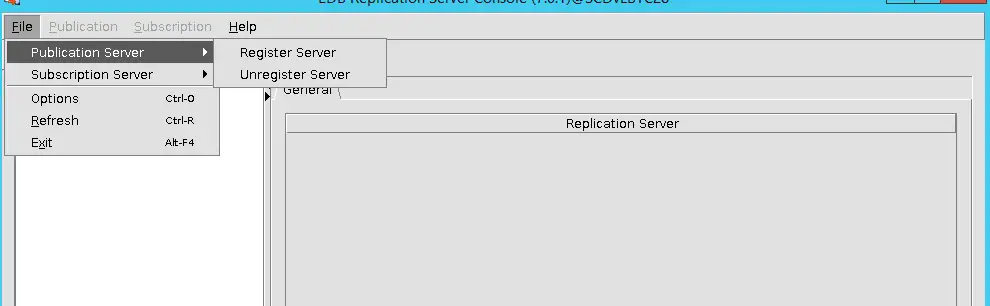
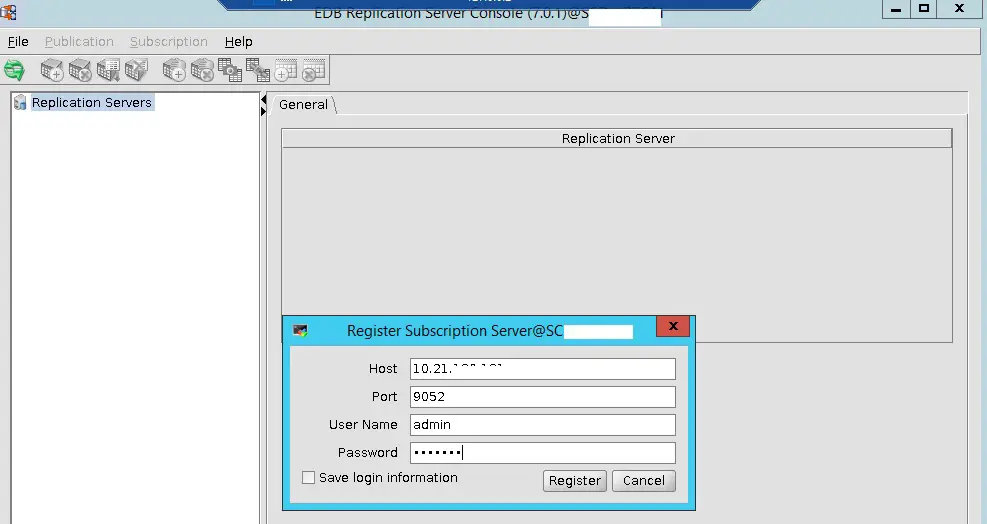
enterprisedb$ /usr/edb/xdb/bin/runRepConsole.sh File – > Publication Server – Register Server password for admin – edb#123 SMR -> Add Database Here i have selected WAL Stream 10.Create Publication and select the table list that need to be prepared. Make sure that these tables has primary key.
Step 9
10

11. Now prepare subscription server:

Update the edb-repl.conf file in subscription server with publication server details.

Code/Command (click line numbers to comment):

1
2
3
4
5
6
7
8
9
10
11
12
13
14
15
16
17
18
19
20
21
22
23
24
25
--- Publication server conf file ( after update) 

-bash-4.2$ cat /etc/edb-repl.conf
#xDB Replication Server Configuration Properties
#Thu Jul 14 10:01:34 AST 2022
admin_password=YGskFD33GfU\=
user=pubuser
port=5444
password=G8iCGMwd6Qg\=
type=enterprisedb
admin_user=admin
host=10.20.30.40
database=postgres

-- Subscription server conf file ( after update)

-bash-4.2$ cat edb-repl.conf
admin_user=admin
admin_password=YGskFD33GfU\=
user=pubuser
port=5444
password=G8iCGMwd6Qg\=
type=enterprisedb
host=10.20.30.40
database=postgres
11

12. Restart the subscription server service:

13. Register subscription server:
Step 11

Code/Command (click line numbers to comment):

1
2
3
4
5
6
7
8
9
10
11
12
13
14
15
[root@~]# systemctl restart edb-xdbsubserver.service

[root@~]# systemctl status edb-xdbsubserver.service
● edb-xdbsubserver.service - Subscription Server Service script for Linux
   Loaded: loaded (/usr/lib/systemd/system/edb-xdbsubserver.service; disabled; vendor preset: disabled)
   Active: active (running) since Fri 2022-07-15 11:01:01 +03; 1 weeks 0 days ago
  Process: 23284 ExecStart=/bin/bash -c cd /usr/edb/xdb/bin; ./runSubServer.sh  >> /var/log/edb/xdb/edb-xdbsubserver.log 2>&1 & (code=exited, status=0/SUCCESS)
 Main PID: 23285 (bash)
    Tasks: 36
   CGroup: /system.slice/edb-xdbsubserver.service
           ├─23285 /bin/bash -c cd /usr/edb/xdb/bin; ./runSubServer.sh  >> /var/log/edb/xdb/edb-xdbsubserver.log 2>&1 &
           └─23314 /usr/bin/java -XX:-UsePerfData -XX:ErrorFile=/var/log/edb/xdb/subserver_pid_%p.log -Djava.awt.headless=true -jar /usr/edb/x...

Jul 15 11:01:01 SCDvLBTC41 systemd[1]: Starting Subscription Server Service script for Linux...
Jul 15 11:01:01 SCDvLBTC41 systemd[1]: Started Subscription Server Service script for Linux.
12

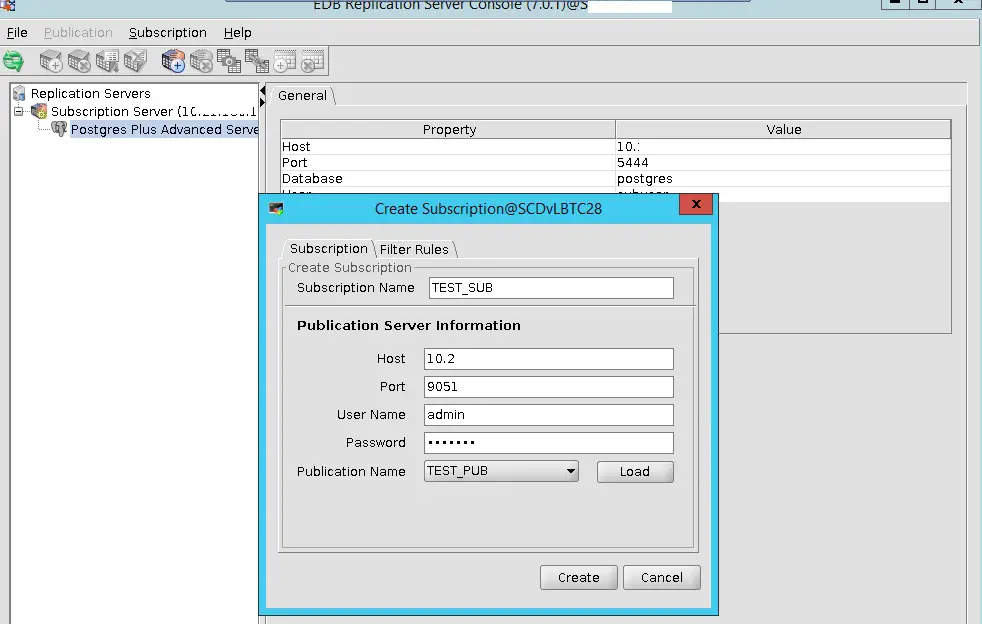
14.CREATE SUBSCRIPTION:

-You need to ass the publication server details. Now we have both publication and subscriptions are created. Currently the tables are not present on the target side ( i.e subscription server). So for the 1st time as part of initial load , we need to do snapshot. This snapshot will clone the table from source to target.
Step 12
13

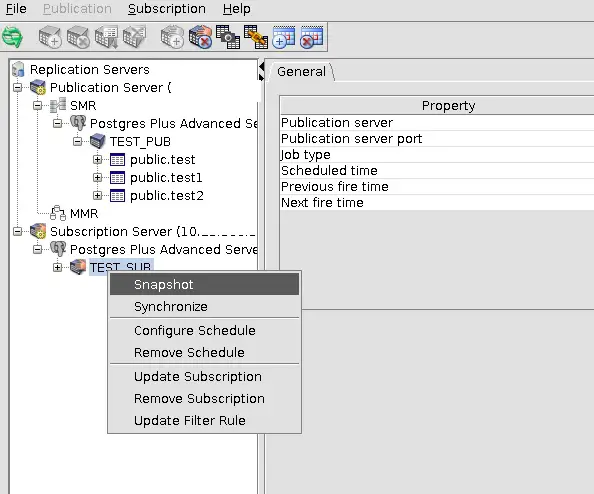
15.SNAPSHOT CREATION:

Now snapshot is done . We can configure continuous sync with a repeat interval.
Step 13
14

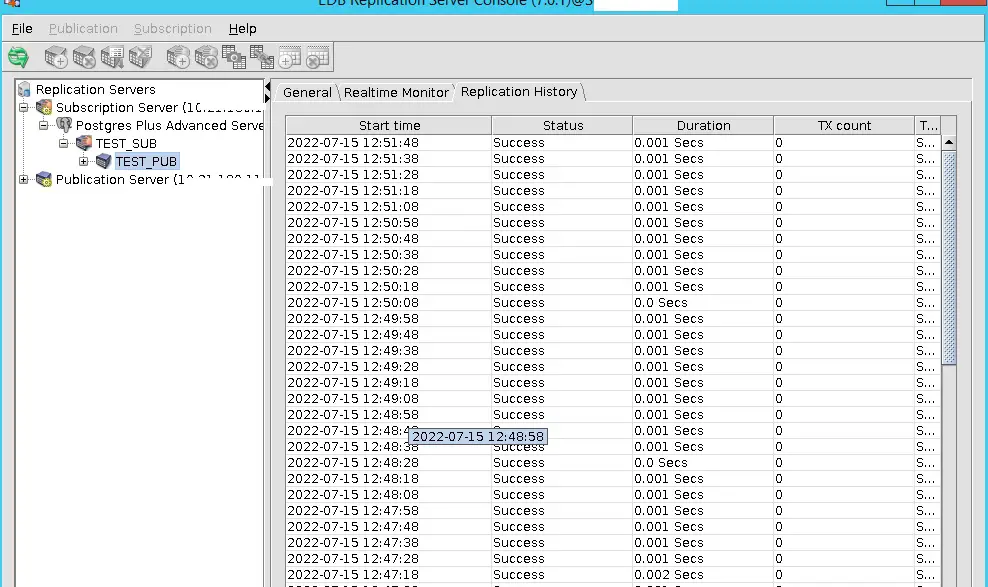
17.View Replication History:

— Check the row count of tables on both source and target: Reference: https://www.enterprisedb.com/docs/eprs/latest/01_introduction/
Step 14

Comments (0)

Please to add comments

No comments yet. Be the first to comment!