DBA Hub

📋Steps in this guide1/3

Install grid Infrastructure 12c on standalone server DBACLASS

Install grid Infrastructure 12c on standalone server. It is also known as oracle restart with ASM file system. There wont be any OCR or VD. See complete steps for creating db on standalone .

oracle clusteringintermediate
by OracleDba
13 views
1

1. Download and unzip the grid software:

2. Run precheck utility: It should be successful.

Code/Command (click line numbers to comment):

1
2
3
4
5
6
7
8
9
10
11
12
13
14
15
16
17
18
19
20
21
22
23
24
25
26
27
28
29
30
31
32
33
34
35
36
37
38
39
40
41
42
43
44
45
46
47
48
49
50
51
52
53
54
55
56
57
58
59
60
61
62
63
64
65
66
-rw-r--r--   1 oracle   oinstall 1765495417 Mar 13 12:58 p21419221_121020_SOLARIS64_1of10.zip
-rw-r--r--   1 oracle   oinstall 1147043852 Mar 13 12:59 p21419221_121020_SOLARIS64_2of10.zip
-rw-r--r--   1 oracle   oinstall 1328921933 Mar 13 13:00 p21419221_121020_SOLARIS64_5of10.zip
-rw-r--r--   1 oracle   oinstall 778288046 Mar 13 13:00 p21419221_121020_SOLARIS64_6of10.zip


unzip p21419221_121020_SOLARIS64_1of10.zip
unzip p21419221_121020_SOLARIS64_2of10.zip
unzip p21419221_121020_SOLARIS64_5of10.zip
unzip p21419221_121020_SOLARIS64_6of10.zip

cd grid

-rwxr-xr-x   1 oracle   oinstall     500 Feb  6  2013 welcome.html
-rwxr-xr-x   1 oracle   oinstall    5085 Dec 31  2013 runcluvfy.sh
drwxr-xr-x   2 oracle   oinstall       5 Jul  8  2014 udlm
-rwxr-xr-x   1 oracle   oinstall   16869 Jul  8  2014 runInstaller
drwxr-xr-x   2 oracle   oinstall       2 Jul  8  2014 rpm
drwxrwxr-x   2 oracle   oinstall       3 Jul  8  2014 sshsetup
drwxrwxr-x   2 oracle   oinstall       3 Jul  8  2014 response
drwxr-xr-x  14 oracle   oinstall      30 Jul  8  2014 stage
-rwxr-xr-x   1 oracle   oinstall   33934 Aug 24  2015 readme.html
drwxr-xr-x   4 oracle   oinstall      16 Mar 13 13:04 install

$ ./runcluvfy.sh stage -pre hacfg

Performing pre-checks for Oracle Restart configuration
Total memory check passed
Available memory check passed
Swap space check passed
Free disk space check passed for "sec97-4:/usr,sec97-4:/etc,sec97-4:/sbin"
Free disk space check passed for "sec97-4:/var,sec97-4:/var/tmp/"
Check for multiple users with UID value 300 passed
User existence check passed for "oracle"
Group existence check passed for "oinstall"
Group existence check passed for "dba"
Membership check for user "oracle" in group "oinstall" [as Primary] passed
Membership check for user "oracle" in group "dba" passed
Run level check passed
Hard limits check passed for "maximum open file descriptors"
Soft limits check passed for "maximum open file descriptors"
Hard limits check passed for "maximum user processes"
Soft limits check passed for "maximum user processes"
System architecture check passed
Kernel version check passed
Kernel parameter check passed for "project.max-sem-ids"
Kernel parameter check passed for "process.max-sem-nsems"
Kernel parameter check passed for "project.max-shm-memory"
Kernel parameter check passed for "project.max-shm-ids"
Kernel parameter check passed for "tcp_smallest_anon_port"
Kernel parameter check passed for "tcp_largest_anon_port"
Kernel parameter check passed for "udp_smallest_anon_port"
Kernel parameter check passed for "udp_largest_anon_port"
Package existence check passed for "make"
Package existence check passed for "assembler"
Package existence check passed for "xcu4"
Package existence check passed for "x11-info-clients"
Package existence check passed for "dtrace"
Check for multiple users with UID value 0 passed
Current group ID check passed

Starting check for consistency of primary group of root user

Check for consistency of root user's primary group passed

Pre-check for Oracle Restart configuration was successful.
2

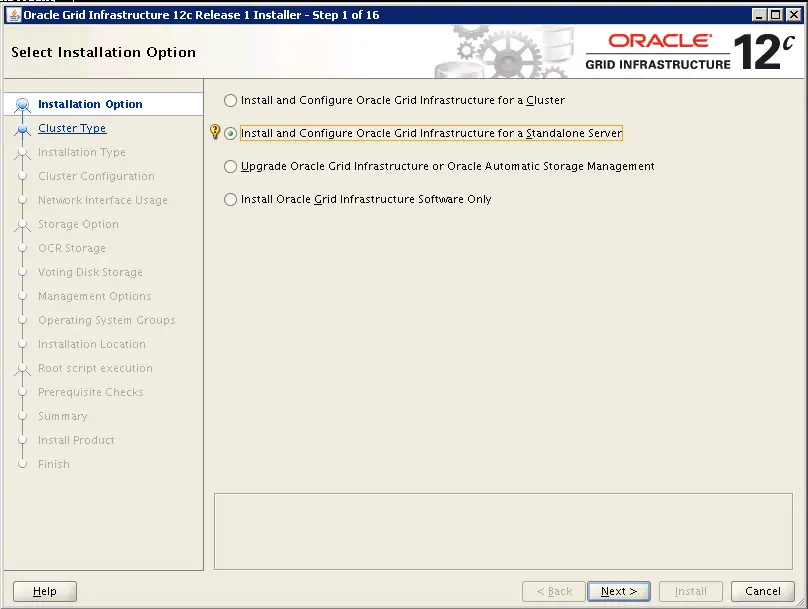
GRID INSTALLATION:

$ ./runInstaller Starting Oracle Universal Installer… Checking Temp space: must be greater than 180 MB. Actual 353012 MB Passed Checking swap space: must be greater than 150 MB. Actual 354764 MB Passed Checking monitor: must be configured to display at least 256 colors. Actual 16777216 Passed Preparing to launch Oracle Universal Installer from /tmp/OraInstall2017-03-13_02-01-46PM. Please wait .. With this standalone grid installation is successful.  Now lets proceed with Oracle rdbms binary installation.
Step 2
3

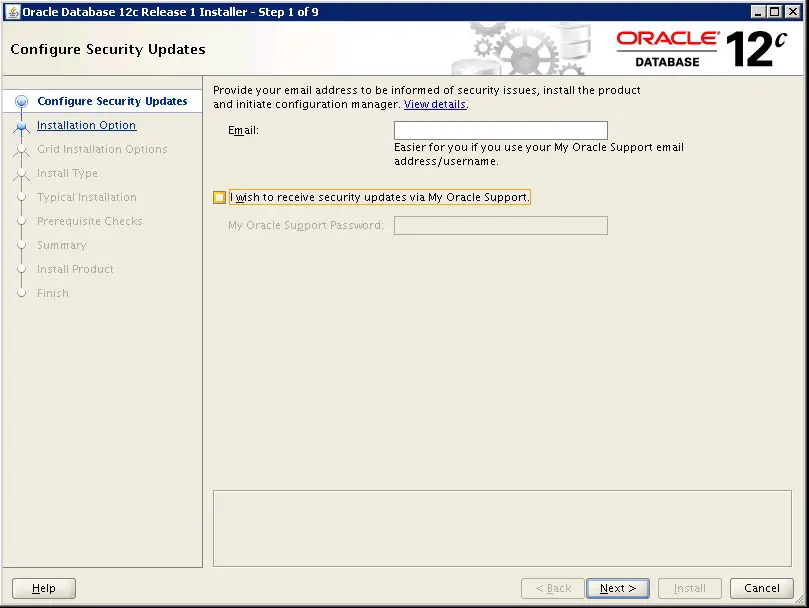
ORACLE BINARY INSTALLATION:

Now oracle binary installation is also successful. Now create your required ASM disk groups using asmca utility. CREATE A DATABASE: We have successfully, create the database on the standalone grid.
Step 3

Comments (0)

Please to add comments

No comments yet. Be the first to comment!