Install MySQL 8 on Linux 7 Using RPM Packages
Install MySQL 8 on Linux 7 Using RPM Packages
mysql installationintermediate
by MYSQL
37 views
Install MySQL 8 on Linux 7 Using RPM Packages
123
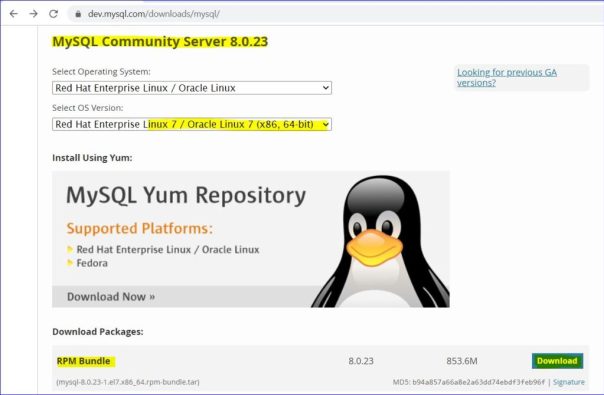
https://dev.mysql.com/downloads/mysql/
https://dev.mysql.com/downloads/file/?id=501382
** Transfer the tar file to target server.12345678910111213141516171819202122232425262728293031323334353637
[root@rac1 ~]#
cd mysql
[root@rac1 mysql]#
ls -ltr
total 1009792
-rw-r--r--. 1 root root 895047680 Mar  6 14:49 m
ysql-8.0.23-1.el7.x86_64.rpm-bundle.tar
[root@rac1 mysql]# pwd
/root/mysql
[root@rac1 mysql]#

[root@rac1 mysql]#
tar -xvf mysql-8.0.23-1.el7.x86_64.rpm-bundle.tar
mysql-community-client-8.0.23-1.el7.x86_64.rpm
mysql-community-client-plugins-8.0.23-1.el7.x86_64.rpm
mysql-community-common-8.0.23-1.el7.x86_64.rpm
mysql-community-devel-8.0.23-1.el7.x86_64.rpm
mysql-community-embedded-compat-8.0.23-1.el7.x86_64.rpm
mysql-community-libs-8.0.23-1.el7.x86_64.rpm
mysql-community-libs-compat-8.0.23-1.el7.x86_64.rpm
mysql-community-server-8.0.23-1.el7.x86_64.rpm
mysql-community-test-8.0.23-1.el7.x86_64.rpm
[root@rac1 mysql]#
[root@rac1 mysql]#
ls -ltr
total 1883876
-rw-r--r--. 1 7155 31415  50078112 Dec 12 21:09 mysql-community-client-8.0.23-1.el7.x86_64.rpm
-rw-r--r--. 1 7155 31415    242596 Dec 12 21:09 mysql-community-client-plugins-8.0.23-1.el7.x86_64.rpm
-rw-r--r--. 1 7155 31415    635504 Dec 12 21:09 mysql-community-common-8.0.23-1.el7.x86_64.rpm
-rw-r--r--. 1 7155 31415   8496724 Dec 12 21:09 mysql-community-devel-8.0.23-1.el7.x86_64.rpm
-rw-r--r--. 1 7155 31415  23598680 Dec 12 21:09 mysql-community-embedded-compat-8.0.23-1.el7.x86_64.rpm
-rw-r--r--. 1 7155 31415   4834112 Dec 12 21:09 mysql-community-libs-8.0.23-1.el7.x86_64.rpm
-rw-r--r--. 1 7155 31415   1273816 Dec 12 21:09 mysql-community-libs-compat-8.0.23-1.el7.x86_64.rpm
-rw-r--r--. 1 7155 31415 543646172 Dec 12 21:10 mysql-community-server-8.0.23-1.el7.x86_64.rpm
-rw-r--r--. 1 7155 31415 262232676 Dec 12 21:12 mysql-community-test-8.0.23-1.el7.x86_64.rpm
-rw-r--r--. 1 root root  895047680 Mar  6 14:49 mysql-8.0.23-1.el7.x86_64.rpm-bundle.tar
[root@rac1 mysql]#123456789101112131415161718192021222324252627282930313233343536373839404142434445464748495051525354555657585960616263646566676869707172737475767778798081828384858687888990919293
In most cases, you need to install the below packages to get functional, standard MySQL installation.
mysql-community-server
mysql-community-client
mysql-community-libs
mysql-community-common
mysql-community-libs-compat
To perform such a standard, basic installation, go to the folder that contains all those packages (and, preferably, no other RPM packages with similar names), and issue the following commands:
-- Common files for server and client libraries
[root@rac1 mysql]#
rpm -ivh mysql-community-common-8.0.23-1.el7.x86_64.rpm
Preparing...                          ################################# [100%]
        package mysql-community-common-8.0.23-1.el7.x86_64 is already installed
[root@rac1 mysql]#
-- MySQL client applications plugins
[root@rac1 mysql]#
rpm -ivh mysql-community-client-plugins-8.0.23-1.el7.x86_64.rpm
Preparing...                          ################################# [100%]
        package mysql-community-client-plugins-8.0.23-1.el7.x86_64 is already installed
[root@rac1 mysql]#
-- Shared libraries for MySQL database client applications
[root@rac1 mysql]#
rpm -ivh mysql-community-libs-8.0.23-1.el7.x86_64.rpm
Preparing...                          ################################# [100%]
        package mysql-community-libs-8.0.23-1.el7.x86_64 is already installed
[root@rac1 mysql]#
-- Shared compatibility libraries for previous MySQL installations
[root@rac1 mysql]#
rpm -ivh mysql-community-libs-compat-8.0.23-1.el7.x86_64.rpm
Preparing...                          ################################# [100%]
        package mysql-community-libs-compat-8.0.23-1.el7.x86_64 is already installed
[root@rac1 mysql]#
-- MySQL client applications and tools
[root@rac1 mysql]#
rpm -ivh mysql-community-client-8.0.23-1.el7.x86_64.rpm
Preparing...                          ################################# [100%]
Updating / installing...
   1:mysql-community-client-8.0.23-1.e################################# [100%]
[root@rac1 mysql]#
-- Database server and related tools
[root@rac1 mysql]#
rpm -ivh mysql-community-server-8.0.23-1.el7.x86_64.rpm
Preparing...                          ################################# [100%]
Updating / installing...
   1:mysql-community-server-8.0.23-1.e################################# [100%]
[root@rac1 mysql]#

[root@rac1 mysql]#
rpm -qa | grep mysql
mysql-community-libs-compat-8.0.23-1.el7.x86_64
mysql-community-server-8.0.23-1.el7.x86_64
mysql-community-common-8.0.23-1.el7.x86_64
qt-mysql-4.8.7-9.el7_9.x86_64
mysql-community-client-8.0.23-1.el7.x86_64
mysql-community-libs-8.0.23-1.el7.x86_64
mysql-community-client-plugins-8.0.23-1.el7.x86_64
mysql80-community-release-el7-3.noarch
[root@rac1 mysql]#

[root@rac1 mysql]#
systemctl status mysqld
● mysqld.service - MySQL Server
   Loaded: loaded (/usr/lib/systemd/system/mysqld.service; enabled; vendor preset: disabled)
Active: inactive (dead)
Docs: man:mysqld(8)
           http://dev.mysql.com/doc/refman/en/using-systemd.html

Mar 06 12:51:27 rac1.rajasekhar.com systemd[1]: Starting MySQL Server...
Mar 06 12:51:41 rac1.rajasekhar.com systemd[1]: Started MySQL Server.
Mar 06 12:57:35 rac1.rajasekhar.com systemd[1]: Stopping MySQL Server...
Mar 06 12:57:36 rac1.rajasekhar.com systemd[1]: Stopped MySQL Server.
[root@rac1 mysql]#

[root@rac1 mysql]#
systemctl start mysqld
[root@rac1 mysql]#

[root@rac1 mysql]#
systemctl status mysqld
● mysqld.service - MySQL Server
   Loaded: loaded (/usr/lib/systemd/system/mysqld.service; enabled; vendor preset: disabled)
Active: active (running) since Sat 2021-03-06 15:25:12 +08;
8s ago
Docs: man:mysqld(8)
           http://dev.mysql.com/doc/refman/en/using-systemd.html
  Process: 12423 ExecStartPre=/usr/bin/mysqld_pre_systemd (code=exited, status=0/SUCCESS)
 Main PID: 12506 (mysqld)
   Status: "Server is operational"
   CGroup: /system.slice/mysqld.service
           └─12506 /usr/sbin/mysqld

Mar 06 15:25:02 rac1.rajasekhar.com systemd[1]: Starting MySQL Server...
Mar 06 15:25:12 rac1.rajasekhar.com systemd[1]: Started MySQL Server.
[root@rac1 mysql]#12345678
cat /var/log/mysqld.log | grep password
OR

[root@rac1 mysql]#
grep 'temporary password' /var/log/mysqld.log
2021-03-06T07:25:07.718556Z 6 [Note] [MY-010454] [Server] A temporary password is generated for root@localhost:
&qixM=kt9wP+
[root@rac1 mysql]#12345678910111213141516171819
[root@rac1 mysql]#
mysql -u root -p
Enter password:
Welcome to the MySQL monitor.  Commands end with ; or \g.
Your MySQL connection id is 8
Server version: 8.0.23

Copyright (c) 2000, 2021, Oracle and/or its affiliates.

Oracle is a registered trademark of Oracle Corporation and/or its
affiliates. Other names may be trademarks of their respective
owners.

Type 'help;' or '\h' for help. Type '\c' to clear the current input statement.
mysql>
mysql>
show databases;
ERROR 1820 (HY000): You must reset your password using ALTER USER statement before executing this statement.
mysql>123456789101112131415161718192021222324252627282930313233343536373839404142434445464748495051525354555657585960616263646566676869707172737475767778798081828384858687888990919293949596979899100101102103104105106107108109110111112
mysql>
alter user root@localhost identified by '
Mysql@123
';
Query OK, 0 rows affected (0.01 sec)

mysql>

mysql>
flush privileges;
Query OK, 0 rows affected (0.01 sec)

mysql>

mysql>
show databases;
+--------------------+
| Database           |
+--------------------+
| information_schema |
| mysql              |
| performance_schema |
| sys                |
+--------------------+
4 rows in set (0.01 sec)

mysql>

[root@rac1 ~]#
cat /etc/my.cnf
# For advice on how to change settings please see
# http://dev.mysql.com/doc/refman/8.0/en/server-configuration-defaults.html

[mysqld]
#
# Remove leading # and set to the amount of RAM for the most important data
# cache in MySQL. Start at 70% of total RAM for dedicated server, else 10%.
# innodb_buffer_pool_size = 128M
#
# Remove the leading "# " to disable binary logging
# Binary logging captures changes between backups and is enabled by
# default. It's default setting is log_bin=binlog
# disable_log_bin
#
# Remove leading # to set options mainly useful for reporting servers.
# The server defaults are faster for transactions and fast SELECTs.
# Adjust sizes as needed, experiment to find the optimal values.
# join_buffer_size = 128M
# sort_buffer_size = 2M
# read_rnd_buffer_size = 2M
#
# Remove leading # to revert to previous value for default_authentication_plugin,
# this will increase compatibility with older clients. For background, see:
# https://dev.mysql.com/doc/refman/8.0/en/server-system-variables.html#sysvar_default_authentication_plugin
# default-authentication-plugin=mysql_native_password
datadir=/var/lib/mysql
socket=/var/lib/mysql/mysql.sock

log-error=/var/log/mysqld.log
pid-file=/var/run/mysqld/mysqld.pid
[root@rac1 ~]#

[root@rac1 ~]#
cd /var/lib/mysql
[root@rac1 mysql]# ls -ltr
total 188880
-rw-r-----. 1 mysql mysql 50331648 Mar  6 15:25 ib_logfile1
-rw-r-----. 1 mysql mysql  8585216 Mar  6 15:25 #ib_16384_1.dblwr
drwxr-x---. 2 mysql mysql     8192 Mar  6 15:25 performance_schema
-rw-r-----. 1 mysql mysql       56 Mar  6 15:25 auto.cnf
-rw-------. 1 mysql mysql     1676 Mar  6 15:25 ca-key.pem
-rw-r--r--. 1 mysql mysql     1112 Mar  6 15:25 ca.pem
-rw-------. 1 mysql mysql     1680 Mar  6 15:25 server-key.pem
-rw-r--r--. 1 mysql mysql     1112 Mar  6 15:25 server-cert.pem
-rw-------. 1 mysql mysql     1676 Mar  6 15:25 client-key.pem
-rw-r--r--. 1 mysql mysql     1112 Mar  6 15:25 client-cert.pem
-rw-r--r--. 1 mysql mysql      452 Mar  6 15:25 public_key.pem
-rw-------. 1 mysql mysql     1676 Mar  6 15:25 private_key.pem
drwxr-x---. 2 mysql mysql     4096 Mar  6 15:25 mysql
drwxr-x---. 2 mysql mysql       28 Mar  6 15:25 sys
-rw-r-----. 1 mysql mysql     5532 Mar  6 15:25 ib_buffer_pool
drwxr-x---. 2 mysql mysql     4096 Mar  6 15:25 #innodb_temp
-rw-r-----. 1 mysql mysql       16 Mar  6 15:25 binlog.index
-rw-------. 1 mysql mysql        6 Mar  6 15:25 mysql.sock.lock
srwxrwxrwx. 1 mysql mysql        0 Mar  6 15:25 mysql.sock
-rw-r-----. 1 mysql mysql 12582912 Mar  6 15:25 ibtmp1
-rw-r-----. 1 mysql mysql 16777216 Mar  6 15:27 undo_001
-rw-r-----. 1 mysql mysql 25165824 Mar  6 15:34 mysql.ibd
-rw-r-----. 1 mysql mysql 12582912 Mar  6 15:34 ibdata1
-rw-r-----. 1 mysql mysql      643 Mar  6 15:35 binlog.000001
-rw-r-----. 1 mysql mysql   196608 Mar  6 15:36 #ib_16384_0.dblwr
-rw-r-----. 1 mysql mysql 16777216 Mar  6 15:36 undo_002
-rw-r-----. 1 mysql mysql 50331648 Mar  6 15:36 ib_logfile0
[root@rac1 mysql]#

[root@rac1 mysql]#
ls -ld */
drwxr-x---. 2 mysql mysql 4096 Mar  6 15:25 #innodb_temp/
drwxr-x---. 2 mysql mysql 4096 Mar  6 15:25 mysql/
drwxr-x---. 2 mysql mysql 8192 Mar  6 15:25 performance_schema/
drwxr-x---. 2 mysql mysql   28 Mar  6 15:25 sys/
[root@rac1 mysql]#
mysql directory:
The mysql directory corresponds to the mysql system schema, which contains information required by the MySQL server as it runs. This database contains data dictionary tables and system tables.
performance_schema directory:
The performance_schema directory corresponds to the Performance Schema, which provides information used to inspect the internal execution of the server at runtime.
sys directory:
The sys directory corresponds to the sys schema, which provides a set of objects to help interpret Performance Schema information more easily.
#innodb_temp directory:
InnoDB uses session temporary tablespaces and a global temporary tablespace.
ndbinfo directory:
The ndbinfo directory corresponds to the ndbinfo database that stores information specific to NDB Cluster (present only for installations built to include NDB Cluster).Please to add comments
No comments yet. Be the first to comment!