DBA Hub

📋Steps in this guide1/2

Install oracle enterprise manager cloud control 12c DBACLASS

Oracle enterprise Manager Cloud control 12c is used for managing and monitoring multiple oracle database and related targets from a single console. Install oracle enterprise manager cloud control 12c using below steps.

oracle monitoringintermediate
by OracleDba
14 views
1

Installing OEM 12C cloud Control:

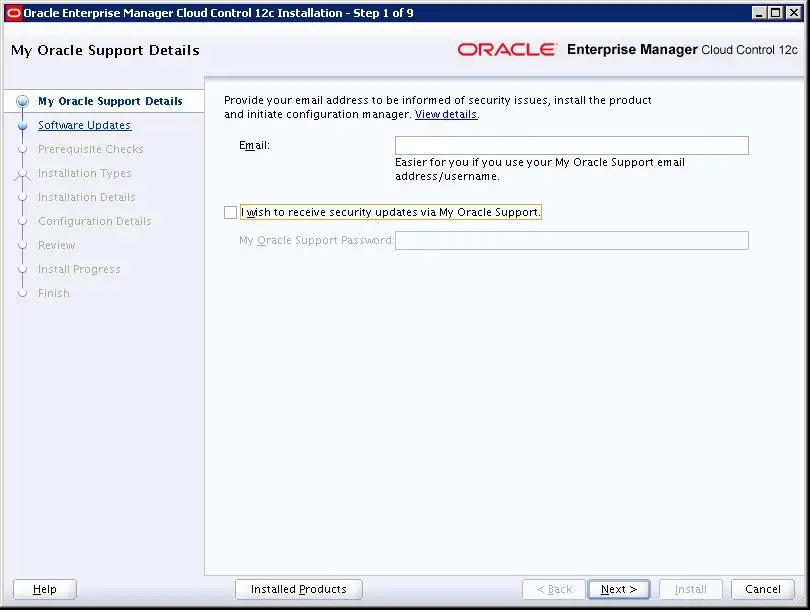
Before Installing OEM cloud control, We need to do below 2 steps. Installing oracle database software 12c Install the oracle database software 12.1.0.2 on the server, where the cloud will be installed. This ORACLE_HOME will be used for creating the repository database. ORACLE_HOME : /oracle/app/oracle/product/12.1.0/dbhome_1 Creating Repository database Now create a repository database by using dbca utility. Make sure to use template while creating db. Once database is created, add below entry in the oratab. BSSCCNTL:/oracle/app/oracle/product/12.1.0/dbhome_1:N Now Unzip the cloud  software and execute runInstaller. cd /data/software/12cloud$ cd /data/software/12cloud unzip /data/software/12cloud$ unzip em12105_sol64_disk1.zip unzip /data/software/12cloud$ unzip em12105_sol64_disk2.zip unzip /data/software/12cloud$ unzip em12105_sol64_disk3.zip ./runInstaller Here, provide the REPOSITORY DATABASE details. Run the above allroot.sh script as root user. And press ok. With this cloud installation has been completed. Now it will generate below url to access the cloud console. https://172.20.204.67:7799/em
Step 1
2

SEE ALSO:

How to deploy Management Agents in target host: How to restart Agent in oracle 12c cloud control: add database as target in oracle 12c cloud control: Blackout targets in oracle 12c cloud control:

Comments (0)

Please to add comments

No comments yet. Be the first to comment!