DBA Hub

📋Steps in this guide1/2

Instrumenting Your PL/SQL Code

No matter who you are or how cool you think you are at programming, you can never know exactly what is going on in your code unless you instrument it.
oracle miscconfigurationintermediate
by OracleDba
13 views
1

DBMS_APPLICATION_INFO

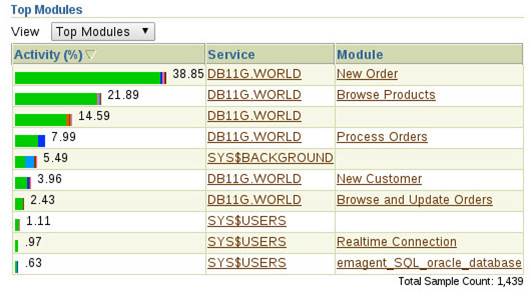
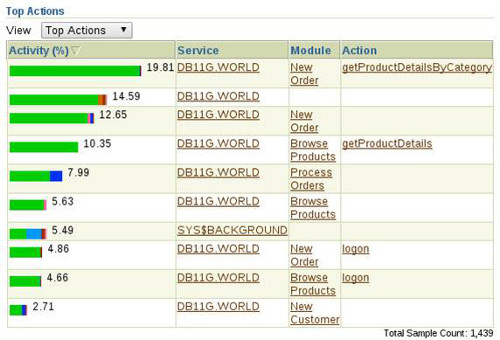
- Introduction - DBMS_APPLICATION_INFO - DBMS_SESSION - DBMS_SYSTEM - Adding Trace Messages to Code - Baselines I’m always telling people to instrument their code. Invariably they don’t. Then this happens: - Dev: Why is this call failing? - Me: What are the parameter values you are calling it with in your code? - Dev: Values X, Y and Z. - Me: Have you called the routine directly with those values? - Dev: Yes, and it worked fine. - Me: That would suggest those are not the values you are really using then. - Dev: But they are. - Me: How do you know. Have to traced the variable values before you made the call. - Dev: No, but they are the correct values. - Me: Can you put in some trace messages to check? - Dev: (walks away) ... grumble ... grumble ... stupid trace ... wasting my time ... - Me: (some time later) So what values were you passing in? - Dev: One of the values was not what I was expecting, which is why it broke. No matter who you are or how cool you think you are at programming, you can never know exactly what is going on in your code unless you instrument it. In its most basic form, instrumentation is just trace messages in your code, allowing you to answer the "What? Where? When? Why?" in any situation. A few points to remember about instrumentation include the following. - The information is the important part, not the implementation. In this article I will discuss some instrumentation methods I like to use, but they are not the only options. - The method and volume of your instrumentation can evolve over time. - If you ever hit a situation where you can’t tell what is going on, it means you need more trace. - Some notable people suggest 50% of your code should be trace. - Instrumentation needs an ON/OFF switch. - What about the overhead? Even calling a procedure that does nothing has an overhead, so adding in calls to tracing routines must slow things down somewhat, right? Strictly speaking this is true, but consider life without instrumentation. You would have no V$ views or SQL Trace etc. Good commercial software makes extensive use of tracing to help make the software easier to support. Your code needs this attention to detail too. To quote Tom Kyte, "It's only an overhead if it is unnecessary!" The package allows programs to add information to the and views. This is important because this information is visible to a number of performance tools, including Enterprise Manager. The following image shows database activity by module for a Swingbench Order Entry workload. The same database activity by action is shown below.
Step 1
2

Baselines

This makes identifying code that has performance problems much simpler. The package can initiate SQL trace on sessions based on their , and settings. This information is also included in the audit trail. You can read more about how to use here . Many applications manage user access internally and log into the database using a single database user. This makes identifying which "real" user is performing which task very difficult. The package allows you to set the column of the view, giving you back the ability to identify real users. The package can initiate SQL trace on sessions based on their settings. The is also included in the audit trail. You can read more about how to use here . The package is an undocumented and unsupported package that allows you to write to Oracle trace files or the Oracle alert log. You can read more about how to use here . The package is probably the most common way to produce trace from PL/SQL, but it does have some issues: Several people have produced wrappers around the package to get around these problems and add extra functionality. Mine is call DSP ( dsp.pks , dps.pkb ). This section includes an example of how to use the DSP package. You might also want to take a look at log4plsql and logger . Load the DSP package into our test user. Assuming these DSP package is loaded, the follow code shows how it might be used in a PL/SQL package. Essentially, it would be called in a similar way to use the package. Now let's see how we could turn on the trace information and direct it to a file. We need to create a directory object to write the trace file to, making sure the directory object is accessible by the test user. Log in as the test user and turn on the trace. We can now run the test package, containing the trace calls, with some different parameters. You can look at the contents of the trace file on the OS, or using the pipelined table function in the DSP package. At a minimum you should trace: - All entry points into your code, including the parameter values that were passed. - All exit points from your code, including the parameter values that were passed during the initial call. - Any major decision points in the code. - Any significant changes to data in the code. You can see how the "50% of your code should be trace" idea is a real possibility. Developers and DBAs are often asked questions like these. - Is the application a little slower since the last release went into production? - The application seems slower today, is something going on? It is impossible to have a good answer to these questions unless you have some baselines to compare the current performance against. A baseline is a measurement of performance for a specific process under a specific circumstance at a specific point in time. The list of possible metrics is virtually limitless (elapsed time, rows processed per unit time, memory, CPU and I/O used etc.). Gathering this information on a number of systems in varying workloads allows you to do the following. - Compare performance between environments (dev, test, prod). - Predict the likely impact of changes in different environments. - Perform trend analysis by comparing baselines over time. It’s up to you to determine what represents a reasonable baseline for any particular process. Your approach and the metric you gather can evolve over time. The important thing to remember is, without something to compare against, a comparison is impossible. Some of the instrumentation discussed above may be used as part of your process of gathering and comparing baselines. For more information see: - DBMS_APPLICATION_INFO : For Code Instrumentation - DBMS_SESSION : Managing Sessions From a Connection Pool in Oracle Databases - DBMS_SYSTEM Hope this helps. Regards Tim...
Step 2

Comments (0)

Please to add comments

No comments yet. Be the first to comment!