My Utopian Development Environment
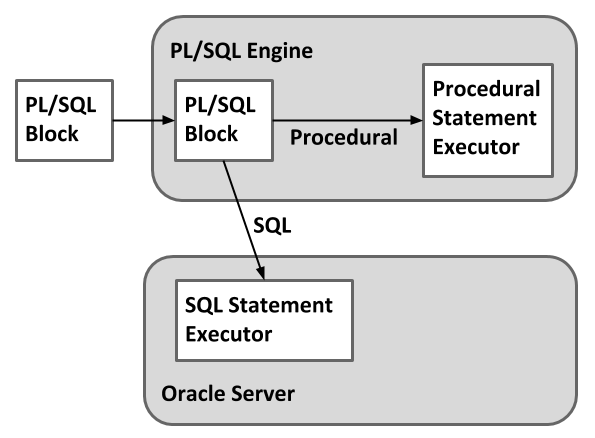
For the most part, the tight binding between these two languages make PL/SQL look like a single language to most developers.
Blocks are the organizational unit for all PL/SQL code, whether it is in the form of an anonymous block, procedure, function, trigger or type. A PL/SQL block is made up of three sections (declaration, executable and exception), of which only the executable section is mandatory.
Based on this definition, the simplest valid block is shown below, but it doesn't do anything.
The optional declaration section allows variables, types, procedures and functions do be defined for use within the block. The scope of these declarations is limited to the code within the block itself, or any nested blocks or procedure calls. The limited scope of variable declarations is shown by the following two examples. In the first, a variable is declared in the outer block and is referenced successfully in a nested block. In the second, a variable is declared in a nested block and referenced from the outer block, resulting in an error as the variable is out of scope.
The main work is done in the mandatory executable section of the block, while the optional exception section is where all error processing is placed. The following two examples demonstrate the usage of exception handlers for trapping error messages. In the first, there is no exception handler so a query returning no rows results in an error. In the second the same error is trapped by the exception handler, allowing the code to complete successfully.
Variables and constants must be declared for use in procedural and SQL code, although the datatypes available in SQL are only a subset of those available in PL/SQL. All variables and constants must be declared before they are referenced. The declarations of variables and constants are similar, but constant definitions must contain the CONSTANT keyword and must be assigned a value as part of the definition. Subsequent attempts to assign a value to a constant will result in an error. The following example shows some basic variable and constant definitions, along with a subsequent assignment of a value to a constant resulting in an error.
In addition to standard variable declarations used within SQL, PL/SQL allows variable datatypes to match the datatypes of existing columns, rows or cursors using the %TYPE and %ROWTYPE qualifiers, making code maintenance much easier. The following code shows each of these definitions in practice.
The qualifier signifies that the variable datatype should match that of the specified table column, while the qualifier signifies that the variable datatype should be a record structure that matches the specified table or cursor structure. Notice that the record structures use the dot notation (variable.column) to reference the individual column data within the record structure.
Values can be assigned to variables directly using the ":=" assignment operator, via a statement or when used as or parameter from a procedure. All three assignment methods are shown in the example below.
The SQL language is fully integrated into PL/SQL, so much so that they are often mistaken as being a single language by newcomers. It is possible to manuallly code the retrieval of data using explicit cursors, or let Oracle do the hard work and use implicit cursors. Examples of both explicit implicit cursors are presented below, all of which rely on the following table definition table.
The statement allows data from one or more columns of a specific row to be retrieved into variables or record structures using an implicit cursor.
The previous example can be recoded to use an explicit cursor a shown below. Notice that the cursor is now defined in the declaration section and is explicitly opened and closed, making the code larger and a little ugly.
When a query returns multiple rows is can be processed within a loop. The following example uses a cursor FOR-LOOP to cycle through multiple rows of an implicit cursor. Notice there is no need for a variable definition as "cur_rec" acts as a pointer to the current record of the cursor.
The explicit cursor version of the previous example is displayed below. Once again the cursor management is all done manually, but this time the exit from the loop must be managed manually also.
In most situations the implicit cursors provide a faster and cleaner solution to data retrieval than their explicit equivalents.
The and statements allow code to decide on the correct course of action for the current circumstances. In the following example the statement is used to decide if today is a weekend day.
First, the expression between the IF and the THEN is evaluated. If that expression equates to TRUE the code between the THEN and the ELSE is performed. If the expression equates to FALSE the code between the ELSE and the END IF is performed. The IF-THEN-ELSE statement can be extended to cope with multiple decisions by using the ELSIF keyword. The example below uses this extended form to produce a different message for Saturday and Sunday.
SQL expressions were introduced in the later releases of Oracle 8i, but Oracle 9i included support for statements in PL/SQL for the first time. The statement is the natural replacement for large statements. The following code gives an example of a matched statement.
The clauses of a matched statement simply state the value to be compared. If the value of the variable specified after the keyword matches this comparison value the code after the keyword is performed.
A searched statement has a slightly different format, with each WHEN clause containing a full expression, as shown below.
Loops allow sections of code to be processed multiple times. In its most basic form a loop consists of the and statement, but this form is of little use as the loop will run forever.
Typically you would expect to define an end condition for the loop using the statement along with a Boolean expression. When the expression equates to true the loop stops. The example below uses this syntax to pint out numbers from 1 to 5.
The placement of the statement can affect the processing inside the loop. For example, placing it at the start of the loop means the code within the loop may be executed "0 to many" times, like a while-do loop in other language. Placing the at the end of the loop means the code within the loop may be executed "1 to many" times, like a do-while loop in other languages.
The statement allows code within the loop to be repeated a specified number of times based on the lower and upper bounds specified in the statement. The example below shows how the previous example could be recorded to use a statement.
The statement allows code within the loop to be repeated until a specified expression equates to TRUE. The following example shows how the previous examples can be re-coded to use a statement.
In addition to these loops a special cursor is available as seen previously.
The statement allows a program to branch unconditionally to a predefined label. The following example uses the statement to repeat the functionality of the examples in the previous section.
In this example the GOTO has been made conditional by surrounding it with an statement. When the is called the program execution immediately jumps to the appropriate label, defined using double-angled brackets.
Procedures and functions allow code to be named and stored in the database, making code reuse simpler and more efficient. Procedures and functions still retain the block format, but the DECLARE keyword is replaced by PROCEDURE or FUNCTION definitions, which are similar except for the additional return type definition for a function. The following procedure displays numbers between upper and lower bounds defined by two parameters, then shows the output when it's run.
The following function returns the difference between upper and lower bounds defined by two parameters.
Packages allow related code, along with supporting types, variables and cursors, to be grouped together. The package is made up of a specification that defines the external interface of the package, and a body that contains all the implementation code. The following code shows how the previous procedure and function could be grouped into a package.
Once the package specification and body are compiled they can be executed as before, provided the procedure and function names are prefixed with the package name.
Since the package specification defines the interface to the package, the implementation within the package body can be modified without invalidating any dependent code, thus breaking complex dependency chains. A call to any element in the package causes the whole package to be loaded into memory, improving performance compared to loading several individual procedures and functions.
Record types are composite data structures, or groups of data elements, each with its own definition. Records can be used to mimic the row structures of tables and cursors, or as a convenient was to pass data between subprograms without listing large number of parameters.
When a record type must match a particular table or cursor structure it can be defined using the attribute, removing the need to define each column within the record manually. Alternatively, the record can be specified manually. The following code provides an example of how records can be declared and used in PL/SQL.
Notice how the records can be assigned to each other directly, and how all elements within a record can be initialized with a single assignment of a NULL value.
Oracle implements Objects through the use of declarations, defined in a similar way to packages. Unlike packages where the instance of the package is limited to the current session, an instance of an object type can be stored in the database for later use. The definition of the type contains a comma separated list of attributes/properties, defined in the same way as package variables, and member functions/procedures. If a type contains member functions/procedures, the procedural work for these elements is defined in the .
To see how objects can be used let's assume we want to create one to represent a person. In this case, a person is defined by three attributes (first_name, last_name, date_of_birth). We would also like to be able to return the age of the person, so this is included as a member function (get_age).
Next the type body is created to implement the get_age member function.
Once the object is defined it can be used to define a column in a database table.
To insert data into the PEOPLE table we must use the t_person() constructor. This can be done as part of a regular DML statement, or using PL/SQL.
Once the data is loaded it can be queried using the dot notation.
The query below shows this in action.
Oracle uses collections in PL/SQL the same way other languages use arrays. You can read more about the types of collections available here .
Database triggers are stored programs associated with a specific table, view or system events, such that when the specific event occurs the associated code is executed. Triggers can be used to validate data entry, log specific events, perform maintenance tasks or perform additional application logic. The following example shows how a table trigger could be used to keep an audit of update actions.
From this you can see that the trigger fired when the price of the record was updated, allowing us to audit the action.
The following trigger sets the current_schema parameter for each session logging on as the APP_LOGON user, making the default schema that of the SCHEMA_OWNER user.
You can read more about database triggers here .
When PL/SQL detects an error normal execution stops and an exception is raised, which can be captured and processed within the block by the exception handler if it is present. If the block does not contain an exception handler section the exception propagates outward to each successive block until a suitable exception handler is found, or the exception is presented to the client application.
Oracle provides many predefined exceptions for common error conditions, like when a statement returns no rows. The following example shows how exceptions are trapped using the appropriate exception handler. Assume we want to return the username associated with a specific user_id value, we might do the following.
That works fine for user_id values that exist, but look what happens if we use one that doesn't.
This is not a very user friendly message, so we can trap this error and produce something more meaningful to the users.
It is possible to declare your own named exceptions for application specific errors, or associate them with Oracle "ORA-" messages, which are executed using the RAISE statement. The example below builds on the previous example using a user-defined named exception to signal an application specific error.
The code still handles users that don't exist, but now it also raises an exception if the user returned is either SYS or SYSTEM.
We can raise errors and give them a friendly message using the procedure. The first parameter is a user-defined error number that has to be between -20000 and -20999. Notice the example below uses , rather than a user-defined named exception. The output includes the error number we specified, but notice we have to trap it with the exception handler.
If we want to associate a named exception with the error number, we can use as show below. This allows us to trap the error in a named exception handler, rather than having to trap it in the handler.
I wrote a blog post about this many years ago. You can read it here . I think it's worth just spending a little time reiterating some of the main points here. It may not be to everyone's liking, but I've always found it to be the most secure and flexible approach I've come across.
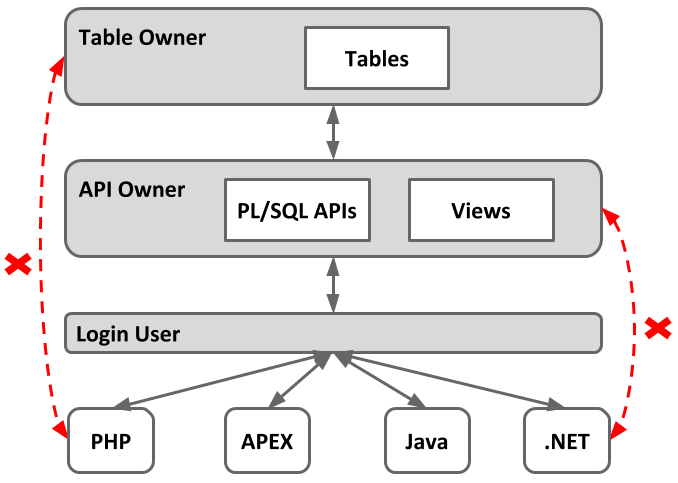
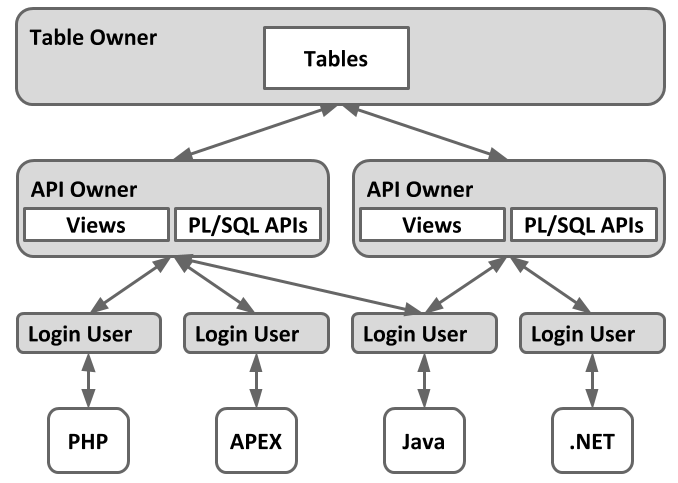
I believe the use of PL/SQL Application Program Interfaces (APIs) should be compulsory. Ideally, client application developers should have no access to tables, but instead access data via PL/SQL APIs, or possibly views if absolutely necessary. The diagram below shows this relationship.