MS SQL Server – Recovery models
MS SQL Server – Recovery models
sqlserver configurationintermediate
by MSSQL
20 views
MS SQL Server – Recovery models
1234567891011121314151617181920212223
i) Simple recovery model
-- Simple recovery model every transaction will be logged into the transaction log file, but at regular intervals the transaction log file will be TRUNCATED whenever a CHECKPOINT operation occurs.
-- Generally used in Development environment where Database Priority/Point-in-time priority is less
-- Not supported Transaction log backups
-- No Point-in-time recovery possible
-- Data loss chances are more
ii) Bulk-logged recovery model
-- In Bulk-logged recovery model every transaction will be logged into the transaction log file, but bulk insert operations are minimally logged.
-- Supports transaction log backups
-- No automatic Truncate of Transaction log.
-- Chances of data loss if bulk insert operations fail
-- May or may not be possible to perform point-in-time recovery
-- Disk consumption will be high when normal transactions but in bulk Disk consumption will be low
iii) Full recovery model
-- In FULL recovery model every transaction will be logged into the transaction log file.
-- This recovery model is generally used in Production databases
-- Supports transaction log backups
-- No automatic Truncate of Transaction log.
-- Minimal/No Data Loss.
-- Point-in-time Recovery
-- Performance Overhead and large transactions at times can take more time.
-- The downside of this model is that it can consume a lot of disk space very fast.
-- Make sure setup regular T-Log Backup, so that after T-Log backup it will truncate T-Log (space will be released)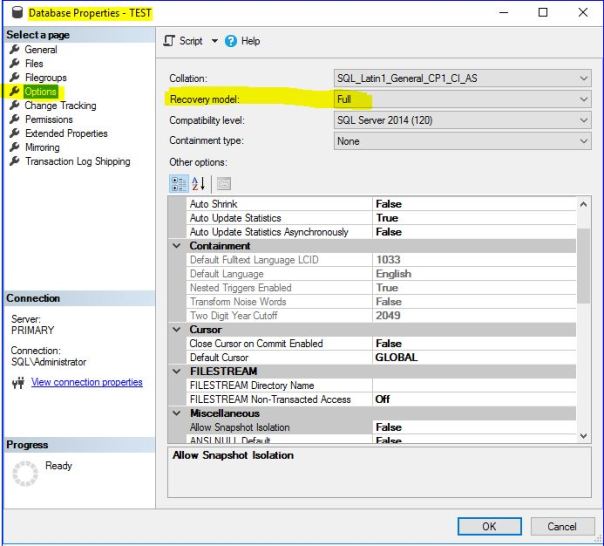
12345678
TEST (Database) -- Right Click --- Properties

USE master;
GO
select [name], DATABASEPROPERTYEX([name],'recovery') As RecoveryModel
from sysdatabases
where name  in ('master','model','tempdb','msdb','test')
GO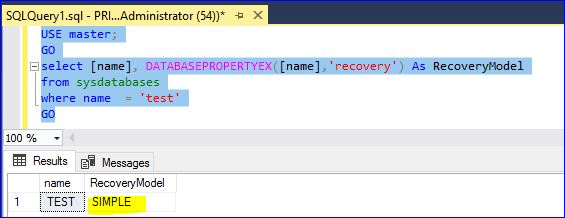
12345678910
-- SET RECOVERY MODEL TO FULL
USE MASTER;
GO
ALTER DATABASE TEST SET RECOVERY FULL;
GO
-- SET RECOVERY MODEL TO SIMPLE
USE MASTER;
GO
ALTER DATABASE TEST SET RECOVERY SIMPLE;
GOPlease to add comments
No comments yet. Be the first to comment!