Application Container Views
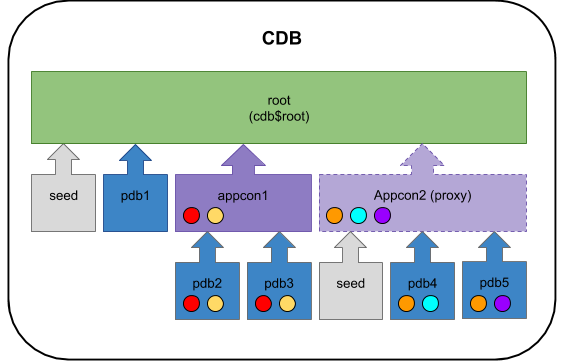
Application containers are a new feature in Oracle Database 12c Release 2 (12.2) that allow you to define an application root, like a mini CDB root container, along with dependent application container PDBs. An application root can house one or more applications, each made up of shared configuration, metadata and objects that are used by the pluggable databases associated with the application root.
The examples in this article use Oracle Managed Files (OMF) so no file name conversions are needed. Although not currently documented, OMF is mandatory for application container synchronisation. Some pieces will work with the appropriate or settings if you need them, but others will fail.
From 12.2 onward we are allowed to have a Proxy PDB, Application Root Container and a single user-defined PDB (regular or Application PDB) inside a single CDB without having to pay for the Multitenant Option. Notice we are still limited to a single user-defined PDB.
- Manage an Application Root
- Manage Application PDBs
- Manage Applications Install an Application Upgrade an Application Uninstall an Application
- Install an Application
- Upgrade an Application
- Uninstall an Application
- Application Common Objects
- Manage an Application Seed
- Application Container Views
- Install an Application
- Upgrade an Application
- Uninstall an Application
Related articles.
- Multitenant : All Articles
Creating a new application container is similar to creating a regular PDB, but you need to include the clause.
You can also create an application container by cloning an existing PDB.
Once the application container is closed it can be dropped in the normal way provided it has no associated PDBs.
Basic management of the application container is similar to a regular PDB, including cloning, unplug, plugin etc. An application container can only be unplugged if it has no associated PDBs.
To create an application PDB you must be connected to an application root, not the CDB root. The application root container in this case is in the local instance, but it could be in a remote instance if we defined a local proxy PDB to pointing to it.
Once connected to the application root we can create a pluggable database as normal, only this time it is an application PDB.
Once we've created a new application PDB we should sync it with all the applications defined in the application root. We will discuss applications later.
We can drop an existing application PDB in the normal way. That cab be done from the application root or from the regular root container.
Applications are managed in the application root container using the clause of the command, described below.
If you spend some time looking at the documentation you will see there is a lot of detail about this functionality. The examples given here are purposely simplistic to allow you to try something out and get a feel for the feature.
Here we will step through the process of creating a simple application in the application root container.
Connect to the application root container.
We initiate the install of a new application, giving it a string to identify the version of the application.
Now we must build the application components. We'll keep this simple by creating a single table.
Once the application components are complete we must end the installation process.
The application is now listed in the view.
At this point we need to sync the application PDBs associated with the application root container, so they can see the new application. The following commands connect to the application container, check for the presence of the application objects, sych the application and check for the presence of the objects again.
We can see the sync operation made the application available in the application container.
The application is now registered against the application PDB, so it is listed in the view.
In this section we will demonstrate a simple upgrade to the application we created in the last section.
Connect to the application root container.
Initiate an upgrade of the application we created earlier, providing a new version string to identify the change.
Make the necessary changes to the application. In this case we will add a new column to the table and create a function to return data from the table.
Once the changes are complete we must end the upgrade process.
As before, we need to connect to the dependent application container and sync it, so the changes are visible.
We can see the modification to the table and the new function became visible after the sync operation.
The new version of the application is now listed in the view.
In this section we will uninstall the application we created previously.
Connect to the application root container.
Initiate an uninstall of the application.
Perform any actions necessary to remove the application.
Once the application components are removed we can end the uninstall process.
We now sync the application conatiner associated with the application root container, so the application is removed.
We can see the sync operation removed the application from the application container.
The application is now marked as uninstalled for the application PDB.
Objects created in an application are known as application common objects, which can take one of three forms.
- Metadata-Linked ( ): The application root holds the metadata information that all linked PDBs will reference using a metadata-link. This can be used to centralise the definition of application objects, but all data will be held locally, not centrally.
- Data-Linked ( ): The application root holds both the metadata and data for the object. All linked PDBs will reference both the centralised metadata and data. The data-link is similar to a synonym, but between containers.
- Extended Data-Linked ( ): The application root holds the metadata and data for the object. All linked PDBs will reference both the centralised metadata and data. In addition to the central shared data, the local application PDB can insert its own data, which the other PDBs can't see.
The parameter, which has as a default value, determines the default type of sharing used.
This can be reset, or the type of sharing can be altered at the object level, as shown below.
The following example uses to create a metadata-linked object.
The following example uses to create and populate a data-linked object.
Any attempt to insert into this table from the application PDB will result in an error.
The following example uses to create and populate an extended data-linked object.
This object will allow data to be inserted from the application PDB, but this local data will not be visible to the other PDBs.
An application root container can optionally have an application seed database, allowing you to have a preconfigured seed for creation of new application containers. An application seed can be created from the CDB seed, an existing application container or an application root container. In this example we will create a new application seed from the CDB seed.
Connect to the application root container.
Create the application seed from the CDB seed, using the clause. The seed will be named after the application root container, with the addition of the "$SEED" suffix.
We can drop an existing application seed like any other PDB. This has no impact on application container PDBs created using it.
To create the application seed from the APPPDB1 application container we created earlier, we would do the following.
To create the application seed from the application root we would do the following. The open command will result in some violations, but they can be ignored as the "pdb_to_apppdb.sql" will fix them.
The following views are available from the application root container and in some cases the application container PDBs to give information about applications.
-
For more information see:
- Overview of Applications in an Application Container
- Application Containers
- Creating and Removing Application Containers and Seeds with SQL*Plus
- Administering Application Containers with SQL*Plus
- Multitenant : All Articles
Hope this helps. Regards Tim...