Cloning a Remote Non-CDB
There is an update of this article for Oracle Database 12c Release 2 (12.2) here .
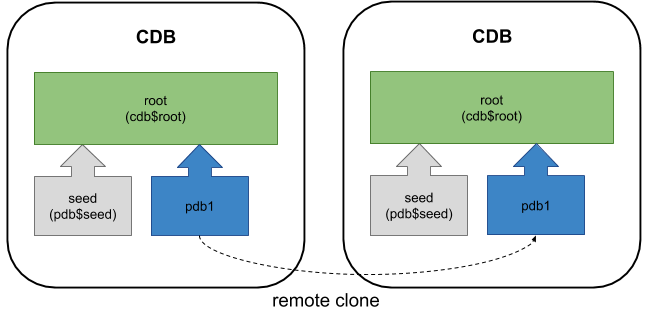
In the initial release of Oracle Database 12c Release 1 (12.1.0.1) remote cloning of PDBs was listed as a feature, but it didn't work. The 12.1.0.2 patch has fixed that, but also added the ability to create a PDB as a clone of a remote non-CDB database.
This provides an alternative to the initial migration path from non-CDB to PDB described here .
- Prerequisites
- Cloning a Remote PDB
- Cloning a Remote Non-CDB
Related articles.
The prerequisites for cloning a remote PDB or non-CDB are very similar, so I will deal with them together.
In this context, the word "local" refers to the destination or target CDB that will house the cloned PDB. The word "remote" refers to the PDB or non-CDB that is the source of the clone.
- The user in the local database must have the privilege in the root container.
- The remote database (PDB or non-CDB) must be open in read-only mode.
- The local database must have a database link to the remote database. If the remote database is a PDB, the database link can point to the remote CDB using a common user, or the PDB using a local or common user.
- The user in the remote database that the database link connects to must have the privilege.
- The local and remote databases must have the same endianness, options installed and character sets.
- If the remote database uses Transparent Data Encryption (TDE) the local CDB must be configured appropriately before attempting the clone. If not you will be left with a new PDB that will only open in restricted mode.
- The default tablespaces for each common user in the remote PDB *must* exist in local CDB. If this is not true, create the missing tablespaces in the root container of the local PDB. If you don't do this your new PDB will only be able to open in restricted mode (Bug 19174942).
- When cloning from a non-CDB, both the the local and remote databases must using version 12.1.0.2 or higher.
In the examples below I have three databases running on the same virtual machine, but they could be running on separate physical or virtual servers.
It is possible to initiate and complete a clone without putting the source database into read-only mode, but this sometimes results in an ORA-00600. Since it is not documented, you should not do this in a real system.
Connect to the remote CDB and prepare the remote PDB for cloning.
Create a user in the remote database for use with the database link. In this case, we will use a local user in the remote PDB.
Open the remote PDB in read-only mode.
Switch to the local server and create a "tnsnames.ora" entry pointing to the remote database for use in the clause of the database link.
Connect to the local database to initiate the clone.
Create a database link in the local database, pointing to the remote database.
Create a new PDB in the local database by cloning the remote PDB. In this case we are using Oracle Managed Files (OMF), so we don't need to bother with parameter for file name conversions.
We can see the new PDB has been created, but it is in the MOUNTED state.
The PDB is opened in read-write mode to complete the process.
As with any PDB clone, check common users and the temporary tablespace is configured as expected.
Connect to the remote database to prepare it for cloning.
Create a user in the remote database for use with the database link.
Open the remote database in read-only mode.
Switch to the local server and create a "tnsnames.ora" entry pointing to the remote database for use in the clause of the database link.
Connect to the local database to initiate the clone.
Create a database link in the local database, pointing to the remote database.
Create a new PDB in the local database by cloning the remote non-CDB. In this case we are using Oracle Managed Files (OMF), so we don't need to bother with parameter for file name conversions. Since there is no PDB to name, we use "NON$CDB" as the PDB name.
We can see the new PDB has been created, but it is in the MOUNTED state.
Since this PDB was created as a clone of a non-CDB, before it can be opened we need to run the "$ORACLE_HOME/rdbms/admin/noncdb_to_pdb.sql" script to clean it up.
The PDB can now be opened in read-write mode.
As with any PDB clone, check common users and the temporary tablespace is configured as expected.
For more information see:
Hope this helps. Regards Tim...