DBA Hub

📋Steps in this guide1/1

Multitenant : Controlling PDB Replication in Data Guard Environments

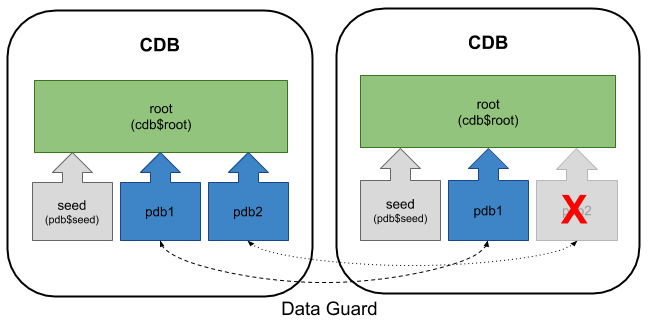
This article describes two methods for controlling the replication of PDBs in standby databases when using Data Guard.
oracle 12cconfigurationintermediate
by OracleDba
16 views
1

ENABLED_PDBS_ON_STANDBY Parameter (12.2)

This article describes two methods for controlling the replication of PDBs in standby databases when using Data Guard. The examples here assume the new PDB is created from the seed database, or from a local read-only PDB in the primary database. The read-only source PDB limitation is still true up to 19c. - Assumptions - STANDBYS Clause (12.1.0.2) - ENABLED_PDBS_ON_STANDBY Parameter (12.2) Related articles. This articles assumes you have a Data Guard environment with a primary database and a single standby database. You can see how to create one manually here. Alternatively, you can create a Data Guard environment with VirtualBox and Vagrant using one of the builds here . The output below shows the current status of the pluggable databases in the primary and standby databases. The container databases are using Oracle Managed Files (OMF), so no file name conversion is needed. If you are not using OMF you will need to include the file name conversion as usual. The clause of the statement was introduced in 12.1.0.2 to allow us to indicate which standby databases should protect the new PDB being created. The syntax is as follows. Here are some examples of the usage. - clause omitted : The pluggable database is protected by all standby databases. - : The pluggable database is not protected on any of the standby databases. - : The pluggable database is protected on all of the standby databases. - : The pluggable database is protected by all standby databases, except those with a of 'cdb1_stby_1' and 'cdb1_stby_2'. - : The pluggable database is only protected by the standby database with a of 'cdb1_stby_1'. Create a new pluggable database on the primary database, which won't be protected by any standby database As expected, we see the PDB is created in the primary database, but is not protected by the standby database. We only have a single standby database, so we could achieve the same result by excluding it using the along with as shown below. As we only have a single standby database, any of the following would result in the PDB being protected by the standby database. Remove the new PDB before trying the examples in the following section. The initialisation parameter was introduced in this form in 12.2 to control which pluggable databases are protected by a specific standby database. The parameter can be set on a primary or standby database, but it is only used by standby databases. Here are some examples of how the parameter might be used with wildcard and exclusions. - : All PDBs are protected. - : Only pluggable databases called "PDB1" and "PDB2" are protected. - : Only pluggable databases with a name beginning with "PDB" are protected. - : All pluggable databases are protected, except those with a name beginning with "PDB". - : All pluggable databases are protected, except if the name is "PDB1". On the standby database we issue the following command to prevent a pluggable database called PDB2 from being replicated to the standby database. All other PDBs will be protected as normal. On primary database create pluggable databases called PDB2 and PDB3. Now check the status of the pluggable databases on both the primary and standby databases. As expected, the pluggable database called PDB2 is not protected by the standby database. To clean up, remove the new pluggable databases and reset the parameter on the standby database. For more information see: Hope this helps. Regards Tim...
Step 1

Comments (0)

Please to add comments

No comments yet. Be the first to comment!