DBA Hub

📋Steps in this guide1/4

Multitenant : Create and Configure a Container Database (CDB) in Oracle Database 12c Release 1 (12.1)

Take your first steps with the Oracle Database 12c Multitenant option by creating container databases.

oracle 12cconfigurationintermediate
by OracleDba
14 views
1

Oracle Universal Installer (OUI)

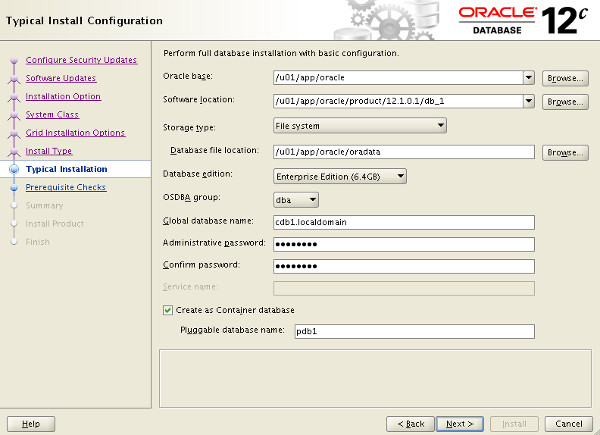
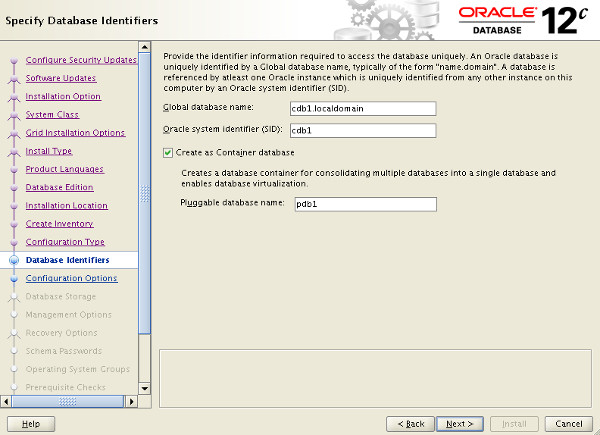
The multitenant option introduced in Oracle Database 12c allows a single container database (CDB) to host multiple separate pluggable databases (PDB). This article covers the options available to create a new container database. There are articles specifically about installation of Oracle Database 12c here . - Oracle Universal Installer (OUI) - Database Configuration Assistant (DBCA) - Manual Creation - Configure a Container Database (CDB) Related articles. - Multitenant : All Articles The Oracle Universal Installer (OUI) allows you to create a container database (CDB) during the software installation. The "Typical Install Configuration" screen has a checkbox to indicate the database is a container database. You can optionally create a single pluggable database (PDB) in this screen also. The advanced configuration options provides the same ability on the "Database Identifiers" screen.
Step 1
2

Database Configuration Assistant (DBCA)

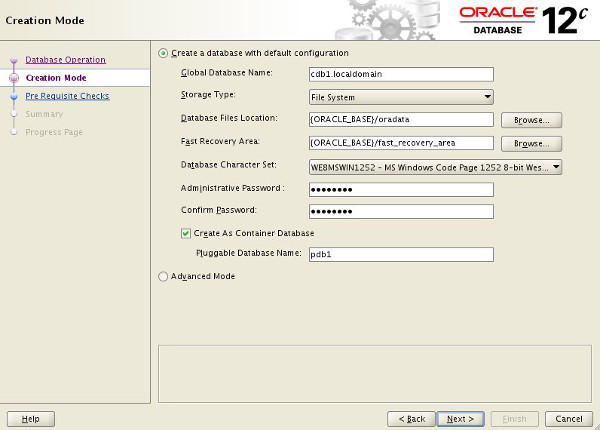
In both cases the creation of a pluggable database (PDB) is optional, so you can create an empty container database and create the pluggable database later if you wish. The Database Configuration Assistant (DBCA) gives similar options to the Oracle Universal Installer (OUI). The "Creation Mode" page allows you to enter the default installation configuration details directly.
Step 2
3

Database Configuration Assistant (DBCA)

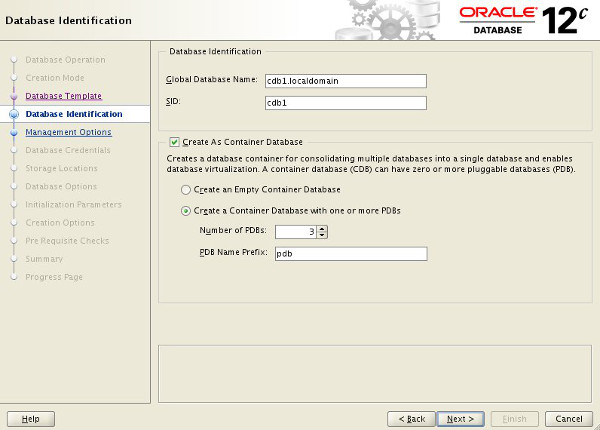
If you chose the "Advanced Mode" option, you can create a CDB and multiple PBDs in one go.
Step 3
4

Configure a Container Database (CDB)

Using the DBCA, either during or after the software installation, is the recommended approach to creating CDBs, but it is possible to create them manually. The simplest way to see how manual creation of a CDB is accomplished is to run the DBCA. Pick "Advanced Mode", select the "Custom Database" option (no template used) and at the end, uncheck the "Create Database" option and check the "Generate Database Creation Scripts" option. The resulting scripts will include one called "CreateDB.sql", with contents similar to this. Most of the statement should look familiar. Notice the and options in bold. When the clause is present, the database is created as a CDB with both root and seed. The clause is used to determine the seed file names, based on the root file names. If you are using Oracle Managed Files (OMF), this clause is not necessary. If you prefer, you can specify the seed datafiles explicitly, rather than using the convert. Remember, your first choice for creating a CDB should always be the DBCA. It's important to know how the DBCA creates the CDB, but that doesn't mean a manual approach is better. With the exception of selecting the "Create as Container database" option, the rest of the configuration during the installation or when using the DBCA is very similar to working with a single instance. After database creation, running the DBCA allows you to reconfigure some of the CDB options. More configuration will be discussed in future articles. For more information see: - Introduction to the Multitenant Architecture - Overview of the Multitenant Architecture - Managing a Multitenant Environment - Multitenant : All Articles Hope this helps. Regards Tim...
Step 4

Comments (0)

Please to add comments

No comments yet. Be the first to comment!