DBA Hub

📋Steps in this guide1/1

Multitenant : DBCA PDB Relocate in Oracle Database 19c

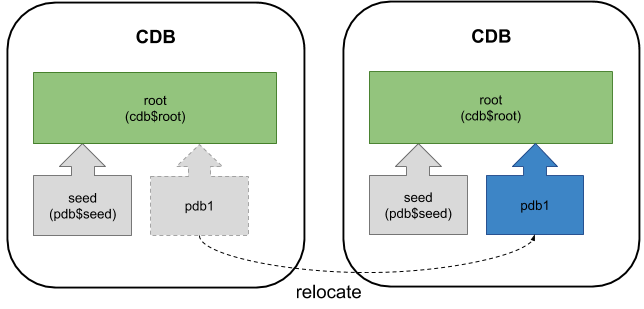
In Oracle 19c it's possible to perform a relocate of a pluggable database (PDB) using the Database Configuration Assistant (DBCA).
oracle 19cconfigurationintermediate
by OracleDba
15 views
1

Appendix

Oracle Database 12c Release 2 (12.2) introduced the ability to relocate pluggable database (PDB) using the command. In Oracle 19c it's now possible to perform a relocate of a pluggable database (PDB) using the Database Configuration Assistant (DBCA). - Prerequisites - Relocate a PDB with the DBCA - Appendix Related articles. Connect to the remote CDB and prepare it for relocating. Create a user in the remote database for use with the database link. In this case, we will use a common user in the remote PDB. Unlike a regular relocate, we don't need to create a database link. We just need to supply the credentials we would use to create the link. The DBCA does the rest. Check the remote CDB is in local undo mode and archivelog mode. Because the remote CDB is in local undo mode and archivelog mode, we don't need to turn the remote database into read-only mode. Connect to the local CDB and prepare it for relocating. Check the local CDB is in local undo mode and archivelog mode. In 19c the DBCA command has been introduced, allowing us to relocate a PDB to a different container database (CDB). You can see the full syntax for the command here , although at the time of writing the documentation doesn't match the utility usage presented by the command. Make sure the environment is set up to point to the local instance "cdb1" and relocate the PDB called "pdb5" from the remote PDB called "pdb5" in the "cdb3" instance. Connect to the local root container and check the status of the new PDB. To relocate it back we need to create the link user in the local database. Make sure the environment is set up to point to the remote instance "cdb3" and relocate the PDB called "pdb5" from the local PDB called "pdb5" in the "cdb1" instance. Connect to the remote root container and check the status of the new PDB. The instances and pluggable databases used in these examples are created using the following commands. The databases have Oracle Managed Files (OMF) enabled and are switched to archivelog mode. For more information see: Hope this helps. Regards Tim...
Step 1

Comments (0)

Please to add comments

No comments yet. Be the first to comment!