DBA Hub

📋Steps in this guide1/2

Multitenant : Dynamic CPU Scaling - Resource Manager Control of CPU using CPU_COUNT and CPU_MIN_COUNT

Resource Manager can control CPU usage in PDBs using the CPU_COUNT and CPU_MIN_COUNT parameters. Oracle call this Dynamic CPU Scaling.

oracle 19cconfigurationintermediate
by OracleDba
13 views
1

The Issue With CPU_COUNT

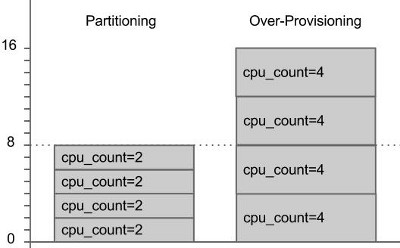
Resource Manager can control CPU usage in PDBs using the and parameters. Oracle call this Dynamic CPU Scaling. The genesis of this functionality began in Oracle 12.2, but Oracle 19.4 saw the introduction of the parameters. Depending on the underlying architecture, the CPU_COUNT refers to the number of cores or threads available to the instance or PDB. We'll use the term threads, but if your architecture doesn't support multiple threads per core, then threads are synonymous to cores. Related articles. It's always been possible to control CPU usage in a pluggable database using Resource Manager. Oracle 12.1 introduced CDB resource plans , and Oracle 12.2 simplified them by introducing PDB performance profiles . Using these, CPU control is based on shares and utilization percentages of the instance CPU. This is not the most intuitive of approaches. Oracle 12.2 also introduced the ability to control the CPU usage of a pluggable database using the parameter. This feels a lot more straight forward. Oracle 19.4 introduced the parameter to make safe over-privsioning possible. From Oracle 12.2 onward the parameter can be set in a PDB, effectively allowing the PDB to be caged to a specific number of cores/threads. Resource manager must be enabled, so we need a CDB resource plan, or we can use the in one or more of the open PDBs. In the following example we use the in all the PDBs, and set the in each pluggable database. From this point onward, the PDBs will be constrained to using the number of threads specified by their parameter value. When dealing with just the parameter, this feels similar to instance caging. We still have to make a hard decision. Do we partition the CPUs to guarantee each PDB will get it's share of CPU, but risk having idle threads. Or over-provision to reduce the chances of idle threads, but risk noisy neighbours affecting the performance of other PDBs. The diagram below gives an example of the two provisioning methods in a container database with 8 threads available for database processing. The can vary for each PDB, to indicate their relative performance requirements.
Step 1
2

Dynamic CPU Scaling Considerations

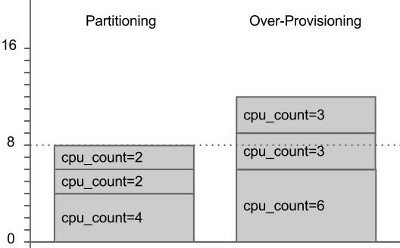
Oracle 19.4 allows us to do a hybrid of the two, allowing us to safely over-provision. From Oracle 19.4 onward the and parameters can be set to provide a lower and upper boundary for CPU usage. Resource Manager will guarantee the lower limit is available when the system is under load, but when there is less load the PDB will be allowed to dynamically scale up to the upper limit. This way you are protecting the PDBs from noisy neighbours by reserving the CPU, but if the system is quiet the PDB is not so restricted, so idle cores/threads don't go to waste. If you are using Oracle 19.4 or above, you should probably use and in preference to just in the PDB. In the following example we set a default value of in the root container. This will apply to all pluggable databases unless a PDB-specific value is set. In the pluggable databases we set PDB-specific and parameter values, remembering to set the in at least one of the open PDBs to enable resource manager. In this case we set it in all PDBs. If you are running in a RAC environment, the documentation suggests the same instance-level value should be set on all instances. Remember, the and parameters are set in the PDB, so each RAC node will attempt to use the same limits. That might be impossible if some nodes have lower values. The parameter can be set to decimal values between 0.1 and 0.95 in multiples of 0.05, or to integer values. The value can't exceed that of the parameter value. The parameter value in the pluggable database can't exceed that of the parameter value for the instance. So we can think of the as our safe partitioned setting, and the as our risky over-provisioned setting. We guarantee protection from noisy neighbours when the system is under load, but we allow idle threads to be used by other PDBs when the system is under less load. Oracle call this Dynamic CPU Scaling. There are some things to consider when using dynamic CPU scaling. For more information see: Hope this helps. Regards Tim...
Step 2

Comments (0)

Please to add comments

No comments yet. Be the first to comment!