DBA Hub

📋Steps in this guide1/1

Multitenant : PDB Archive Files for Unplug and Plugin in Oracle Database 12c Release 2 (12.2)

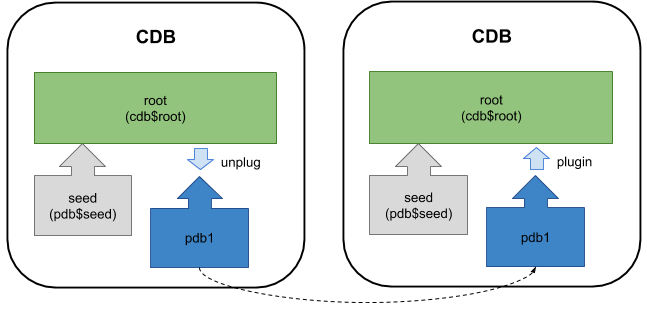
Oracle 12.2 allows a PDB to be unplugged to an archive file, containing all the files necessary to move and plugin the PDB.

oracle 12cconfigurationintermediate
by OracleDba
12 views
1

Considerations

In Oracle 12.1 a pluggable database could be unplugged to a ".xml" file, which describes the contents of the pluggable database. To move the PDB, you needed to manually move the ".xml" file and all the relevant database files. In addition to this functionality, Oracle 12.2 allows a PDB to be unplugged to a ".pdb" archive file. The resulting archive file contains the ".xml" file describing the PDB as well as all the datafiles associated with the PDB. This can simplify the transfer of the files between servers and reduce the chances of human error. This article includes the unplug/plugin functionality available from Oracle 12.1. This was first described in the 12.1 article here . This article assumes you are using Oracle Managed Files (OMF). If you aren't, you will need add the file name conversion information, as explained here . - Unplug PDB to ".pdb" Archive File - Plugin PDB from ".pdb" Archive File - Unplug PDB to ".xml" File - Plugin PDB from ".xml" File - Considerations Related articles. Before attempting to unplug a PDB, you must make sure it is closed. To unplug the database use the command with the clause to specify the location of the ".pdb" archive file. You see the archive file not now present. You can delete the PDB and drop the datafile, as they are all present in the archive file. Plugging in a PDB into the CDB is similar to creating a new PDB. First check the PBD is compatible with the CDB by calling the function, passing in the archive file and the name of the PDB you want to create using it. If the PDB is not compatible, violations are listed in the view. If the PDB is compatible, create a new PDB using it as the source. If we were creating it with a new name we might do something like this. Before attempting to unplug a PDB, you must make sure it is closed. To unplug the database use the command with the clause to specify the location of the XML metadata file. The pluggable database is still present, but you shouldn't open it until the metadata file and all the datafiles are copied somewhere safe. You can delete the PDB, choosing to keep the files on the file system. First check the PBD is compatible with the CDB by calling the function, passing in the XML metadata file and the name of the PDB you want to create using it. If the PDB is not compatible, violations are listed in the view. If the PDB is compatible, create a new PDB using it as the source. If we were creating it with a new name we might do something like this. Instead, we want to plug the database back into the same container, so we don't need to copy the files or recreate the temp file, so we can do the following. - Having a single file to transport between servers is a lot simpler as you can't accidentally forget to transfer one or more files. - Using a zipped version of the database can reduce the total amount of network traffic involved in moving the database. - Zipping the datafiles of a large database can take a lot of time and CPU. If this is a problem, you may want to avoid this PDB archive method. - Even in Oracle 12.1 it was possible to unplug a PDB to an archive using the DBCA. Having this functionality available directly from the database just simplifies things. - If you are using Transparent Data Encryption (TDE) you will need to manage the encryption keys, which is described here . For more information see: Hope this helps. Regards Tim...
Step 1

Comments (0)

Please to add comments

No comments yet. Be the first to comment!