Appendix
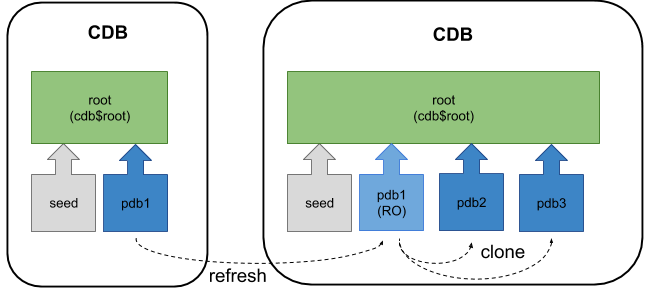
From Oracle Database 12.2 onward it is possible to refresh the contents of a remotely hot cloned PDB provided it is created as a refreshable PDB and has only ever been opened in read only mode. The read-only PDB can be used for reporting purposes, or as the source for other clones, to minimise the impact on a production system when multiple up-to-date clones are required on a regular basis.
- Prerequisites
- Create a Refreshable PDB
- Alter the Source PDB
- Refresh the PDB
- Refresh Modes
- Appendix
Related articles.
In this context, the word "local" refers to the destination or target CDB that will house the cloned PDB. The word "remote" refers to the PDB that is the source of the clone.
The prerequisites for a PDB refresh are similar to those of a hot remote clone, so you should be confident with that before continuing. You can read about it in this article.
In addition to the prerequisites for hot remote cloning, we must also consider the following.
- A refreshable PDB must be in a separate CDB to its source, so it must be a remote clone.
- You can change a refreshable PDB to a non-refreshable PDB, but not vice versa.
- If the source PDB is not available over a DB link, the archived redo logs can be read from a location specified by the optional parameter.
- New datafiles added to the source PDB are automatically created on the destination PDB. The parameter must be specified to allow the conversion to take place.
In the examples below we have two databases running on the same virtual machine, but they could be running on separate physical or virtual servers.
- cdb1 : The local CDB, that will eventually house the refreshable clone (pdb5_ro).
- cdb3 : The remote CDB, used for the source PDB (pdb5)
Remember, you must have completed all the preparations for a hot remote clone described in the linked article before going forward.
Connect to the local database to initiate the clone.
Create a new PDB in the local database by cloning the remote PDB. In this case we are using Oracle Managed Files (OMF), so we don't need to bother with parameter for file name conversions. In this case we are using manual refresh mode.
We can see the new PDB has been created, but it is in the MOUNTED state.
The PDB is opened in read-only mode to complete the process.
We want to prove the new PDB can be refreshed, so we will add a new tablespace, user and table owned by that user in the source database.
Connect to the source database.
Make some changes to the source PDB.
The source PDB now differs from the clone, so we should be able to easily see if the clone can be refreshed.
Connect to the target database.
Switch to the refreshable PDB and check for the presence of the test table. It will not exist yet.
In 12.2 the refresh operation can only take place from the refreshable PDB, not the root container. This restriction was removed in later releases, but the documentation still says you must be connected to the PDB. The example below shows both possible approaches, but only the second will work in 12.2.
Check for the presence of the test table again. It will now exist.
Notice the tablespace as also been created in the refreshable PDB.
In the example above we created a refreshable PDB using the manual refresh mode. Alternatively we could allow it to refresh automatically. The possible variations during creation are shown below.
The current refresh mode can be queried using the view.
The refresh mode can be altered after the refreshable PDB is created, as shown below.
Remember, once the PDB is made non-refreshable, it can't be made refreshable again.
The auto-refresh is only possible if the PDB is closed. This sounds odd, but the auto-refresh is meant to be used when the refreshable PDB is a source of a chain of clones. As such, you would open it read-only, use it as the source of a new clone, then close it again, so it can stay up to date. If you want the PDB to be open read-only most of the time, it's better to define your own job that closes, refreshes and opens the PDB again.
The two container database instances were built using the following commands. The commands to remove the instances are included, so you can clean up when you are finished.
For more information see:
Hope this helps. Regards Tim...