Proxy Views
- Introduction
- Prerequisites
- Create a Proxy PDB
- Test It
- Local Datafiles
- Alternate Host and Port
- Proxy Views
Related articles.
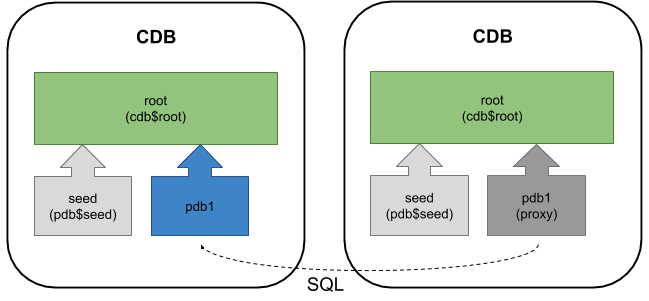
A proxy PDB can provide a local connection point that references a remote PDB. There are a few situations where this might be of interest to you.
- You want to relocate a PDB to a different machine or data centre, without having to change any of the existing connection details. In this case you can relocate the PDB and create a proxy PDB of the same name in the original location.
- You want to run a PDB in the cloud, but you don't want to open access to multiple applications, having each of them connecting directly. Instead you make all your applications connect to the local PDB, which in turn connects to the referenced PDB, so there is only a single route in and out of the cloud PDB.
- You want to share a single application root container between multiple databases.
Here are a few things to consider.
- DML and DDL is sent to the referenced PDB for execution and the results returned.
- When connected to the proxy PDB, and commands refer to the proxy only, they are not passed to the referenced PDB.
- In the same way, when connected to the root container, commands refer to the proxy only.
- A database link is used for the initial creation of the proxy PDB, but all subsequent communication between the servers doesn't use the DB link, so it can be removed once the creation is complete.
- The database link used to create a proxy PDB must be created in the root container of the local instance, but can point to a common user in the referenced CDB root container, or a common or local user in the referenced PDB itself.
- The , , and tablespaces are copied to the local instance and kept synchronized. As a result, you still need to consider file name conversion like a normal clone, unless you are using Oracle Managed Files (OMF).
- There will be performance implications due to all the network traffic. This won't magically make remote data transfer faster.
From 12.2 onward we are allowed to have a Proxy PDB, Application Root Container and a single user-defined PDB (regular or Application PDB) inside a single CDB without having to pay for the Multitenant Option. Notice we are still limited to a single user-defined PDB.
The prerequisites for creating a proxy PDB are similar to that of hot-cloning, so rather than repeat them, you can read them here .
In the examples below I have two databases running on the same virtual machine, but they could be running on separate physical or virtual servers.
- cdb1 : The local database that will eventually house the proxy PDB.
- cdb3 : The remote CDB, housing the remote referenced PDB (pdb5).
The databases use Oracle Managed Files (OMF) so I don't need to worry about the or settings.
The proxy PDB and referenced PDB share the same listener, so they can't have the same name. If they had different listeners, either on the same machine or on separate machines, they could have the same name.
Connect to the root container of the local instance (cdb1). With the prerequisites in place we can create and open the proxy PDB using the following commands.
If you connect to the root container using OS authentication, switch to the proxy PDB container and try to perform a query you will get the following error.
If you connect to SYS using a service, the switch works fine.
Create a new entry in the "tnsnames.ora" file for the proxy PDB in the local instance.
You can now connect directly to the proxy PDB. Notice in the output below, the database name is showing as CDB3, even though we are connected to the pdb5_proxy container in the cdb1 instance.
Once the proxy PDB is created the database link and link user are no longer needed.
We will test the proxy PDB by making changes in both the proxy PDB and the referenced PDB. First, create a new tablespace and a test user with a quota in the new tablespace.
Connect to the referenced PDB using the newly created user and create a test table.
Return to the proxy PDB and query the table.
Insert another record into the table in the proxy PDB.
Return to the referenced PDB and query the table.
We can see the proxy PDB and referenced PDB are working as expected.
What might seem a little odd is the , , and tablespaces are copied to the local instance and kept synchronized. All other tablespaces are only present in the referenced instance.
If we query datafiles and tempfiles in the proxy PDB we are shown those of the referenced PDB. Notice the datafiles associated with the and tablespaces.
If we check in the local instance we see a different pattern. Notice the datafiles associated with the and tablespaces are not present.
The command can also include the and clauses.
The clause should be used if the referenced PDB is accessed by a port other than 1521. The clause is used if the referenced PDB is to be accessed using a name other that produced by the command on the remote server, for example a DNS alias or SCAN. The host and port are amended using the following commands, issued from the referenced PDB.
After a change, any proxy PDBs pointing to the referenced PDB must be recreated.
You can see which are proxy PDBs using the column or column.
The displays information about the connection details for the referenced PDB used by a proxy PDB.
For more information see:
Hope this helps. Regards Tim...