DBA Hub

📋Steps in this guide1/1

Multitenant : Relocate a PDB in Oracle Database 12c Release 2 (12.2)

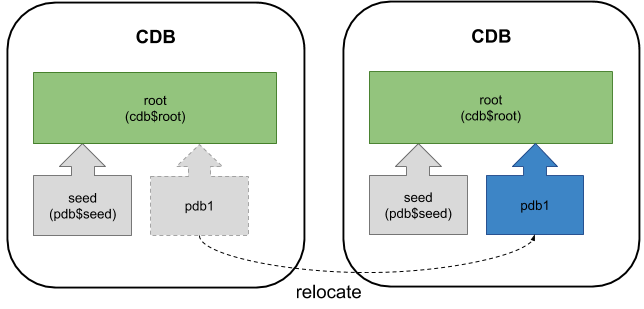
From Oracle 12.2 onward you can relocate a PDB by moving it between two root containers with near zero-downtime.
oracle 12cconfigurationintermediate
by OracleDba
12 views
1

Appendix

From Oracle 12.2 onward you can relocate a PDB by moving it between two root containers with near zero-downtime. The process is similar to performing a remote clone of a PDB. - Prerequisites - Prepare Remote CDB - Prepare Local CDB - Relocate a PDB - Managing Connections - Appendix Related articles. In this context, the word "local" refers to the destination or target CDB that will house the relocated PDB. The word "remote" refers to the PDB that is to be relocated. - The user in the local database must have the privilege in the root container. - The remote CDB must use local undo mode. Without this you must open the remote PDB. - The remote and local databases should be in archivelog mode. - The local database must have a public database link to the remote CDB using a common user. - The common user in the remote database that the database link connects to must have the and SYSDBA or SYSOPER privilege. - The local and remote databases must have the same endianness. - The local and remote databases must be the same version, and the parameter of the remote database can't be higher than the local database. - The local and remote databases must either have the same options installed, or the remote database must have a subset of those present on the local database. - If the character set of the local CDB is AL32UTF8, the remote database can be any character set. If the local CDB does not use AL32UTF8, the character sets of the remote and local databases much match. - If the remote database uses Transparent Data Encryption (TDE) the local CDB must be configured appropriately before attempting the relocate. If not you will be left with a new PDB that will only open in restricted mode. - Bug 19174942 is marked as fixed in 12.2. I can't confirm this, so just in case I'll leave this here, but it should no longer be the case. The default tablespaces for each common user in the remote PDB *must* exist in local CDB. If this is not true, create the missing tablespaces in the root container of the local PDB. If you don't do this your new PDB will only be able to open in restricted mode (Bug 19174942). In the examples below I have two databases running on the same virtual machine, but they could be running on separate physical or virtual servers. - cdb1 : The local database that will eventually house the relocated PDB. - cdb3 : The remote CDB that houses the PDB (pdb5) to be relocated. Connect to the remote CDB and prepare the remote PDB for relocating. Create a user in the remote database for use with the database link. In this case, we must use a comon user in the remote CDB. Check the remote CDB is in local undo mode and archivelog mode. Because the remote CDB is in local undo mode and archivelog mode, we don't need to turn the remote database into read-only mode. Switch to the local server and create a "tnsnames.ora" entry pointing to the remote CDB for use in the clause of the database link. The connection details must include the "(SERVER = DEDICATED)" entry, or you will receive a "ORA-01031: insufficient privileges" error. Connect to the local database to initiate the relocate. Check the local CDB is in local undo mode and archivelog mode. Create a public database link in the local CDB, pointing to the remote CDB. Remember to remove this once the relocate is complete. Create a new PDB in the local CDB by relocating the remote PDB. In this case we are using Oracle Managed Files (OMF), so we don't need to bother with parameter for file name conversions. We can see the new PDB has been created, but it is in the MOUNTED state. The PDB is opened in read-write mode to complete the process. Drop the public database link. As with any PDB clone, check common users and the temporary tablespace is configured as expected. If we switch back to the remote instance we can see PDB5 has been dropped. Moving the database is only one aspect of keeping a system running. Once the database is in the new location, you need to make sure connections can still me made to it. The options are as follows. - If your connection information is centralised in an LDAP server (OID, AD etc.) then the definition can be altered centrally. - If both CBSs use the same listener, the relocated PDB will auto-register once the relocate is complete. - If both CDBs use different listeners, you can specify to instruct the initial listener to forward connections to the new listener. - If both CDBs use different listeners, the and parameters can be used to configure cross-registration. Here are the DBCA commands to create and delete the CDB instances and PDBs used by these examples. For more information see: Hope this helps. Regards Tim...
Step 1

Comments (0)

Please to add comments

No comments yet. Be the first to comment!