DBA Hub

📋Steps in this guide1/2

NGINX : Reverse Proxy Configuration

Learn how to configure NGINX as a reverse proxy server.
oracle miscconfigurationintermediate
by OracleDba
15 views
1

Introduction

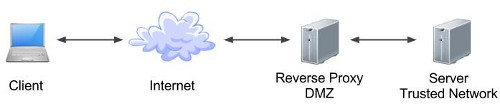
A reverse proxy can act as a gateway service allowing access to servers on your trusted network from an external network. There are a number of ways to achieve this, but this article discusses how to configure a reverse proxy using NGINX. - Introduction - Installation - HTTP Reverse Proxy - HTTPS Reverse Proxy Related articles. - Apache : Reverse Proxy Configuration - Let's Encrypt - Free Certificates on Oracle Linux (CertBot) Using a reverse proxy is a simple and convenient approach to allowing access to servers on your trusted network from external networks, such as the internet. Much of its appeal comes from the fact it allows all your servers to remain hidden from the external networks and the user community. The diagram below shows a simple architecture that could be employed to achieve this. Of course, there are an almost limitless variety of configurations possible depending on your requirements and the products being used.
Step 1
2

HTTPS Reverse Proxy

Reverse proxies provide a number of benefits in terms of security and maintenance, including the following. - The obvious point is none of your application or database servers are exposed to external networks directly, which is a good starting point when trying to build a secure solution. - URLs presented to users can be "pretty", rather than containing specific machine names, ports and long paths. A simple redirect would still expose the true URL, while a reverse proxy completely hides it from the user. - Following on from the previous point, users bookmark URLs. If that bookmark contains a specific machine name, then no matter how resilient you try to make your solution, they will go to their bookmark and think your site it down. Separating them from the physical implementation of your services make your apparent availability better. - From a security perspective, the less architectural information you expose to the outside world, the better. If hackers are presented the actual machine names and ports that are running a service, it makes it significantly easier for them to attack those services. - The fact the URLs no longer point directly to actual machines enables dramatic architecture changes to be hidden from users. A simple configuration change within the reverse proxy can direct all the workload to a new set of servers. We're going to keep things simple by installing NGINX from the default Oracle Linux Yum repository. Enable and start the NGINX service. Top level configuration is in the "/etc/nginx/nginx.conf" file. You can make amendments here, but it is often neater to use the modular approach and add config files for each virtual host in the "/etc/nginx/conf.d/" directory. Any files matching the *.conf" pattern will be picked up from this directory. The "proxy_pass" parameter is used to tell NGINX how to proxy requests. In the following example, the "my-app-1.example.com" URL resolves to the IP address of the reverse proxy server. We create a file called "/etc/nginx/conf.d/my-app-1.example.com.conf" with the following content. If we were proxying to a HTTPS URL from a HTTP endpoint, we will need to add the parameter. Changes to the NGINX configuration will not take effect until the service is reloaded or restarted. Remember, for named virtual hosts to work, the URL must contain the correct name, so to test this you will either need the appropriate DNS entries, or "/etc/hosts" entries. In my case the reverse proxy is running on a server with an IP address of "192.168.0.190", so the hosts file would look like this. The applications is now being proxied using the following URL. In order to define a HTTPS reverse proxy you will need to configure NGINX to handle HTTPS requests. The HTTPS reverse proxy definitions are similar to those seen previously, with the addition of the SSL related parameters. The following example also includes a number of additional entries to harden the server. The most important points are the and parameters, which point to the certificates being used for HTTPS. After a restart of the NGINX service, the following URL will be proxied appropriately. The above example used a Let's Encrypt certificate. For internal servers you may want to create a self-signed certificate. Here's an example of doing that with OpenSSL. For more information see: - Apache : Reverse Proxy Configuration - Let's Encrypt - Free Certificates on Oracle Linux (CertBot) - Server Icon - Cloud Icon Hope this helps. Regards Tim...
Step 2

Comments (0)

Please to add comments

No comments yet. Be the first to comment!