RAC Node 1 Build
This article describes the "hands-off" installation of Oracle Database 21c RAC on Oracle Linux 8 using VirtualBox and Vagrant with no additional shared disk devices.
If you are wondering why there isn't a GUI version of this installation, please read Why no GUI installations anymore?
- TL;DR
- Introduction
- Required Software
- Clone Repository
- Amend File Paths
- Build the RAC
- Turn Off RAC
- Remove Whole RAC
- Description of the Build DNS Server Build RAC Node 2 Build RAC Node 1 Build
- DNS Server Build
- RAC Node 2 Build
- RAC Node 1 Build
- DNS Server Build
- RAC Node 2 Build
- RAC Node 1 Build
Related articles.
- Vagrant Oracle Real Application Clusters (RAC) Build
- All RAC Articles
- Silent Installation and Configuration : All Articles
If you are comfortable with VirtualBox, Vagrant and RAC you might want to jump straight to the GitHub repository and use the basic instructions here .
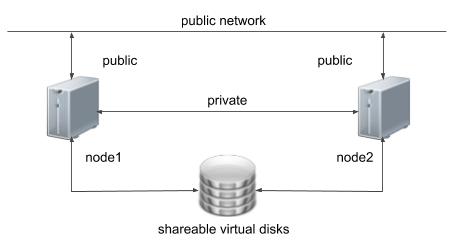
One of the biggest obstacles preventing people from setting up test RAC environments is the requirement for shared storage. In a production environment, shared storage is often provided by a SAN or high-end NAS device, but both of these options are very expensive when all you want to do is get some experience installing and using RAC. A cheaper alternative is to use virtualization to fake the shared storage.
Using VirtualBox you can run multiple Virtual Machines (VMs) on a single server, allowing you to run both RAC nodes on a single machine. In addition, it allows you to set up shared virtual disks, overcoming the obstacle of expensive shared storage.
In previous releases I gave walk through of a manual installation, but this doesn't really make sense as you shouldn't be installing anything this way anymore, so instead I'm discussing a silent installation. I will be describing the contents of the Vagrant builds, so there will be links to the actual scripts on GitHub, rather than repeating them here.
Before you launch into this installation, here are a few things to consider.
Download and install the following software on your PC. If you can't figure out this step, you probably shouldn't be considering a RAC installation.
- VirtualBox
- Vagrant
- A Git client for your PC, so you can clone the vagrant repository.
You will also need to download the 21c grid and database software
- Grid : LINUX.X64_213000_grid_home.zip
- Database : LINUX.X64_213000_db_home.zip
Pick an area on your PC file system to act as the base for this git repository and issue the following command.
Copy the Oracle software under the "..../software/" directory. From the "rac/ol8_21" subdirectory, the structure should look like this.
When you clone the repository on Windows it is important you maintain the line terminators. All ".sh" scripts are run inside the Linux VMs, so they need UNIX style line terminators. If your Git client is set to convert all files to Windows style line terminators on a clone/pull, you will run into problems when those scripts are called from Linux.
The "config" directory contains a "install.env" and a "vagrant.yml" file. The combination of these two files contain all the config used for this build. You can alter the configuration of the build here, but remember to make sure the combination of the two stay consistent.
At minimum you will have to amend the following paths in the "vagrant.yml" file, providing suitable paths for the shared disks on your PC.
For example, if you were working on a Windows PC, you might create a path called "C:\VirtualBox\shared\ol8_21_rac" and use the following settings.
If you don't alter them, they will get written to "C:\u05\VirtualBox\shared\ol8_21_rac".
The following commands will leave you with a functioning RAC installation.
Start the DNS server.
Start the second node of the cluster. This must be running before you start the first node.
Start the first node of the cluster. This will perform all of the installations operations. Depending on the spec of the host system, this could take a long time. On one of my servers it took about 3.5 hours to complete.
Perform the following to turn off the RAC cleanly.
The following commands will destroy all VMs and the associated files, so you can run the process again.
From here on we will describe the sections in the build process. Remember, all parameters come from the following two files.
- vagrant.yml
- install.env
The DNS server build is really simple. You can see an example of the vagrant output I received here . This VM took about 2 minutes to build.
- OS : Oracle Linux 8
- VM Name : ol8_21_dns
- CPUs : 1
- RAM : 1G
- NIC 1 : NAT Network
- NIC 2 : 192.168.56.100 - An IP on the "public" network used by the cluster nodes.
- Disk 1 : The box disk with the operating system pre-installed.
The last stage of the VM build it to run the setup.sh script, which simply runs the root_setup.sh script.
The root_setup.sh script does the following.
- Sources the install.env file to make sure all environment variables for the build are present.
- Gets the latest Yum repository file.
- Adds entries to the "/etc/hosts" file in the VM for the public, private and virtual IP addresses of each RAC node, as well as the SCAN IP addresses. These are built using environment variables.
- Installs and enables Dnsmasq. This presents the contents of the "/etc/hosts" file as a DNS server, which is a much simpler alternative to using BIND for the DNS setup. It's not going to be perfect for every DNS solution, but it is really good for this.
Once the command completes you will be left with a functioning DNS server ready for use with your RAC.
If you have any problems with the DNS build, don't continue with the RAC nodes until you fix them.
The basic setup of the OS for the RAC nodes are very similar, but node 2 doesn't perform any installation actions, so we need this in place before starting node 1. You can see an example of the vagrant output I received here . This VM took about 5 minutes to build.
- OS : Oracle Linux 8
- VM Name : ol8_21_rac2
- CPUs : 4
- RAM : 6144M
- NIC 1 : NAT Network
- NIC 2 : 192.168.56.102 - An IP on the "public" network used by the cluster nodes.
- NIC 3 : 192.168.1.102 - An IP on the "private" network used by the cluster nodes.
- Disk 1 : The box disk with the operating system pre-installed.
- Disk 2 : A disk which will be local to the VM, used for the "/u01" mount point.
- Disk 3 : CRS disk 1.
- Disk 4 : CRS disk 2.
- Disk 5 : CRS disk 3.
- Disk 6 : DATA disk.
- Disk 7 : RECO disk.
The last stage of the VM build it to run the setup.sh script, which simply runs the root_setup.sh .
The root_setup.sh script does the following.
Once the command completes you will be left with a prepared RAC node 2.
If you have any problems with the node 2 build, don't continue with the node 1 build until you fix them.
The basic setup of the OS for the RAC nodes are very similar, but unlike node 2, the node 1 setup also includes the software installation and configuration actions. Remember, the DNS and node 2 VMs should be running before starting this node. You can see an example of the vagrant output I received here . This VM took about 50 minutes to build.
- OS : Oracle Linux 8
- VM Name : ol8_21_rac1
- CPUs : 2
- RAM : 7168M
- NIC 1 : NAT Network
- NIC 2 : 192.168.56.101 - An IP on the "public" network used by the cluster nodes.
- NIC 3 : 192.168.1.101 - An IP on the "private" network used by the cluster nodes.
- Disk 1 : The box disk with the operating system pre-installed.
- Disk 2 : A disk which will be local to the VM, used for the "/u01" mount point.
- Disk 3 : CRS disk 1.
- Disk 4 : CRS disk 2.
- Disk 5 : CRS disk 3.
- Disk 6 : DATA disk.
- Disk 7 : RECO disk.
The last stage of the VM build it to run the setup.sh script, which simply runs the root_setup.sh .
The root_setup.sh script does all of the same actions as the node 2 build described above, but it also includes the installation and configuration steps. Rather than repeat the explanations of the common steps we will just focus on the differences here.
- In addition to repeating the password-less authentication (user equivalence) steps from node 2 for the "oracle" and "root" users, the node 1 root_setup.sh script uses and to complete the password-less authentication.
- Install the "cvuqdisk" package on node 1 and node 2.
- Run oracle_grid_software_installation.sh to perform a silent installation of the Grid Infrastructure software.
- Run "orainstRoot.sh" on node 1 then node 2.
- Run "root.sh" on node 1 then node 2.
- Run oracle_grid_software_config.sh to perform a silent configuration of the Grid Infrastructure, then show the cluster status.
- Run oracle_db_software_installation.sh to perform a silent installation of the database software.
- Run "root.sh" on node 1 then node 2.
- Apply the OJVM Patch for the DB software on both nodes using calls to the oracle_software_patch.sh script.
- Run oracle_create_database.sh to perform a silent creation of a database using DBCA. Once complete it displays the status of the installed services.
Once the command completes you will be left with a fully configured and running 2 node RAC.
For more information see:
- Installation Guide for Linux and UNIX : Oracle Real Application Clusters - Release 21
- Installation Guide for Linux : Oracle Database - Release 21
- Vagrant Oracle Real Application Clusters (RAC) Build
- All RAC Articles
- Silent Installation and Configuration : All Articles
Hope this helps. Regards Tim...
- OS : Oracle Linux 8
- VM Name : ol8_21_dns
- CPUs : 1
- RAM : 1G
- NIC 1 : NAT Network
- NIC 2 : 192.168.56.100 - An IP on the "public" network used by the cluster nodes.
- Disk 1 : The box disk with the operating system pre-installed.
The last stage of the VM build it to run the setup.sh script, which simply runs the root_setup.sh script.
The root_setup.sh script does the following.
- Sources the install.env file to make sure all environment variables for the build are present.
- Gets the latest Yum repository file.
- Adds entries to the "/etc/hosts" file in the VM for the public, private and virtual IP addresses of each RAC node, as well as the SCAN IP addresses. These are built using environment variables.
- Installs and enables Dnsmasq. This presents the contents of the "/etc/hosts" file as a DNS server, which is a much simpler alternative to using BIND for the DNS setup. It's not going to be perfect for every DNS solution, but it is really good for this.
Once the command completes you will be left with a functioning DNS server ready for use with your RAC.
If you have any problems with the DNS build, don't continue with the RAC nodes until you fix them.
The basic setup of the OS for the RAC nodes are very similar, but node 2 doesn't perform any installation actions, so we need this in place before starting node 1. You can see an example of the vagrant output I received here . This VM took about 5 minutes to build.
- OS : Oracle Linux 8
- VM Name : ol8_21_rac2
- CPUs : 4
- RAM : 6144M
- NIC 1 : NAT Network
- NIC 2 : 192.168.56.102 - An IP on the "public" network used by the cluster nodes.
- NIC 3 : 192.168.1.102 - An IP on the "private" network used by the cluster nodes.
- Disk 1 : The box disk with the operating system pre-installed.
- Disk 2 : A disk which will be local to the VM, used for the "/u01" mount point.
- Disk 3 : CRS disk 1.
- Disk 4 : CRS disk 2.
- Disk 5 : CRS disk 3.
- Disk 6 : DATA disk.
- Disk 7 : RECO disk.
The last stage of the VM build it to run the setup.sh script, which simply runs the root_setup.sh .
The root_setup.sh script does the following.
Once the command completes you will be left with a prepared RAC node 2.
If you have any problems with the node 2 build, don't continue with the node 1 build until you fix them.
The basic setup of the OS for the RAC nodes are very similar, but unlike node 2, the node 1 setup also includes the software installation and configuration actions. Remember, the DNS and node 2 VMs should be running before starting this node. You can see an example of the vagrant output I received here . This VM took about 50 minutes to build.
- OS : Oracle Linux 8
- VM Name : ol8_21_rac1
- CPUs : 2
- RAM : 7168M
- NIC 1 : NAT Network
- NIC 2 : 192.168.56.101 - An IP on the "public" network used by the cluster nodes.
- NIC 3 : 192.168.1.101 - An IP on the "private" network used by the cluster nodes.
- Disk 1 : The box disk with the operating system pre-installed.
- Disk 2 : A disk which will be local to the VM, used for the "/u01" mount point.
- Disk 3 : CRS disk 1.
- Disk 4 : CRS disk 2.
- Disk 5 : CRS disk 3.
- Disk 6 : DATA disk.
- Disk 7 : RECO disk.
The last stage of the VM build it to run the setup.sh script, which simply runs the root_setup.sh .
The root_setup.sh script does all of the same actions as the node 2 build described above, but it also includes the installation and configuration steps. Rather than repeat the explanations of the common steps we will just focus on the differences here.
- In addition to repeating the password-less authentication (user equivalence) steps from node 2 for the "oracle" and "root" users, the node 1 root_setup.sh script uses and to complete the password-less authentication.
- Install the "cvuqdisk" package on node 1 and node 2.
- Run oracle_grid_software_installation.sh to perform a silent installation of the Grid Infrastructure software.
- Run "orainstRoot.sh" on node 1 then node 2.
- Run "root.sh" on node 1 then node 2.
- Run oracle_grid_software_config.sh to perform a silent configuration of the Grid Infrastructure, then show the cluster status.
- Run oracle_db_software_installation.sh to perform a silent installation of the database software.
- Run "root.sh" on node 1 then node 2.
- Apply the OJVM Patch for the DB software on both nodes using calls to the oracle_software_patch.sh script.
- Run oracle_create_database.sh to perform a silent creation of a database using DBCA. Once complete it displays the status of the installed services.
Once the command completes you will be left with a fully configured and running 2 node RAC.
For more information see:
- Installation Guide for Linux and UNIX : Oracle Real Application Clusters - Release 21
- Installation Guide for Linux : Oracle Database - Release 21
- Vagrant Oracle Real Application Clusters (RAC) Build
- All RAC Articles
- Silent Installation and Configuration : All Articles
Hope this helps. Regards Tim...
- OS : Oracle Linux 8
- VM Name : ol8_21_dns
- CPUs : 1
- RAM : 1G
- NIC 1 : NAT Network
- NIC 2 : 192.168.56.100 - An IP on the "public" network used by the cluster nodes.
- Disk 1 : The box disk with the operating system pre-installed.
The last stage of the VM build it to run the setup.sh script, which simply runs the root_setup.sh script.
The root_setup.sh script does the following.
- Sources the install.env file to make sure all environment variables for the build are present.
- Gets the latest Yum repository file.
- Adds entries to the "/etc/hosts" file in the VM for the public, private and virtual IP addresses of each RAC node, as well as the SCAN IP addresses. These are built using environment variables.
- Installs and enables Dnsmasq. This presents the contents of the "/etc/hosts" file as a DNS server, which is a much simpler alternative to using BIND for the DNS setup. It's not going to be perfect for every DNS solution, but it is really good for this.
Once the command completes you will be left with a functioning DNS server ready for use with your RAC.
If you have any problems with the DNS build, don't continue with the RAC nodes until you fix them.
The basic setup of the OS for the RAC nodes are very similar, but node 2 doesn't perform any installation actions, so we need this in place before starting node 1. You can see an example of the vagrant output I received here . This VM took about 5 minutes to build.
- OS : Oracle Linux 8
- VM Name : ol8_21_rac2
- CPUs : 4
- RAM : 6144M
- NIC 1 : NAT Network
- NIC 2 : 192.168.56.102 - An IP on the "public" network used by the cluster nodes.
- NIC 3 : 192.168.1.102 - An IP on the "private" network used by the cluster nodes.
- Disk 1 : The box disk with the operating system pre-installed.
- Disk 2 : A disk which will be local to the VM, used for the "/u01" mount point.
- Disk 3 : CRS disk 1.
- Disk 4 : CRS disk 2.
- Disk 5 : CRS disk 3.
- Disk 6 : DATA disk.
- Disk 7 : RECO disk.
The last stage of the VM build it to run the setup.sh script, which simply runs the root_setup.sh .
The root_setup.sh script does the following.
Once the command completes you will be left with a prepared RAC node 2.
If you have any problems with the node 2 build, don't continue with the node 1 build until you fix them.
The basic setup of the OS for the RAC nodes are very similar, but unlike node 2, the node 1 setup also includes the software installation and configuration actions. Remember, the DNS and node 2 VMs should be running before starting this node. You can see an example of the vagrant output I received here . This VM took about 50 minutes to build.
- OS : Oracle Linux 8
- VM Name : ol8_21_rac1
- CPUs : 2
- RAM : 7168M
- NIC 1 : NAT Network
- NIC 2 : 192.168.56.101 - An IP on the "public" network used by the cluster nodes.
- NIC 3 : 192.168.1.101 - An IP on the "private" network used by the cluster nodes.
- Disk 1 : The box disk with the operating system pre-installed.
- Disk 2 : A disk which will be local to the VM, used for the "/u01" mount point.
- Disk 3 : CRS disk 1.
- Disk 4 : CRS disk 2.
- Disk 5 : CRS disk 3.
- Disk 6 : DATA disk.
- Disk 7 : RECO disk.
The last stage of the VM build it to run the setup.sh script, which simply runs the root_setup.sh .
The root_setup.sh script does all of the same actions as the node 2 build described above, but it also includes the installation and configuration steps. Rather than repeat the explanations of the common steps we will just focus on the differences here.
- In addition to repeating the password-less authentication (user equivalence) steps from node 2 for the "oracle" and "root" users, the node 1 root_setup.sh script uses and to complete the password-less authentication.
- Install the "cvuqdisk" package on node 1 and node 2.
- Run oracle_grid_software_installation.sh to perform a silent installation of the Grid Infrastructure software.
- Run "orainstRoot.sh" on node 1 then node 2.
- Run "root.sh" on node 1 then node 2.
- Run oracle_grid_software_config.sh to perform a silent configuration of the Grid Infrastructure, then show the cluster status.
- Run oracle_db_software_installation.sh to perform a silent installation of the database software.
- Run "root.sh" on node 1 then node 2.
- Apply the OJVM Patch for the DB software on both nodes using calls to the oracle_software_patch.sh script.
- Run oracle_create_database.sh to perform a silent creation of a database using DBCA. Once complete it displays the status of the installed services.
Once the command completes you will be left with a fully configured and running 2 node RAC.
For more information see:
- Installation Guide for Linux and UNIX : Oracle Real Application Clusters - Release 21
- Installation Guide for Linux : Oracle Database - Release 21
- Vagrant Oracle Real Application Clusters (RAC) Build
- All RAC Articles
- Silent Installation and Configuration : All Articles
Hope this helps. Regards Tim...
- OS : Oracle Linux 8
- VM Name : ol8_21_rac2
- CPUs : 4
- RAM : 6144M
- NIC 1 : NAT Network
- NIC 2 : 192.168.56.102 - An IP on the "public" network used by the cluster nodes.
- NIC 3 : 192.168.1.102 - An IP on the "private" network used by the cluster nodes.
- Disk 1 : The box disk with the operating system pre-installed.
- Disk 2 : A disk which will be local to the VM, used for the "/u01" mount point.
- Disk 3 : CRS disk 1.
- Disk 4 : CRS disk 2.
- Disk 5 : CRS disk 3.
- Disk 6 : DATA disk.
- Disk 7 : RECO disk.
The last stage of the VM build it to run the setup.sh script, which simply runs the root_setup.sh .
The root_setup.sh script does the following.
Once the command completes you will be left with a prepared RAC node 2.
If you have any problems with the node 2 build, don't continue with the node 1 build until you fix them.
The basic setup of the OS for the RAC nodes are very similar, but unlike node 2, the node 1 setup also includes the software installation and configuration actions. Remember, the DNS and node 2 VMs should be running before starting this node. You can see an example of the vagrant output I received here . This VM took about 50 minutes to build.
- OS : Oracle Linux 8
- VM Name : ol8_21_rac1
- CPUs : 2
- RAM : 7168M
- NIC 1 : NAT Network
- NIC 2 : 192.168.56.101 - An IP on the "public" network used by the cluster nodes.
- NIC 3 : 192.168.1.101 - An IP on the "private" network used by the cluster nodes.
- Disk 1 : The box disk with the operating system pre-installed.
- Disk 2 : A disk which will be local to the VM, used for the "/u01" mount point.
- Disk 3 : CRS disk 1.
- Disk 4 : CRS disk 2.
- Disk 5 : CRS disk 3.
- Disk 6 : DATA disk.
- Disk 7 : RECO disk.
The last stage of the VM build it to run the setup.sh script, which simply runs the root_setup.sh .
The root_setup.sh script does all of the same actions as the node 2 build described above, but it also includes the installation and configuration steps. Rather than repeat the explanations of the common steps we will just focus on the differences here.
- In addition to repeating the password-less authentication (user equivalence) steps from node 2 for the "oracle" and "root" users, the node 1 root_setup.sh script uses and to complete the password-less authentication.
- Install the "cvuqdisk" package on node 1 and node 2.
- Run oracle_grid_software_installation.sh to perform a silent installation of the Grid Infrastructure software.
- Run "orainstRoot.sh" on node 1 then node 2.
- Run "root.sh" on node 1 then node 2.
- Run oracle_grid_software_config.sh to perform a silent configuration of the Grid Infrastructure, then show the cluster status.
- Run oracle_db_software_installation.sh to perform a silent installation of the database software.
- Run "root.sh" on node 1 then node 2.
- Apply the OJVM Patch for the DB software on both nodes using calls to the oracle_software_patch.sh script.
- Run oracle_create_database.sh to perform a silent creation of a database using DBCA. Once complete it displays the status of the installed services.
Once the command completes you will be left with a fully configured and running 2 node RAC.
For more information see:
- Installation Guide for Linux and UNIX : Oracle Real Application Clusters - Release 21
- Installation Guide for Linux : Oracle Database - Release 21
- Vagrant Oracle Real Application Clusters (RAC) Build
- All RAC Articles
- Silent Installation and Configuration : All Articles
Hope this helps. Regards Tim...
- OS : Oracle Linux 8
- VM Name : ol8_21_rac2
- CPUs : 4
- RAM : 6144M
- NIC 1 : NAT Network
- NIC 2 : 192.168.56.102 - An IP on the "public" network used by the cluster nodes.
- NIC 3 : 192.168.1.102 - An IP on the "private" network used by the cluster nodes.
- Disk 1 : The box disk with the operating system pre-installed.
- Disk 2 : A disk which will be local to the VM, used for the "/u01" mount point.
- Disk 3 : CRS disk 1.
- Disk 4 : CRS disk 2.
- Disk 5 : CRS disk 3.
- Disk 6 : DATA disk.
- Disk 7 : RECO disk.
The last stage of the VM build it to run the setup.sh script, which simply runs the root_setup.sh .
The root_setup.sh script does the following.
Once the command completes you will be left with a prepared RAC node 2.
If you have any problems with the node 2 build, don't continue with the node 1 build until you fix them.
The basic setup of the OS for the RAC nodes are very similar, but unlike node 2, the node 1 setup also includes the software installation and configuration actions. Remember, the DNS and node 2 VMs should be running before starting this node. You can see an example of the vagrant output I received here . This VM took about 50 minutes to build.
- OS : Oracle Linux 8
- VM Name : ol8_21_rac1
- CPUs : 2
- RAM : 7168M
- NIC 1 : NAT Network
- NIC 2 : 192.168.56.101 - An IP on the "public" network used by the cluster nodes.
- NIC 3 : 192.168.1.101 - An IP on the "private" network used by the cluster nodes.
- Disk 1 : The box disk with the operating system pre-installed.
- Disk 2 : A disk which will be local to the VM, used for the "/u01" mount point.
- Disk 3 : CRS disk 1.
- Disk 4 : CRS disk 2.
- Disk 5 : CRS disk 3.
- Disk 6 : DATA disk.
- Disk 7 : RECO disk.
The last stage of the VM build it to run the setup.sh script, which simply runs the root_setup.sh .
The root_setup.sh script does all of the same actions as the node 2 build described above, but it also includes the installation and configuration steps. Rather than repeat the explanations of the common steps we will just focus on the differences here.
- In addition to repeating the password-less authentication (user equivalence) steps from node 2 for the "oracle" and "root" users, the node 1 root_setup.sh script uses and to complete the password-less authentication.
- Install the "cvuqdisk" package on node 1 and node 2.
- Run oracle_grid_software_installation.sh to perform a silent installation of the Grid Infrastructure software.
- Run "orainstRoot.sh" on node 1 then node 2.
- Run "root.sh" on node 1 then node 2.
- Run oracle_grid_software_config.sh to perform a silent configuration of the Grid Infrastructure, then show the cluster status.
- Run oracle_db_software_installation.sh to perform a silent installation of the database software.
- Run "root.sh" on node 1 then node 2.
- Apply the OJVM Patch for the DB software on both nodes using calls to the oracle_software_patch.sh script.
- Run oracle_create_database.sh to perform a silent creation of a database using DBCA. Once complete it displays the status of the installed services.
Once the command completes you will be left with a fully configured and running 2 node RAC.
For more information see:
- Installation Guide for Linux and UNIX : Oracle Real Application Clusters - Release 21
- Installation Guide for Linux : Oracle Database - Release 21
- Vagrant Oracle Real Application Clusters (RAC) Build
- All RAC Articles
- Silent Installation and Configuration : All Articles
Hope this helps. Regards Tim...
- OS : Oracle Linux 8
- VM Name : ol8_21_rac1
- CPUs : 2
- RAM : 7168M
- NIC 1 : NAT Network
- NIC 2 : 192.168.56.101 - An IP on the "public" network used by the cluster nodes.
- NIC 3 : 192.168.1.101 - An IP on the "private" network used by the cluster nodes.
- Disk 1 : The box disk with the operating system pre-installed.
- Disk 2 : A disk which will be local to the VM, used for the "/u01" mount point.
- Disk 3 : CRS disk 1.
- Disk 4 : CRS disk 2.
- Disk 5 : CRS disk 3.
- Disk 6 : DATA disk.
- Disk 7 : RECO disk.
The last stage of the VM build it to run the setup.sh script, which simply runs the root_setup.sh .
The root_setup.sh script does all of the same actions as the node 2 build described above, but it also includes the installation and configuration steps. Rather than repeat the explanations of the common steps we will just focus on the differences here.
- In addition to repeating the password-less authentication (user equivalence) steps from node 2 for the "oracle" and "root" users, the node 1 root_setup.sh script uses and to complete the password-less authentication.
- Install the "cvuqdisk" package on node 1 and node 2.
- Run oracle_grid_software_installation.sh to perform a silent installation of the Grid Infrastructure software.
- Run "orainstRoot.sh" on node 1 then node 2.
- Run "root.sh" on node 1 then node 2.
- Run oracle_grid_software_config.sh to perform a silent configuration of the Grid Infrastructure, then show the cluster status.
- Run oracle_db_software_installation.sh to perform a silent installation of the database software.
- Run "root.sh" on node 1 then node 2.
- Apply the OJVM Patch for the DB software on both nodes using calls to the oracle_software_patch.sh script.
- Run oracle_create_database.sh to perform a silent creation of a database using DBCA. Once complete it displays the status of the installed services.
Once the command completes you will be left with a fully configured and running 2 node RAC.
For more information see:
- Installation Guide for Linux and UNIX : Oracle Real Application Clusters - Release 21
- Installation Guide for Linux : Oracle Database - Release 21
- Vagrant Oracle Real Application Clusters (RAC) Build
- All RAC Articles
- Silent Installation and Configuration : All Articles
Hope this helps. Regards Tim...
- OS : Oracle Linux 8
- VM Name : ol8_21_rac1
- CPUs : 2
- RAM : 7168M
- NIC 1 : NAT Network
- NIC 2 : 192.168.56.101 - An IP on the "public" network used by the cluster nodes.
- NIC 3 : 192.168.1.101 - An IP on the "private" network used by the cluster nodes.
- Disk 1 : The box disk with the operating system pre-installed.
- Disk 2 : A disk which will be local to the VM, used for the "/u01" mount point.
- Disk 3 : CRS disk 1.
- Disk 4 : CRS disk 2.
- Disk 5 : CRS disk 3.
- Disk 6 : DATA disk.
- Disk 7 : RECO disk.
The last stage of the VM build it to run the setup.sh script, which simply runs the root_setup.sh .
The root_setup.sh script does all of the same actions as the node 2 build described above, but it also includes the installation and configuration steps. Rather than repeat the explanations of the common steps we will just focus on the differences here.
- In addition to repeating the password-less authentication (user equivalence) steps from node 2 for the "oracle" and "root" users, the node 1 root_setup.sh script uses and to complete the password-less authentication.
- Install the "cvuqdisk" package on node 1 and node 2.
- Run oracle_grid_software_installation.sh to perform a silent installation of the Grid Infrastructure software.
- Run "orainstRoot.sh" on node 1 then node 2.
- Run "root.sh" on node 1 then node 2.
- Run oracle_grid_software_config.sh to perform a silent configuration of the Grid Infrastructure, then show the cluster status.
- Run oracle_db_software_installation.sh to perform a silent installation of the database software.
- Run "root.sh" on node 1 then node 2.
- Apply the OJVM Patch for the DB software on both nodes using calls to the oracle_software_patch.sh script.
- Run oracle_create_database.sh to perform a silent creation of a database using DBCA. Once complete it displays the status of the installed services.
Once the command completes you will be left with a fully configured and running 2 node RAC.
For more information see:
- Installation Guide for Linux and UNIX : Oracle Real Application Clusters - Release 21
- Installation Guide for Linux : Oracle Database - Release 21
- Vagrant Oracle Real Application Clusters (RAC) Build
- All RAC Articles
- Silent Installation and Configuration : All Articles
Hope this helps. Regards Tim...