DBA Hub

📋Steps in this guide1/16

Oracle Enterprise Manager Cloud Control 13c Release 2 (13.2.0.0) Installation on Oracle Linux 64 bit

Oracle Enterprise Manager Cloud Control 13c Release 2 (13.2.0.0) Installation on Oracle Linux 64 bit

oracle installationintermediate
by OracleDba
20 views
1

Overview

Oracle Enterprise Manager Cloud Control 13c Release 2 (13.2.0.0) Installation on Oracle Linux 64 bit 0. Overview

Code/Command (click line numbers to comment):

1
Oracle Enterprise Manager is a system management tool which provides an integrated solution for managing your heterogeneous environment. It combines a graphical console, agents, common services, and tools to provide an integrated, comprehensive systems management platform for managing Oracle products.
2

Section 2

Oracle Enterprise Manager is a system management tool which provides an integrated solution for managing your heterogeneous environment. It combines a graphical console, agents, common services, and tools to provide an integrated, comprehensive systems management platform for managing Oracle products. 1. Environment Platform : Linuxx86_64, Linux 7 Server IP : 192.168.2.101 OEM Version : 13c Release 2 (13.2.0.0) OMS HOME : /u01/app/oracle/middleware Agent HOME : /u01/app/oracle/agent DB ORACLE_HOME : /u01/app/oracle/product/12.1.0.2/db_1 Repository DB Name : OEMSTAR Repository DB Version : 12.1.0.2 OMS Binary Owner : oracle:oinstall DB Binary Owner : oracle:oinstall 2. Verify Certification

Code/Command (click line numbers to comment):

1
2
3
4
5
6
7
8
9
10
Platform   		: Linuxx86_64, Linux 7
Server IP 		: 192.168.2.101
OEM Version 		: 13c Release 2 (13.2.0.0)
OMS HOME		: /u01/app/oracle/middleware
Agent HOME 		: /u01/app/oracle/agent
DB ORACLE_HOME		: /u01/app/oracle/product/12.1.0.2/db_1
Repository DB Name 	: OEMSTAR
Repository DB Version 	: 12.1.0.2
OMS Binary Owner 	: oracle:oinstall
DB Binary Owner		: oracle:oinstall
3

Section 3

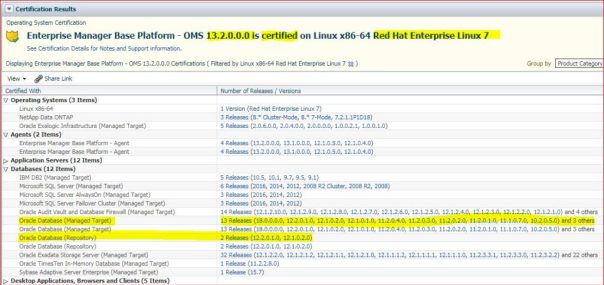
Enterprise Manager Base Platform - OMS 13.2.0.0.0 is certified on Linux x86-64 Red Hat Enterprise Linux 7. 3. Download Software 3.1 Oracle Enterprise Manager Cloud Control 13c Release 2 (13.2.0.0) 3. Download Software 3.1 Oracle Enterprise Manager Cloud Control 13c Release 2 (13.2.0.0)
Step 3

Code/Command (click line numbers to comment):

1
2
3
Enterprise Manager Base Platform - OMS 13.2.0.0.0 is certified on Linux x86-64 Red Hat Enterprise Linux 7.

https://www.oracle.com/enterprise-manager/downloads/linux-x86-64-13c-rel2-downloads.html
4

Section 4

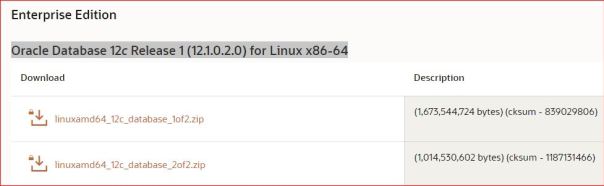
https://www.oracle.com/enterprise-manager/downloads/linux-x86-64-13c-rel2-downloads.html 3.2 Oracle Database 12c Release 1 (12.1.0.2.0) for Linux x86-64 https://www.oracle.com/database/technologies/database12c-linux-downloads.html 3.3 DB Template 12.1.0.2 for EM 13.2.0.0 on Linux x86-64 (This is NOT Mandatory)
Step 4

Code/Command (click line numbers to comment):

1
https://www.oracle.com/database/technologies/database12c-linux-downloads.html
5

Section 5

https://www.oracle.com/enterprise-manager/downloads/db-templates-13c-release2-downloads.html There are two templates available. In this article I will be using non-CDB architecture, but there is one for the Multitenant architecture also, however there won't be any CDB Repository Database. 4. Install Oracle 12.1.0.2 software only 4.1 Oracle Installation Prerequisites
Step 5

Code/Command (click line numbers to comment):

1
2
3
4
5
6
https://www.oracle.com/enterprise-manager/downloads/db-templates-13c-release2-downloads.html
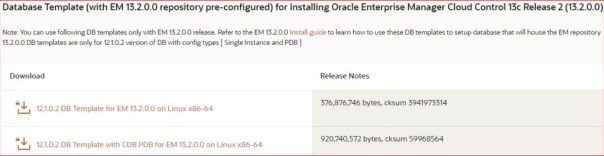
Database Template (with EM 13.2.0.0 repository pre-configured) for Installing Oracle Enterprise Manager Cloud Control 13c Release 2 (13.2.0.0)
There are two templates available. In this article I will be using non-CDB architecture, but there is one for the Multitenant architecture also, however there won't be any CDB Repository Database.
12.1.0.2 DB Template for EM 13.2.0.0 on Linux x86-64
(OR)
12.1.0.2 DB Template with CDB PDB for EM 13.2.0.0 on Linux x86-64
6

Section 6

# yum install oracle-rdbms-server-12cR1-preinstall -y 4.2 Set the password for the “oracle” user 4.3 Set SELINUX to permissive

Code/Command (click line numbers to comment):

1
2
3
4
5
6
7
8
9
10
# yum install oracle-rdbms-server-12cR1-preinstall -y

[root@rac1 ~]#
passwd oracle
Changing password for user oracle.
New password:
BAD PASSWORD: The password is shorter than 8 characters
Retype new password:
passwd: all authentication tokens updated successfully.
[root@rac1 ~]#
7

Section 7

4.3 Set SELINUX to permissive cat /etc/selinux/config | grep -i "SELINUXTYPE=targeted" SELINUXTYPE=targeted 4.4 Disable Firewall

Code/Command (click line numbers to comment):

1
2
3
4
5
6
7
8
9
10
11
12
13
14
15
16
17
18
19
20
21
22
23
24
25
26
27
28
29
30
31
32
33
34
[root@rac1 ~]#
cat /etc/selinux/config | grep -i "SELINUXTYPE=targeted"
SELINUXTYPE=targeted
[root@rac1 ~]#

[root@rac1 ~]#
systemctl status firewalld
firewalld.service - firewalld - dynamic firewall daemon
   Loaded: loaded (/usr/lib/systemd/system/firewalld.service; disabled; vendor preset: enabled)
Active: active (running) since Wed 2019-09-18 00:17:12 +08; 2s ago
Docs: man:firewalld(1)
 Main PID: 8252 (firewalld)
   CGroup: /system.slice/firewalld.service
           ââ8252 /usr/bin/python -Es /usr/sbin/firewalld --nofork --nopid

Sep 18 00:17:11 rac1 systemd[1]: Starting firewalld - dynamic firewall daemon...
Sep 18 00:17:12 rac1 systemd[1]: Started firewalld - dynamic firewall daemon.
[root@rac1 ~]#
[root@rac1 ~]#
systemctl stop firewalld
[root@rac1 ~]#
systemctl disable firewalld
[root@rac1 ~]#
systemctl status firewalld
firewalld.service - firewalld - dynamic firewall daemon
   Loaded: loaded (/usr/lib/systemd/system/firewalld.service; disabled; vendor preset: enabled)
Active: inactive (dead)
Docs: man:firewalld(1)

Sep 18 00:17:11 rac1 systemd[1]: Starting firewalld - dynamic firewall daemon...
Sep 18 00:17:12 rac1 systemd[1]: Started firewalld - dynamic firewall daemon.
Sep 18 00:17:40 rac1 systemd[1]: Stopping firewalld - dynamic firewall daemon...
Sep 18 00:17:40 rac1 systemd[1]: Stopped firewalld - dynamic firewall daemon.
[root@rac1 ~]#
8

Section 8

systemctl status firewalld Active: active (running) since Wed 2019-09-18 00:17:12 +08; 2s ago systemctl stop firewalld systemctl disable firewalld Active: inactive (dead)
9

Section 9

4.5 Create the directories mkdir -p /u01/app/oracle/product/12.1.0.2/db_1 chown -R oracle:oinstall /u01 chmod -R 775 /u01

Code/Command (click line numbers to comment):

1
2
3
4
5
6
7
[root@rac1 ~]#
mkdir -p /u01/app/oracle/product/12.1.0.2/db_1
[root@rac1 ~]#
chown -R oracle:oinstall /u01
[root@rac1 ~]#
chmod -R 775 /u01
[root@rac1 ~]#
10

Section 10

4.6 Unzip Database Files unzip linuxamd64_12102_database_1of2.zip unzip linuxamd64_12102_database_2of2.zip 4.7 Install Database software only 12.1.0.2

Code/Command (click line numbers to comment):

1
2
3
4
[oracle@rac1 backup]$
unzip linuxamd64_12102_database_1of2.zip
[oracle@rac1 backup]$
unzip linuxamd64_12102_database_2of2.zip
11

Section 11

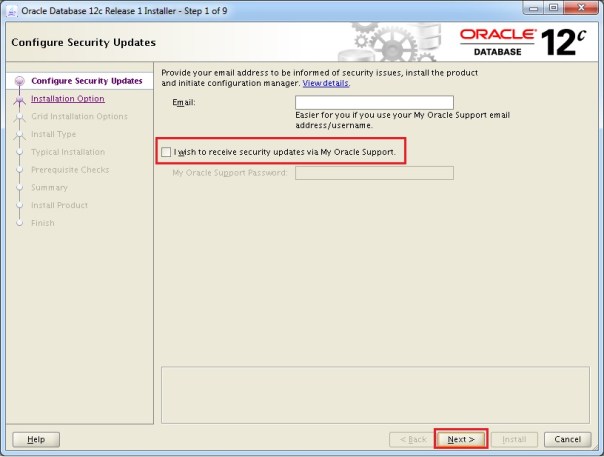
4.7 Install Database software only 12.1.0.2 cd database -rwxr-xr-x. 1 oracle oinstall 8533 Jul 7 2014 runInstaller <---- ./runInstaller 5. Unzip Database Template (This is NOT Mandatory, without this template you can create database)
Step 11

Code/Command (click line numbers to comment):

1
2
3
4
5
6
7
8
9
10
11
12
13
14
15
16
17
18
19
20
21
22
23
24
25
26
[oracle@rac1 backup]$
cd database
[oracle@rac1 database]$ pwd
/u01/app/backup/database
[oracle@rac1 database]$
ls -ltr
total 24
-rwxr-xr-x.  1 oracle oinstall  500 Feb  7  2013 welcome.html
-rwxr-xr-x.  1 oracle oinstall 8533 Jul  7  2014 runInstaller <----
drwxr-xr-x.  2 oracle oinstall   34 Jul  7  2014 rpm
drwxrwxr-x.  2 oracle oinstall   29 Jul  7  2014 sshsetup
drwxrwxr-x.  2 oracle oinstall   61 Jul  7  2014 response
drwxr-xr-x. 14 oracle oinstall 4096 Jul  7  2014 stage
drwxr-xr-x.  4 oracle oinstall 4096 Sep 18 00:27 install
[oracle@rac1 database]$

[oracle@rac1 database]$
export DISPLAY=192.168.2.2:0.0
[oracle@rac1 database]$
./runInstaller
Starting Oracle Universal Installer...

Checking Temp space: must be greater than 500 MB.   Actual 3568 MB    Passed
Checking swap space: must be greater than 150 MB.   Actual 4095 MB    Passed
Checking monitor: must be configured to display at least 256 colors.    Actual 16777216    Passed
Preparing to launch Oracle Universal Installer from /tmp/OraInstall2019-09-18_12-34-54AM. Please wait ...[oracle@rac1 database]$
12

Section 12

cd /u01/app/oracle/product/12.1.0.2/db_1/assistants/dbca/templates unzip /u01/app/backup/12.1.0.2.0_Database_Template_for_EM13_2_0_0_0_Linux_x64.zip 6. Create Repository DB 12.1.0.2
Step 12

Code/Command (click line numbers to comment):

1
2
3
4
5
6
7
8
9
10
11
12
13
14
15
16
17
18
19
20
21
22
23
24
25
26
27
28
29
30
31
32
33
34
35
36
37
38
39
40
41
42
43
44
45
46
47
48
49
50
51
52
53
54
55
[oracle@rac1 ~]$
cd /u01/app/oracle/product/12.1.0.2/db_1/assistants/dbca/templates
[oracle@rac1 templates]$
ls -ltr
total 679404
-rw-r--r--. 1 oracle oinstall     11000 Dec 23  2013 New_Database.dbt
-rw-r--r--. 1 oracle oinstall   2379776 Jul  7  2014 example.dmp
-rw-r--r--. 1 oracle oinstall  22339584 Jul  7  2014 example01.dfb
-rw-r--r--. 1 oracle oinstall 178683904 Jul  7  2014 sampleschema.dfb
-rw-r--r--. 1 oracle oinstall      5333 Jul  7  2014 sampleschema.xml
-rw-r--r--. 1 oracle oinstall 155189248 Jul  7  2014 pdbseed.dfb
-rw-r--r--. 1 oracle oinstall      4045 Jul  7  2014 pdbseed.xml
-rw-r--r--. 1 oracle oinstall 319102976 Jul  7  2014 Seed_Database.dfb
-rw-r--r--. 1 oracle oinstall  17973248 Jul  7  2014 Seed_Database.ctl
-rw-r--r--. 1 oracle oinstall      5028 Jul  7  2014 Data_Warehouse.dbc
-rw-r--r--. 1 oracle oinstall      4908 Jul  7  2014 General_Purpose.dbc
[oracle@rac1 templates]$
unzip /u01/app/backup/12.1.0.2.0_Database_Template_for_EM13_2_0_0_0_Linux_x64.zip
Archive:  /u01/app/backup/12.1.0.2.0_Database_Template_for_EM13_2_0_0_0_Linux_x64.zip
  inflating: set_repo_param_12.1.0.2.0_Database_SQL_for_EM13_2_0_0_0_Large_deployment.sql
  inflating: set_repo_param_12.1.0.2.0_Database_SQL_for_EM13_2_0_0_0_Medium_deployment.sql
  inflating: set_repo_param_12.1.0.2.0_Database_SQL_for_EM13_2_0_0_0_Small_deployment.sql
  inflating: shpool_12.1.0.2.0_Database_SQL_for_EM13_2_0_0_0.sql
  inflating: 12.1.0.2.0_Database_Template_for_EM13_2_0_0_0_Large_deployment.dbc
  inflating: 12.1.0.2.0_Database_Template_for_EM13_2_0_0_0_Medium_deployment.dbc
  inflating: 12.1.0.2.0_Database_Template_for_EM13_2_0_0_0_Small_deployment.dbc
  inflating: 12.1.0.2.0_Database_Template_for_EM13_2_0_0_0.dfb
  inflating: 12.1.0.2.0_Database_Template_for_EM13_2_0_0_0.ctl
[oracle@rac1 templates]$

[oracle@rac1 database]$
cd /u01/app/oracle/product/12.1.0.2/db_1/bin/
[oracle@rac1 bin]$
./dbca <-----
Connection Verification
[oracle@rac1 admin]$
sqlplus sys@OEMSTAR AS SYSDBA
SQL*Plus: Release 12.1.0.2.0 Production on Wed Sep 18 02:32:58 2019

Copyright (c) 1982, 2014, Oracle.  All rights reserved.
Enter password:
Connected to:
Oracle Database 12c Enterprise Edition Release 12.1.0.2.0 - 64bit Production
With the Partitioning, OLAP, Advanced Analytics and Real Application Testing options
SQL>

SQL>
alter user SYSMAN identified by SYSMAN_123;
User altered.

SQL>
alter user SYSMAN account unlock;
User altered.

SQL>
13

Section 13

cd /u01/app/oracle/product/12.1.0.2/db_1/bin/ ./dbca <----- Connection Verification alter user SYSMAN identified by SYSMAN_123; alter user SYSMAN account unlock; 7. Install EM Cloud Control 13c (13.2.0.0)
14

Section 14

7. Install EM Cloud Control 13c (13.2.0.0) No need to unzip the software. mkdir -p /u01/app/oracle/middleware mkdir -p /u01/app/oracle/agent em13200_linux64.bin
Step 14

Code/Command (click line numbers to comment):

1
2
3
4
5
6
7
8
9
10
11
12
13
14
15
16
17
18
19
20
21
22
23
24
25
26
27
28
29
30
31
32
33
34
35
36
37
38
39
40
No need to unzip the software.
[oracle@rac1 ~]$
mkdir -p /u01/app/oracle/middleware
[oracle@rac1 ~]$
mkdir -p /u01/app/oracle/agent
[oracle@rac1 backup]$
ls -ltr
total 7727644
-rwxrwxr-x. 1 oracle oinstall  474441637 Jun  3 12:15
em13200_linux64-6.zip
-rwxrwxr-x. 1 oracle oinstall  554607894 Jun  3 12:15
em13200_linux64.bin
-rwxrwxr-x. 1 oracle oinstall  553563556 Jun  3 12:16
em13200_linux64-3.zip
-rwxrwxr-x. 1 oracle oinstall 2118110455 Jun  3 12:31
em13200_linux64-2.zip
-rwxrwxr-x. 1 oracle oinstall 2084299941 Jun  3 12:31
em13200_linux64-4.zip
-rwxrwxr-x. 1 oracle oinstall 2128070240 Jun  3 12:32
em13200_linux64-5.zip
[oracle@rac1 backup]$


[oracle@rac1 backup]$
./em13200_linux64.bin
** The directory "/tmp" does not have enough space. At least 10241 MB of free space are required.
Please input another directory or [Exit]:
/u01/app/temp
0%.........................................................................100%
Launcher log file is /u01/app/temp/OraInstall2019-09-18_02-00-54AM/launcher2019-09-18_02-00-54AM.log.
Starting Oracle Universal Installer

Checking if CPU speed is above 300 MHz.   Actual 2603.810 MHz    Passed
Checking monitor: must be configured to display at least 256 colors.   Actual 16777216
Passed
Checking swap space: must be greater than 512 MB.   Actual 4095 MB
Passed
Checking if this platform requires a 64-bit JVM.   Actual 64
Passed
(64-bit not required)
15

Section 15

./em13200_linux64.bin ** The directory "/tmp" does not have enough space. At least 10241 MB of free space are required. Please input another directory or [Exit]: /u01/app/temp 8. Open Enterprise Manager Cloud Control https://rac1.rajasekhar.com:7803/em Caution: Your use of any information or materials on this website is entirely at your own risk. It is provided for educational purposes only. It has been tested internally, however, we do not guarantee that it will work for you. Ensure that you run it in your test environment before using.
Step 15

Code/Command (click line numbers to comment):

1
https://rac1.rajasekhar.com:7803/em
16

Section 16

Caution: Your use of any information or materials on this website is entirely at your own risk. It is provided for educational purposes only. It has been tested internally, however, we do not guarantee that it will work for you. Ensure that you run it in your test environment before using.

Comments (0)

Please to add comments

No comments yet. Be the first to comment!