DBA Hub

📋Steps in this guide1/15

Oracle Enterprise Manager Cloud Control 13c Release 3 (13.3.0.0) Installation on Oracle Linux 64 bit

Oracle Enterprise Manager Cloud Control 13c Release 3 (13.3.0.0) Installation on Oracle Linux 64 bit

oracle installationintermediate
by OracleDba
13 views
1

Overview

Oracle Enterprise Manager Cloud Control 13c Release 3 (13.3.0.0) Installation on Oracle Linux 64 bit 0. Overview
2

Section 2

0. Overview Oracle Enterprise Manager is a system management tool which provides an integrated solution for managing your heterogeneous environment. It combines a graphical console, agents, common services, and tools to provide an integrated, comprehensive systems management platform for managing Oracle products. 1. Environment Platform : Linuxx86_64, Linux 7 Server IP : 192.168.2.10 OEM Version : 13c Release 3 (13.3.0.0) OMS HOME : /u01/app/oracle/middleware Agent HOME : /u01/app/oracle/agent DB ORACLE_HOME : /u01/app/oracle/product/19.0.0/dbhome_1 Repository DB Name : OEMSTAR Repository DB Version : 19.3.0.0.0 OMS Binary Owner : oracle:oinstall DB Binary Owner : oracle:oinstall

Code/Command (click line numbers to comment):

1
2
3
4
5
6
7
8
9
10
11
12
Oracle Enterprise Manager is a system management tool which provides an integrated solution for managing your heterogeneous environment. It combines a graphical console, agents, common services, and tools to provide an integrated, comprehensive systems management platform for managing Oracle products.

Platform   		: Linuxx86_64, Linux 7
Server IP 		: 192.168.2.10
OEM Version 		: 13c Release 3 (13.3.0.0)
OMS HOME		: /u01/app/oracle/middleware
Agent HOME 		: /u01/app/oracle/agent
DB ORACLE_HOME		: /u01/app/oracle/product/19.0.0/dbhome_1
Repository DB Name 	: OEMSTAR
Repository DB Version 	: 19.3.0.0.0
OMS Binary Owner 	: oracle:oinstall
DB Binary Owner		: oracle:oinstall
3

Section 3

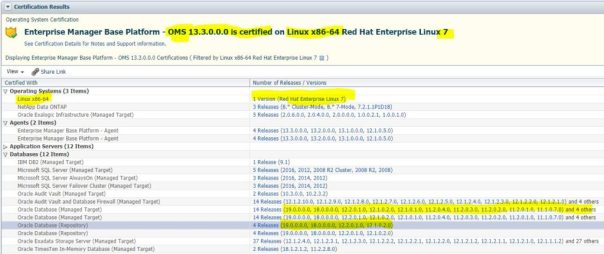
2. Verify Certification Enterprise Manager Base Platform - OMS 13.3.0.0.0 is certified on Linux x86-64 Red Hat Enterprise Linux 7 3. Download Software 3.1 Oracle Enterprise Manager Cloud Control 13c Release 3 (13.3.0.0) 3. Download Software
Step 3

Code/Command (click line numbers to comment):

1
Enterprise Manager Base Platform - OMS 13.3.0.0.0 is certified on Linux x86-64 Red Hat Enterprise Linux 7
4

Section 4

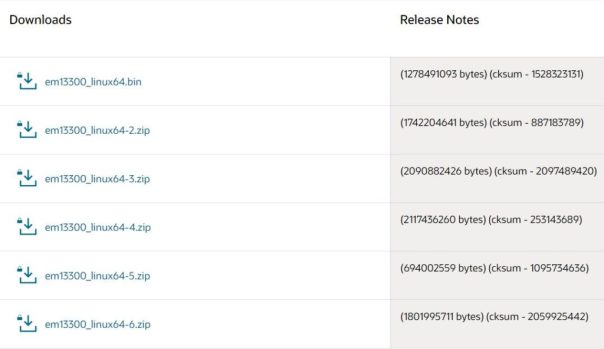
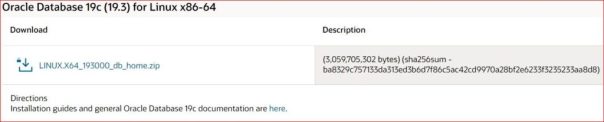
3.1 Oracle Enterprise Manager Cloud Control 13c Release 3 (13.3.0.0) https://www.oracle.com/enterprise-manager/downloads/linux-x86-64-13c-rel3-downloads.html 3.2 Oracle Database 19c (19.3) for Linux x86-64
Step 4

Code/Command (click line numbers to comment):

1
2
3
https://www.oracle.com/enterprise-manager/downloads/linux-x86-64-13c-rel3-downloads.html

https://www.oracle.com/database/technologies/oracle19c-linux-downloads.html
5

Section 5

https://www.oracle.com/database/technologies/oracle19c-linux-downloads.html 4. Install Oracle 19c Release 3 on Linux 7.5 Please find the sample doc below. http://www.br8dba.com/install-19c/
Step 5

Code/Command (click line numbers to comment):

1
2
Please find the sample doc below.
http://www.br8dba.com/install-19c/
6

Section 6

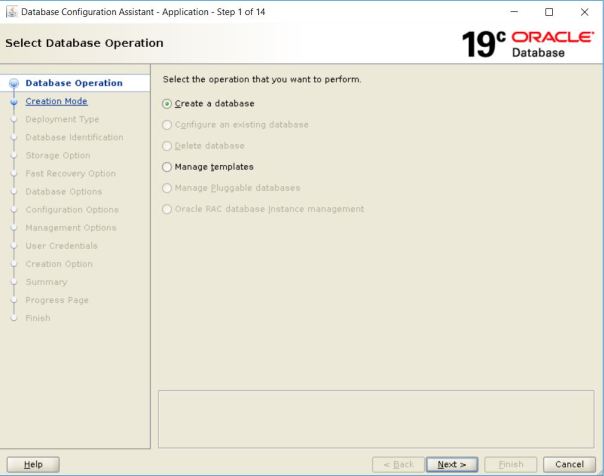
5. Create Repository Database 19.3 ./dbca -- Connection Verification sqlplus sys@OEMSTAR as sysdba
Step 6

Code/Command (click line numbers to comment):

1
2
3
4
5
6
7
8
9
10
11
12
13
14
15
16
17
18
19
20
21
22
23
24
25
26
27
28
29
30
31
32
33
34
35
36
37
38
39
40
41
42
43
44
45
46
47
48
49
50
51
52
53
54
55
56
57
58
59
60
61
62
63
64
65
66
67
68
69
70
71
72
73
74
75
76
77
78
79
80
81
82
[oracle@rac1 database]$
cd /u01/app/oracle/product/19.0.0/dbhome_1/bin/
[oracle@rac1 bin]$
./dbca
-- Connection Verification
[oracle@oem ~]$
sqlplus sys@OEMSTAR as sysdba
Copyright (c) 1982, 2019, Oracle.  All rights reserved.

Enter password:

Connected to:
Oracle Database 19c Enterprise Edition Release 19.0.0.0.0 - Production
Version 19.3.0.0.0

SQL>

Recommended parameter changes for 19c repository database.

SQL> select name,open_mode from v$database;

NAME      OPEN_MODE
--------- --------------------
OEMSTAR   READ WRITE

SQL>
SQL> alter system set "_allow_insert_with_update_check"=true scope=both;
System altered.
SQL> alter system set session_cached_cursors=200 scope=spfile;
System altered.
SQL> alter system set shared_pool_size=600M scope=spfile;
System altered.
SQL> alter system set processes=600 scope=spfile;
System altered.
SQL>
SQL> shut immediate;
Database closed.
Database dismounted.
ORACLE instance shut down.
SQL> startup;
ORACLE instance started.

Total System Global Area 2432695144 bytes
Fixed Size                  8899432 bytes
Variable Size             536870912 bytes
Database Buffers         1879048192 bytes
Redo Buffers                7876608 bytes
Database mounted.
Database opened.
SQL> 

SQL> show parameter session_cached_cursors

NAME                                 TYPE        VALUE
------------------------------------ ----------- ------------------------------
session_cached_cursors
integer
200
SQL>
SQL> show parameter "
_allow_insert_with_update_check
"

NAME                                 TYPE        VALUE
------------------------------------ ----------- ------------------------------
_allow_insert_with_update_check      boolean
TRUE
SQL>
SQL> show parameter
shared_pool_size
NAME                                 TYPE        VALUE
------------------------------------ ----------- ------------------------------
shared_pool_size                     big integer
608M
SQL>
SQL> show parameter processes

NAME                                 TYPE        VALUE
------------------------------------ ----------- ------------------------------
processes                            integer
600
SQL>
7

Section 7

SQL> alter system set "_allow_insert_with_update_check"=true scope=both; System altered. SQL> alter system set session_cached_cursors=200 scope=spfile; System altered. SQL> alter system set shared_pool_size=600M scope=spfile; System altered. SQL> alter system set processes=600 scope=spfile; System altered. SQL> session_cached_cursors 200 _allow_insert_with_update_check TRUE shared_pool_size
8

Section 8

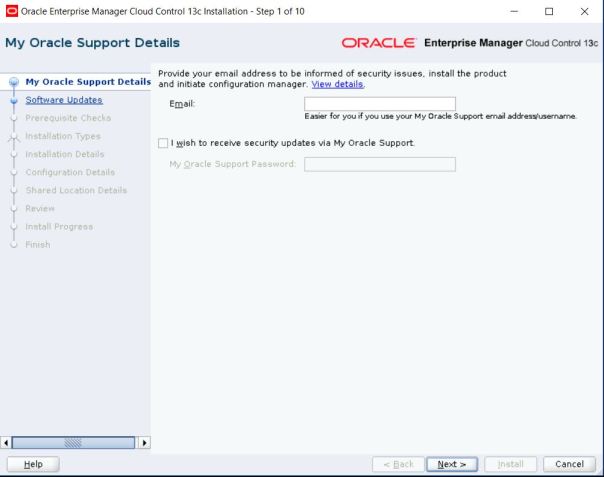
608M 600 6. Install EM Cloud Control 13c Release 3 (13.3.0.0) No need to unzip the software.
Step 8

Code/Command (click line numbers to comment):

1
2
3
4
5
6
7
8
9
10
11
12
13
14
15
16
17
18
19
20
21
22
23
24
25
26
27
28
No need to unzip the software.
[oracle@rac1 ~]$
mkdir -p /u01/app/oracle/middleware
[oracle@rac1 ~]$
mkdir -p /u01/app/oracle/agent
[oracle@rac1 backup]$ ls -ltr
-rw-r--r--. 1 oracle oinstall  694002559 Jul 10 19:13
em13300_linux64-5.zip
-rwxr--r--. 1 oracle oinstall 1278491093 Jul 10 19:15
em13300_linux64.bin
-rw-r--r--. 1 oracle oinstall 1742204641 Jul 10 19:17
em13300_linux64-2.zip
-rw-r--r--. 1 oracle oinstall 1801995711 Jul 10 19:17
em13300_linux64-6.zip
-rw-r--r--. 1 oracle oinstall 2090882426 Jul 10 19:18
em13300_linux64-3.zip
-rw-r--r--. 1 oracle oinstall 2117436260 Jul 10 19:18
em13300_linux64-4.zip
[oracle@rac1 backup]$


[oracle@rac1 backup]$
./em13300_linux64.bin
** The directory "/tmp" does not have enough space. At least 12289 MB of free space are required.
Please input another directory or [Exit]:
/u01/app/oracle/backup
0%.........................................................................100%
Starting Oracle Universal Installer
9

Section 9

mkdir -p /u01/app/oracle/middleware mkdir -p /u01/app/oracle/agent ./em13300_linux64.bin 0%.........................................................................100% Starting Oracle Universal Installer 7. Open Enterprise Manager Cloud Control
10

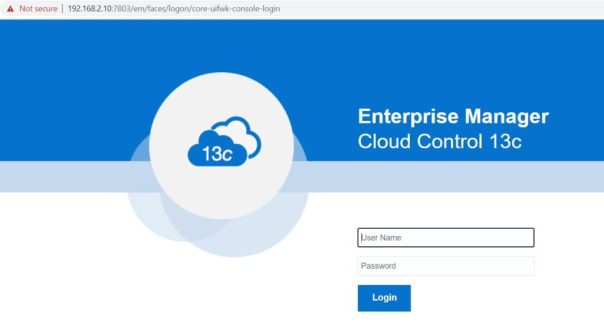
Section 10

https://oem.rajasekhar.com:7803/em 8. Stop EM Cloud Control 13c export OMS_HOME=/u01/app/oracle/middleware
Step 10

Code/Command (click line numbers to comment):

1
2
3
4
5
6
7
8
9
10
11
12
13
14
15
16
17
18
19
20
21
22
23
24
25
26
27
28
29
30
31
32
33
34
35
36
37
38
39
40
41
42
43
44
45
46
47
48
49
50
51
52
53
54
55
56
57
58
59
60
61
62
63
64
65
66
67
68
69
70
71
72
73
74
75
76
77
78
79
https://oem.rajasekhar.com:7803/em

#Stop OMS
[oracle@oem ~]$
export OMS_HOME=/u01/app/oracle/middleware
[oracle@oem ~]$
/u01/app/oracle/middleware/bin/emctl stop oms -all
Oracle Enterprise Manager Cloud Control 13c Release 3
Copyright (c) 1996, 2018 Oracle Corporation.  All rights reserved.
Stopping Oracle Management Server...
WebTier Successfully Stopped
Oracle Management Server Successfully Stopped
Oracle Management Server is Down
JVMD Engine is Down
BI Publisher is disabled, to enable BI Publisher on this host, use the 'emctl config oms -enable_bip' command
Stopping BI Publisher Server...
BI Publisher Server Already Stopped
BI Publisher is disabled, to enable BI Publisher on this host, use the 'emctl config oms -enable_bip' command
AdminServer Successfully Stopped
BI Publisher Server is Down
BI Publisher is disabled, to enable BI Publisher on this host, use the 'emctl config oms -enable_bip' command
[oracle@oem ~]$
#Stop Agent
[oracle@oem ~]$
export AGENT_HOME=/u01/app/oracle/agent/agent_inst
[oracle@oem ~]$
/u01/app/oracle/agent/agent_inst/bin/emctl stop agent
Oracle Enterprise Manager Cloud Control 13c Release 3
Copyright (c) 1996, 2018 Oracle Corporation.  All rights reserved.
Stopping agent ... stopped.
[oracle@oem ~]$
# Stop Database
[oracle@oem ~]$
. oraenv
ORACLE_SID = [
oemstar
] ?
The Oracle base remains unchanged with value /u01/app/oracle
[oracle@oem ~]$
sqlplus / as sysdba
SQL*Plus: Release 19.0.0.0.0 - Production on Sat Jul 11 21:23:46 2020
Version 19.3.0.0.0

Copyright (c) 1982, 2019, Oracle.  All rights reserved.


Connected to:
Oracle Database 19c Enterprise Edition Release 19.0.0.0.0 - Production
Version 19.3.0.0.0

SQL>
select name,open_mode from v$database;
NAME      OPEN_MODE
--------- --------------------
OEMSTAR   READ WRITE

SQL>
shut immediate;
Database closed.
Database dismounted.
ORACLE instance shut down.
SQL>

[oracle@oem ~]$
ps -ef | grep tns
root        22     2  0 19:55 ?        00:00:00 [netns]
oracle    5025  9474  0 21:24 pts/0    00:00:00 grep --color=auto tns
oracle   20522     1  0 20:48 ?        00:00:00 /u01/app/oracle/product/19.0.0/dbhome_1/bin/tnslsnr OEMSTAR -inherit
[oracle@oem ~]$
[oracle@oem ~]$
lsnrctl stop OEMSTAR
LSNRCTL for Linux: Version 19.0.0.0.0 - Production on 11-JUL-2020 21:25:08

Copyright (c) 1991, 2019, Oracle.  All rights reserved.

Connecting to (DESCRIPTION=(ADDRESS=(PROTOCOL=TCP)(HOST=oem.rajasekhar.com)(PORT=1522)))
The command completed successfully
[oracle@oem ~]$
[oracle@oem ~]$
11

Section 11

/u01/app/oracle/middleware/bin/emctl stop oms -all #Stop Agent export AGENT_HOME=/u01/app/oracle/agent/agent_inst /u01/app/oracle/agent/agent_inst/bin/emctl stop agent # Stop Database . oraenv
12

Section 12

oemstar sqlplus / as sysdba select name,open_mode from v$database; shut immediate; ps -ef | grep tns lsnrctl stop OEMSTAR
13

Section 13

9. Start EM Cloud Control 13c # Start Database startup; lsnrctl start OEMSTAR

Code/Command (click line numbers to comment):

1
2
3
4
5
6
7
8
9
10
11
12
13
14
15
16
17
18
19
20
21
22
23
24
25
26
27
28
29
30
31
32
33
34
35
36
37
38
39
40
41
42
43
44
45
46
47
48
49
50
51
52
53
54
55
56
57
58
59
60
61
62
63
64
65
66
67
68
69
70
71
72
73
74
75
76
77
78
79
80
81
82
# Start Database
[oracle@oem ~]$
. oraenv
ORACLE_SID = [oracle] ?
oemstar
The Oracle base has been set to /u01/app/oracle
[oracle@oem ~]$ sqlplus

SQL*Plus: Release 19.0.0.0.0 - Production on Sat Jul 11 20:17:38 2020
Version 19.3.0.0.0

Copyright (c) 1982, 2019, Oracle.  All rights reserved.

Enter user-name: / as sysdba
Connected to an idle instance.

SQL>
startup;
ORACLE instance started.

Total System Global Area 2432695144 bytes
Fixed Size                  8899432 bytes
Variable Size            1090519040 bytes
Database Buffers         1325400064 bytes
Redo Buffers                7876608 bytes
Database mounted.
Database opened.
SQL>

[oracle@oem ~]$
lsnrctl start OEMSTAR
[oracle@oem ~]$
lsnrctl status OEMSTAR
LSNRCTL for Linux: Version 19.0.0.0.0 - Production on 11-JUL-2020 20:48:59

Copyright (c) 1991, 2019, Oracle.  All rights reserved.

Connecting to (DESCRIPTION=(ADDRESS=(PROTOCOL=TCP)(HOST=oem.rajasekhar.com)(PORT=1522)))
STATUS of the LISTENER
------------------------
Alias                     OEMSTAR
Version                   TNSLSNR for Linux: Version 19.0.0.0.0 - Production
Start Date                11-JUL-2020 20:48:21
Uptime                    0 days 0 hr. 0 min. 38 sec
Trace Level               off
Security                  ON: Local OS Authentication
SNMP                      OFF
Listener Parameter File   /u01/app/oracle/product/19.0.0/dbhome_1/network/admin/listener.ora
Listener Log File         /u01/app/oracle/diag/tnslsnr/oem/oemstar/alert/log.xml
Listening Endpoints Summary...
  (DESCRIPTION=(ADDRESS=(PROTOCOL=tcp)(HOST=oem.rajasekhar.com)(PORT=1522)))
  (DESCRIPTION=(ADDRESS=(PROTOCOL=ipc)(KEY=EXTPROC1522)))
Services Summary...
Service "
oemstar
.rajasekhar.com" has 1 instance(s).
  Instance "oemstar", status READY, has 1 handler(s) for this service...
Service "oemstarXDB.rajasekhar.com" has 1 instance(s).
  Instance "oemstar", status READY, has 1 handler(s) for this service...
The command completed successfully
[oracle@oem ~]$
#Start OMS
[oracle@oem ~]$
export OMS_HOME=/u01/app/oracle/middleware
[oracle@oem ~]$
/u01/app/oracle/middleware/bin/emctl start oms
Oracle Enterprise Manager Cloud Control 13c Release 3
Copyright (c) 1996, 2018 Oracle Corporation.  All rights reserved.
Starting Oracle Management Server...
WebTier Successfully Started
Oracle Management Server Successfully Started
Oracle Management Server is Up
JVMD Engine is Up
[oracle@oem ~]$

#Start Agent
[oracle@oem ~]$
/u01/app/oracle/agent/agent_inst/bin/emctl start agent
Oracle Enterprise Manager Cloud Control 13c Release 3
Copyright (c) 1996, 2018 Oracle Corporation.  All rights reserved.
Starting agent ................................................................... started.
[oracle@oem ~]$
14

Section 14

#Start OMS export OMS_HOME=/u01/app/oracle/middleware /u01/app/oracle/middleware/bin/emctl start oms /u01/app/oracle/agent/agent_inst/bin/emctl start agent Caution: Your use of any information or materials on this website is entirely at your own risk. It is provided for educational purposes only. It has been tested internally, however, we do not guarantee that it will work for you. Ensure that you run it in your test environment before using. Caution:
15

Section 15

Your use of any information or materials on this website is entirely at your own risk. It is provided for educational purposes only. It has been tested internally, however, we do not guarantee that it will work for you. Ensure that you run it in your test environment before using.

Comments (0)

Please to add comments

No comments yet. Be the first to comment!