DBA Hub

📋Steps in this guide1/1

Oracle REST Data Services (ORDS) : Installation on Tomcat (Windows)

Install Oracle REST Data Services (ORDS) version 22.1 onward on Tomcat running on Windows.
oracle miscconfigurationintermediate
by OracleDba
33 views
1

ORDS Uninstall

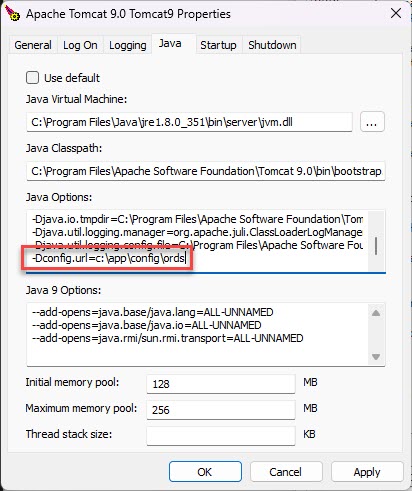
Oracle REST Data Services (ORDS), formerly known as the APEX Listener, allows APEX applications to be deployed without the use of Oracle HTTP Server (OHS) and mod_plsql or the Embedded PL/SQL Gateway . ORDS version 3.0 onward also includes JSON API support to work in conjunction with the JSON support in the database . ORDS can be deployed on WebLogic, Tomcat or run in standalone mode. This article describes the installation of ORDS on Tomcat 9 running on Windows. - Prerequisites - Multitenant : CDB or PDB Installation - ORDS Installation - Tomcat Deployment - Starting/Stopping ORDS Under Tomcat - ORDS Repair - ORDS Uninstall Related articles. - Oracle REST Data Services (ORDS) Articles We need the Java and Tomcat software installed on the server before we can proceed. Java: - Down load Java SE 17 from here . We used the "Windows x64 MSI Installer". It's OK to use the Oracle JDK, as it is being used to run an official Oracle product (ORDS), so you don't need to pay support for Java. - Install it by double-clicking and accepting the defaults. Tomcat: - Download the Tomcat 9 software from here . We used the "32-bit/64-bit Windows Service Installer", so Tomcat would run as a Windows Service. - Install it by double-clicking and filling in the details when prompted. Remember to select the Java 17 installation as your Java home. We will also need the ORDS and APEX software. This article will assume it is in our "%USERPROFILE%\Downloads" directory. - ORDS Download - APEX Download When using the multitenant architecture there are several options for how to install ORDS. For this article we are going to install ORDS into the PDB. This is preferable for Lone-PDB installations (a CDB with one PDB), or for CDBs with small numbers of PDBs If you are using many PDBs per CDB, you may prefer to install ORDS into the CDB. You can read more about the CDB installation options here . Check the SYS user (or an alternative SYSDBA user) and common public users are unlocked. Remember to lock the SYS user when the installation is complete. Change the passwords as required. All commands are run with the command prompt unless otherwise stated. Make a directory for the ORDS software. Unzip the ORDS software into the directory. Make a config directory for ORDS, with a logs subdirectory. Install ORDS. Amend the environment variables as required, and enter the SYSDBA and ORDS_PUBLIC_USER passwords when prompted. Add the ORDS "bin" directory to your path permanently, and in the current session. Unzip the APEX software. Copy the APEX images to the Tomcat "webapps\i" directory. Copy the "ords.war" file to the Tomcat "webapps" directory. The environment variable must include a reference to the "-Dconfig.url" flag, to tell ORDS where to find the ORDS configuration. Some references suggest you may need to use the environment variable instead of environment variable. This can be done in one of two ways. We could create a system variable with the following details, but that would affect any java processes on the server. Alternatively we could run the following program. Then add the variable value to the "Java Options" on the "Java" tab. After restarting Tomcat (see below) ORDS should now be accessible using the following type of URL. ORDS is started or stopped using the Windows service. We must be running the command prompt as the administrator. We can repair the current ORDS installation using the following command. ORDS is uninstalled using the following command. For more information see: - Oracle REST Data Services : Installation and Configuration Guide - Oracle REST Data Services Documentation Release - Oracle REST Data Services (ORDS) Articles Hope this helps. Regards Tim...
Step 1

Comments (0)

Please to add comments

No comments yet. Be the first to comment!