DBA Hub

📋Steps in this guide1/1

Oracle Universal Installer (OUI) Silent Installations

Use the Oracle Universal Installations (OUI) to create and use response files to automate the installation of Oracle products.
oracle miscconfigurationintermediate
by OracleDba
15 views
1

Using Response Files : 18c - Patching Installation Media (-applyRU and -applyOneOffs)

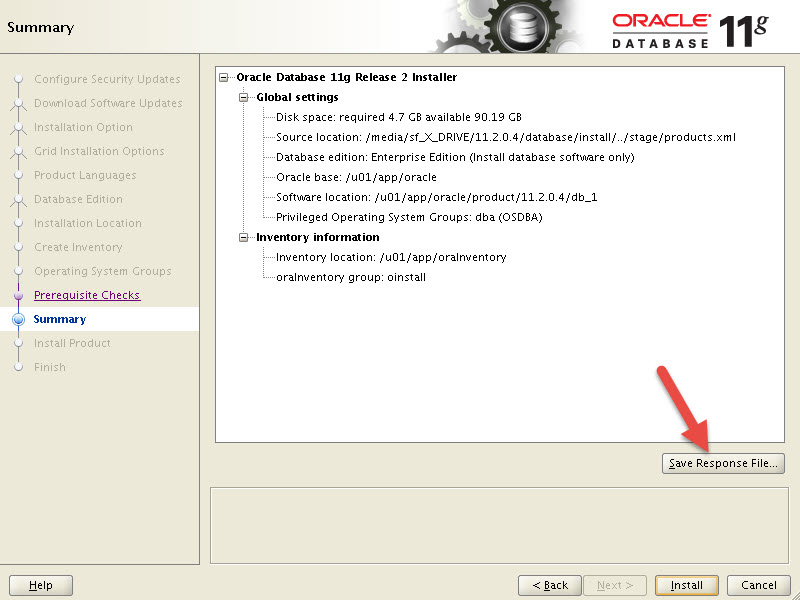
The Oracle Universal Installer (OUI) is a GUI tool requiring user input to define the type of installation to be performed. Alternatively, a response file can be used to provide all the required information for the installation, so no additional user input is required. The process of running silent installations is similar to using Kickstart for Linux installations. This article explains how to record a response file using the OUI. There are three ways of using a response file. - The Oracle installation media contains an example response file called "db_install.rsp" in the "response" directory. You can manually edit this file and use it for a silent installation. - Use the example response file from the media as is, and amend the necessary parameters on the command line. - The OUI allows you to record the selections made in the GUI screens, writing them to a response file. This response file, modified or not, can then be used to perform silent installations. If you are unsure how to manually amend a response file, this option is probably the easiest way to get started. Prior to Oracle 11gR2, to create a response file you would start the OUI with the following command and perform an installation as normal. The "-record" parameter tells the installer to write to the response file and the "-destinationFile" parameter defines the name and location of the response file. From 11gR2 onward the "-record" option is no longer supported. Instead, the final OUI screen before starting the installation always gives you the option of saving a response file. The response files are quite large, containing a large number of parameters and comments. The following files are examples of response files from different Oracle Database versions. A silent installation is initiated using the following command. The "-silent" parameter indicates that this is a silent installation and the "-responseFile" parameter defines the name and location of the response file. Some useful "runInstaller" flags include the following. The full list is available here . Once the installation completes you will be prompted to run the root scripts. Once the root scripts are run as instructed, the installation is complete. An alternative to amending a response file is to use the default response file from the media and alter the parameters inline. Here is an example of a 12cR1 installation using the default response file. The OS group name parameters were renamed in 12cR2 to include a prefix of "OS" and the parameter is now mandatory, as shown below. The "-ignoreSysPrereqs" and "-showProgress" parameters tell the installer to ignore any failed prerequisite checks and to show the installation process. The latter is very useful when scripting installations. Several parameter names have been simplified in Oracle AI Database 26ai, as shown below. Once the installation completes you will be prompted to run the root scripts. Once the root scripts are run as instructed, the installation is complete. From Oracle 18c onward things are a little different as the software is unzipped into the Oracle home, then the installer is run. Once the installation completes you will be prompted to run the root scripts. Once the root scripts are run as instructed, the installation is complete. Oracle 18c also introduced the concept of patching the installation media prior to installation or upgrades. The flag allows you to specify the location of a Release Update (RU), which is applied to the new before the installation takes place. This saves you from having to install then patch the software as separate steps. If we had a release update "10000000" unzipped in the "/u01/software" directory, we might do something like this. The flag is similar, but as the name suggests allows you to apply one-off patches. These can be combined with combined with release updates if needed. We can also specify multiple one-off patches as a comma-separated list. For the release update "10000000" with the one-off patches "10000001" and "10000002" we might do the following. This approach is also available for the Grid Infrastructure installation. For more information see: - Oracle : Silent Installation and Database Creation - Installing and Configuring Oracle Database Using Response Files Hope this helps. Regards Tim...
Step 1

Comments (0)

Please to add comments

No comments yet. Be the first to comment!