DBA Hub

📋Steps in this guide1/1

Real-Time Materialized Views in Oracle Database 12c Release 2 (12.2)

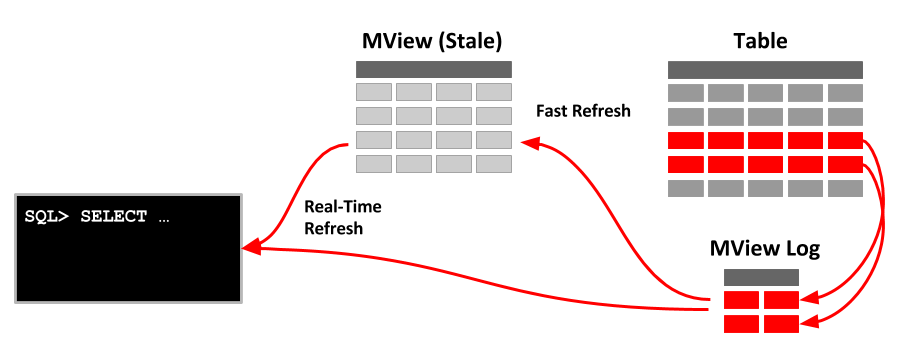
Oracle 12.2 introduced the concept of real-time materialized views, which allow a statement-level wind-forward of a stale materialised view, making the data appear fresh to the statement.

oracle 12cconfigurationintermediate
by OracleDba
15 views
1

Direct Query of Materialized View (FRESH_MV Hint)

- Introduction - Setup - Materialized View Logs - Materialized View - Basic Rewrite - Rewrite Plus Real-Time Refresh - Direct Query of Materialized View (FRESH_MV Hint) Related articles. - Real-Time Materialized Views - Materialized Views in Oracle Materialized views are a really useful performance feature, allowing you to pre-calcuate joins and aggregations, which can make applications and reports feel more responsive. The complication comes from the lag between the last refresh of the materialized view and subsequent DML changes to the base tables. Fast refreshes allow you to run refreshes more often, and in some cases you can make use of refreshes triggered on commit of changes to the base tables, but this can represent a significant overhead from a DML performance perspective. Oracle 12.2 introduced the concept of real-time materialized views, which allow a statement-level wind-forward of a stale materialised view, making the data appear fresh to the statement. This wind-forward is based on changes computed using materialized view logs, similar to a conventional fast refresh, but the operation only affect the current statement. The changes are not persisted in the materialized view, so a conventional refresh is still required at some point. The real-time materialized functionality has some restrictions associated with it including the following. - It is only available if the parameter is set to (the default) or . If the parameter is set to , Oracle will not wind forward the data in a stale materialized view. - This can't be used in conjunction with a materialized view using the option. - The materialized view must be capable of a fast refresh, so all the typical fast refresh restrictions apply here also. - The materialized view can't use database links. I don't think this is a problem as I see this as a solution for real-time reporting and dashboards, rather than part of a distributed environment. - The materialized view must use the option. - Queries making direct references to a materialized view will not use the real-time materialized view functionality by default. To use this functionality the query much use the hint. The rest of this article provides some simple examples of real-time materialized views. We need a table to act as the source of the materialized view. The following script creates and populates a test table with random data. For real-time materialized views to work we must have materialised view logs on all the tables the materialized view is based on. We can now create the materialized view. Notice the option, which is new to Oracle 12.2. As with previous versions of the database, if we run a query that could be serviced quicker by the materialized view, Oracle will rewrite the query to use the materialized view. We can see from the execution plan the materialized view was used, rather than accessing the base table. Notice the row count value of 95. We amend the data in the table, so the materialized view is now considered stale. A regular materialized view would no longer be considered for query rewrites unless we had the parameter set to for the session. Since we have the option on the materialized view it is still considered usable, as Oracle will dynamically amend the values to reflect the changes in the materialized view logs. We can see the row count is now 96 and the execution plan includes additional work to complete the wind-forward. In addition to the query rewrites, we also have the ability to query materialized views directly. When we do this we get the current contents of the materialized view by default. The hint tells Oracle we want to take advantage of the real-time functionality when doing a direct query against the materialized view, which is why we see a row count of 96 again. For more information see: - Using Real-time Materialized Views - Real-Time Materialized Views - Materialized Views in Oracle Hope this helps. Regards Tim...
Step 1

Comments (0)

Please to add comments

No comments yet. Be the first to comment!