DBA Hub

📋Steps in this guide1/13

Reclaiming Unused Space in Datafiles

This article shows several methods for reclaiming unused space from datafiles.
oracle miscconfigurationintermediate
by OracleDba
12 views
1

Setup Test Environment

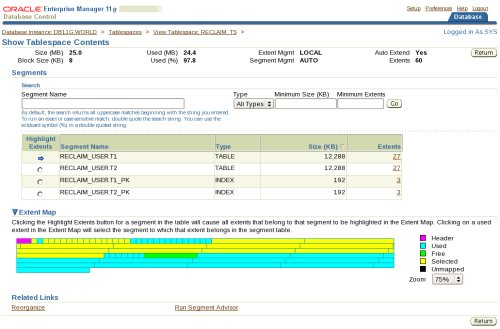
There are a number of scenarios that can lead to unused space in datafiles. The two most common I see are: - A lack of housekeeping/maintenance means that one or more tables have grown excessively. After the data is pruned the datafiles contain unused space that needs to be reclaimed. - One or more segments (tables, partitions or indexes) have been moved to another tablespace leaving empty areas in the datafiles that previously held them. In this article I will discuss a few of the ways of reclaiming this unused space. - Setup Test Environment - Identify Tablespaces with Free Space - Export/Import - Manual Tablespace Reorganization - Enterprise Manager Tablespace Reorganization - Shrink Bigfile Tablespaces (23ai) - Shrink? - Tablespaces with Multiple Datafiles - Undo Tablespace - Temp Tablespace - SYSAUX Tablespace I do not advise reorganizing tablespaces every time a bit of free space appears. In many cases the space will be used as segments in the tablespace continue to grow. I consider this type of action a one-off task when something significant has happened in the tablespace. Remember, reorganising a tablespace is a big structural change. You should *always* take backups before doing any structural changes to databases you care about. Before we can look at the solutions we need to create a test environment so we can clearly see the problem. Each of the solutions presented require that this setup is done first. We can see both table segments are made up of multiple extents, each extent being made up of multiple blocks. Enterprise Manager gives us a nice image of the contents of the tablespace by doing the following: - Click on the "Server" tab. - Click the "Tablespaces" link. - Select the "RECLAIM_TS" tablespace by clicking the radio button. - Select the "Show Tablespace Contents" action and click the "Go" button. - On the resulting page, expand the "Extent Map" section. The image below shows the extent map for the "RECLAIM_TS" tablespace. Clicking on a specific segment in the list, or an extent in the extent map, causes all extents for that segment to be highlighted yellow. From this point on I will ignore the rest of the page and just focus on the extent maps. Now truncate the "T1" table to simulate a maintenance operation. What we can see now is the "T1" table has a single extent (yellow) and there is lots of free space (green) in the centre of the tablespace.
Step 1
2

Setup Test Environment

The fact that the majority of the free space is before some of the "T2" extents means we can not shrink the size of the datafile to release the space. So this represents the starting point of our problem. We have free space we need to release from the datafile associated with our tablespace.
Step 2
3

Export/Import

Before working through any of the methods described below, recreate this situation. You can easily identify tablespaces with lots of free space using the ts_free_space.sql script. For tablespaces with autoextend enabled, the script calculates the maximum sizes and percentages based on maximum size the datafiles can grow to, but the "FREE_MB" column is based on the current file size, so use that figure for tablespaces with datafiles set to autoextend. If we switch off autoextend for the relevant datafile, the last four columns will look more representative. The export/import process looks like this: - Export the schema objects that are stored in the specific tablespace/datafile you want to resize. - Drop the exported objects. - Resize the datafiles. - Import the objects. - Perform any required maintenance, like grants etc. Although the process is simple, it may involve substantial downtime if the objects being dropped are large. The following shows how each of these stages is achieved. First, create a directory object for the export and import to work with. Export the objects in question. In this case we are doing the whole schema, but you may be able to get away with a subset of the objects if your schema is spread across several tablespaces. Drop the original objects and reduce the size of the datafile. Import the objects back into the schema. The tablespace map shows we have removed the large section of free space in the middle of the datafile associated with our tablespace.
Step 3
4

Manual Tablespace Reorganization

We can also see the size of the datafile has been reduced from 26M to 14M. In this example I truncated the first table, so my table segments did not contain much free space internally. If you have segments with lots of internal free space to clean up in addition to the unused space in the datafile, you may want to include the TRANFORM parameter in your import command. Using "TRANSFORM=SEGMENT_ATTRIBUTES:N" setting tells the import command to forget the physical attributes (including the storage clause) of the table when recreating it. Support for online segment move operations improve with every release. Depending on the database version you use, and the types of segments you are moving, you may be able to do this entirely as online operations. This method can take one of two forms. It you are happy to change the datafile name do the following: - Create a new tablespace. - Move the segments to the new tablespace. - Drop the original tablespace. - Rename the new tablespace to match the original name. * * As pointed out by Manfred Milhofer in the comments, some versions of the database are susceptible to an error if you rename a tablespace to a name that was used previously, as described in MOS Doc ID 604648.1 . If the tablespace must keep the same name, it might be better to drop and recreate the original and move everything back. If the datafile name must remain the same do the following: - Create a new tablespace. - Move the segments to the new tablespace. - Resize the original datafile. - Move the segments back to the original tablespace. - Drop the new tablespace. Obviously the second method requires much more work as all segments are being moved twice. The way to move segments depends on the type of segment being moved. Here are a few examples. Of course, the tables and their respective indexes could be moved using the Online Table Redefinition functionality. The following example performs a manual reorganization where the datafile name is not retained. Remember to recreate the test environment before starting this example. First, create a new tablespace to hold the objects. Move the objects to the new tablespace. Drop the original tablespace and rename the new one back to the original name. Once again, the tablespace map shows we have removed the large section of free space in the middle of the datafile associated with our tablespace.
Step 4
5

Enterprise Manager Tablespace Reorganization

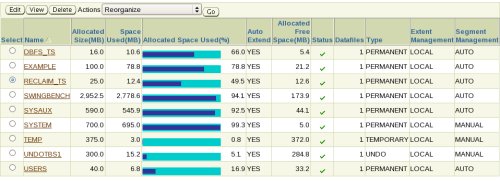
We can also see the size of the datafile has been reduced from 26M to 13M. In Oracle 12c Release 1 (12.1) you can move table partitions and sub-partitions online. In Oracle 12c Release 2 (12.2) you can move regular tables online. The manual tablespace reorganization method works well, but when you start dealing with lots of segments it can become a bit painful to script, especially if you start using the online table redefinition functionality. This is where Enterprise Manager comes to the rescue because it can perform all the hard work for you, allowing you to easily define a job to perform a tablespace reorganization. Starting at the "tablespaces" screen, select the "RECLAIM_TS" tablespace by clicking the radio group button next to it, select the "Reorganize" action and click the "Go" button.
Step 5
6

Enterprise Manager Tablespace Reorganization

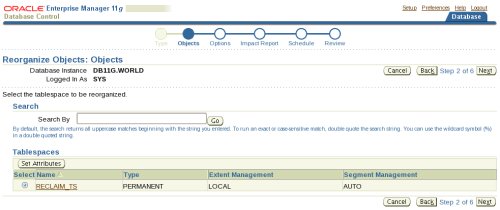
Accept the default object selection by clicking the "Next" button.
Step 6
7

Enterprise Manager Tablespace Reorganization

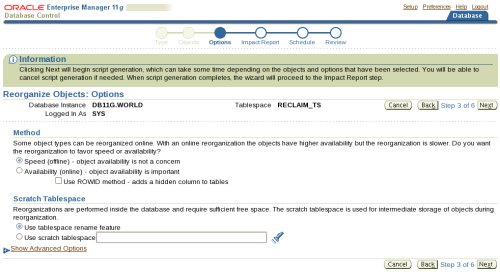
The options screen allows you to decide how the reorganization should take place. The "Method" section has two options: - Speed: This is an offline operation using MOVE for tables and REBUILD for indexes. Essentially this is the same as the Manual Tablespace Reorganization shown previously. - Availability: This is an online operation, making use of the online table redefinition functionality. The online table redefinition can be done based on the primary key of the table or the ROWID of the rows. The "Scratch Tablespace" section has two options which determine if the datafile name is preserved or not. - Use tablespace rename feature: As the name implies, this uses the first method described in the manual reorganization section. - Use scratch tablespace: This uses the second method described in the manual reorganization section. You must provide a existing scratch tablespace name to hold all the objects during the reorganaization. When you have picked the options you want, click the "Next" button.
Step 7
8

Enterprise Manager Tablespace Reorganization

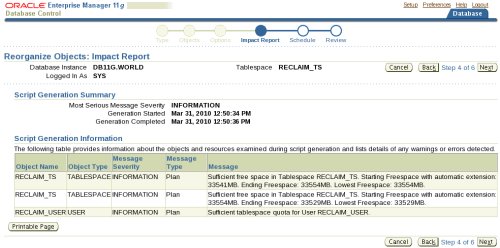
The resulting screen provides an impact report. If it includes any anticipated problems, you may need to move back and alter your options. When you are happy with the impact report, click the "Next" button.
Step 8
9

Enterprise Manager Tablespace Reorganization

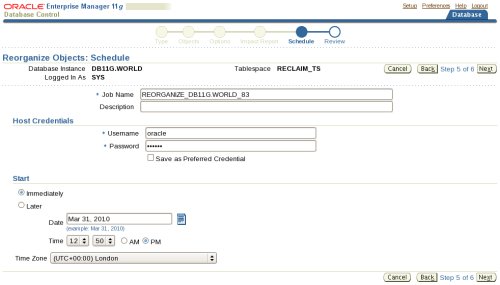
Enter the desired schedule information and click the "Next" button.
Step 9
10

Enterprise Manager Tablespace Reorganization

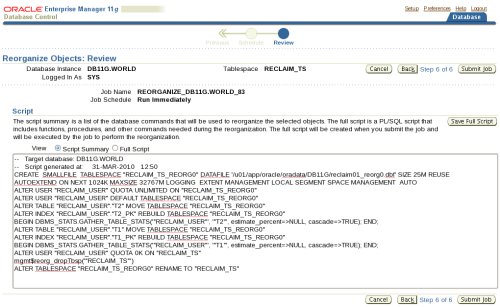
The review page includes the script that will be run by the job. If you are happy with the review information, click the "Submit Job" button.
Step 10
11

Enterprise Manager Tablespace Reorganization

After the job completes we can see the segments are now at the start of the tablespace map, allowing us to reduce the associated datafile size if we want. The reorganization process doesn't actually do the datafile resize for us, so the tablespace size is unchanged.
Step 11
12

Tablespaces with Multiple Datafiles

When using bigile tablespaces in Oracle database 23ai, the easiest way to reclaim free space is to use the procedure in the package. Unlike a conventional shrink, discussed below, this actually does move objects to the start of the datafile to free up unused space. - Bigfile Tablespace Shrink in Oracle Database 23ai If there is only a single object in the datafile, it's possible a online shrink operation will actually be enough to compact the data and free up the empty blocks, allowing the datafile to be resized to a smaller size. Remember, the shrink only compacts the data. It doesn't guarantee the blocks will be placed at the front of the datafile, so it's possible you will have blocks at the end of the datafile, which means the datafile can't be resized smaller. If this is the case you will need to use one of the methods mentioned previously. - ALTER TABLE ... SHRINK SPACE Command : Online Segment Shrink for Tables, LOBs and IOTs - online shrink operation So far I've conveniently side-stepped the issue of tablespaces with multiple datafiles. Why? Because it makes the tablespace extent map a little more confusing to look at. To see what I mean, perform the setup again, but this time before building the tables add an additional datafile to the tablespace. With the tables built, populated and the "T1" table truncated, the extent map will look something like this.
Step 12
13

SYSAUX Tablespace

The problem here is we can't tell what files the gaps are in without hovering over the gaps and reading the tool tip. That's not very simple when we have lots of files, segments and gaps to contend with. At this point I stop looking at the extent map and just use a script to identify all the gaps in the tablespace, or individual datafiles. The ts_extent_map.sql script produces a list of all the free space in the tablespace or individual datafile. The combined output and separate output for each datafile is shown below. This can help you make a judgment as to whether a tablespace reorganization is necessary. The simplest way to reclaim space from the undo tablespace is to create a new undo tablespace, make it the database undo tablespace and drop the old tablespace. In the following example I've used autoextend, but you may wish to remove this if you want manual control over the datafile size. Remember, flashback operations requiring undo will not be possible because you have deleted the retained undo. You may want to consider your parameter setting. If you are using oracle 11g, you can shrink a temporary tablespace using the command, as shown here . If you are using a database version prior to 11g, reducing the size of the temporary tablespace is similar to reclaiming space from the undo tablespace. Create a new temp tablespace, move the users on to it, then drop the old temp tablespace. The SYSAUX tablespace is similar to any other tablespace, so the techniques discussed in this article will work on the SYSAUX tablespace too. If you've moved some of the occupants to a new tablespace, you may want to reduce the size of the SYSAUX tablespace to recovery the room you've saved. Options include the following. - Online shrink of objects towards the end of the datafile may allow you to reduce the datafile size. - Move the SYSAUX objects with extents towards the end of the datafile to a temporary tablespace, reduce the datafile size and move them back. For more information see: Hope this helps. Regards Tim...
Step 13

Comments (0)

Please to add comments

No comments yet. Be the first to comment!