DBA Hub

📋Steps in this guide1/1

Service-Level Access Control Lists (ACLs) - Database Service Firewall in Oracle Database 12c Release 2 (12.2)

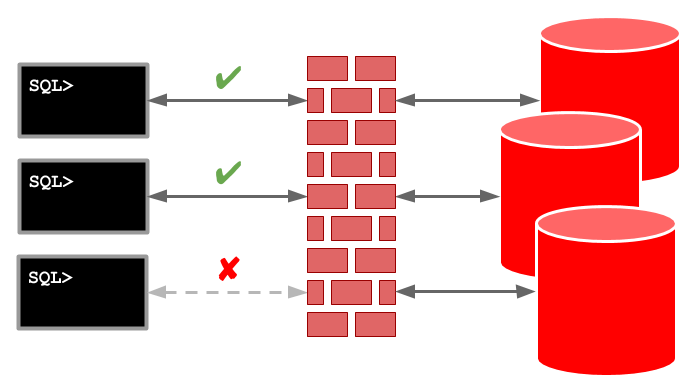
Service-Level Access Control Lists (ACLs) allow you to control access to specific services, including those associated with a pluggable database (PDB).

oracle 12cconfigurationintermediate
by OracleDba
12 views
1

PDB-Level Access Control Lists (ACLs)

Service-Level Access Control Lists (ACLs) allow you to control access to specific services, including those associated with individual pluggable databases (PDBs). This functionality is part of the Database Service Firewall, which isn't specifically a multitenant feature, but it is useful for controlling access to PDBs. - Setup - Service-Level Access Control Lists (ACLs) - PDB-Level Access Control Lists (ACLs) Related articles. - SQL Firewall in Oracle Database 23ai - Multitenant : All Articles The setting must be added to the "listener.ora" file. It should either specify a protocol and group or be set to "ON", which defaults to "IPC" and "oinstall". The attribute can be added to the listener endpoint to control the action of the database firewall. - Unset : If an ACL is present for the service it is enforced. If no ACL is present for the service, all connections are considered valid. - : Only connections matching an ACL are considered valid. All other connections are rejected. - : The firewall functionality is disabled, so all connections are considered valid. If we wanted to force the firewall functionality we might amend the default listener configuration as follows. Remember, the attribute is optional. The user owns the package, which provides an API to manage service-level access control lists (ACLs). We will be using this API in the following examples. Service-level ACLs can limit access to any named service handled by the listener, including those for a PDB. Create and start a test service. The procedure accepts a service name and a host parameter. The host parameter can be IPv4 or IPv6, and wildcards are allowed. Once the ACL is built it is saved using the procedure. The table holds all the saved ACLs, while the view lists the active ACLs. At the time of writing the view seems to have an issue such that the data doesn't respond correctly to the format command of SQL*Plus. With the ACL in place we can connect to the services from the database server, but not from any other machine. In the example below the SQL*Plus connections from the server works fine, but the SQLcl connections from a PC fails with a "IO Error: Undefined Error" error. We can add an entry for the PC to allow it to connect. The SQLcl connections from the PC now work as expected. The procedure is used to remove service-level ACL entries. The following removes all the service-level ACLs created for this example. We can stop and remove the test service using the following code. PDB-level ACLs allow us to manage access to all services for a PDB, rather than having to name them individually. Create and start a test service in the PDB. The procedure accepts a PDB name and a host parameter. The host parameter can be IPv4 or IPv6, and wildcards are allowed. Once the ACL is built it is saved using the procedure in the normal way. The table holds all the saved ACLs, while the view lists the active ACLs. With the ACL in place we can connect to the services from the database server, but not from any other machine. In the example below the SQL*Plus connections from the server works fine, but the SQLcl connections from a PC fails with a "IO Error: Undefined Error" error. We can add an entry for the PC to allow it to connect. The SQLcl connections from the PC now work as expected. The procedure is used to remove PDB-level ACL entries. The following removes all the PDB-level ACLs created for this example. We can stop and remove the test service using the following code. For more information see: - DBMS_SFW_ACL_ADMIN - SQL Firewall in Oracle Database 23ai - Multitenant : All Articles Hope this helps. Regards Tim...
Step 1

Comments (0)

Please to add comments

No comments yet. Be the first to comment!