DBA Hub

📋Steps in this guide1/4

Upgrade database from 12.1.0.2 to 12.2.0.1 DBACLASS

Upgrade database from 12.1.0.2 to 12.2.0.1. Upgrade from Oracle 12cR1 to 12CR2. This article includes both installation and upgrade steps with screenshots.

oracle clusteringintermediate
by OracleDba
11 views
1

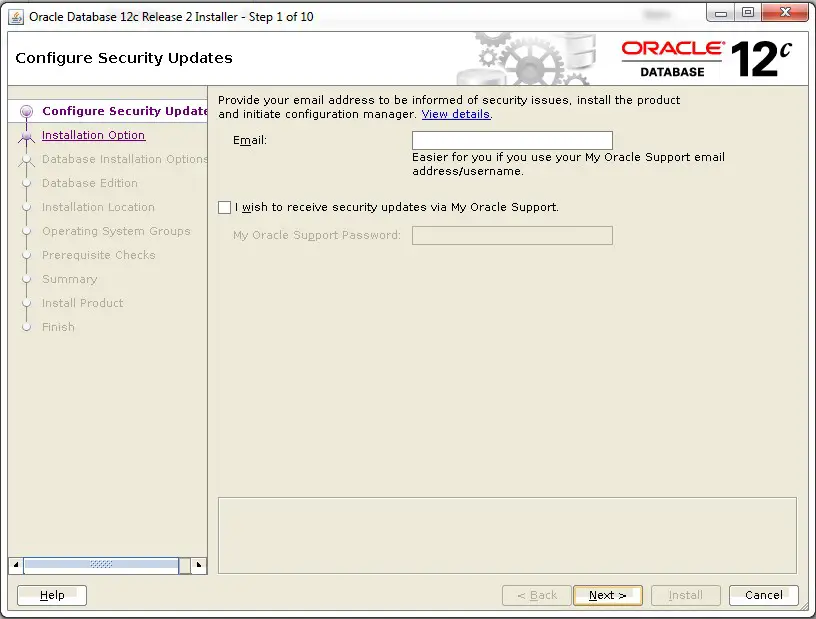
Here we will first Install  12.2. ORACLE_HOME and then upgrade the database TESTDB ( which is on 12.1.0.2 version)  to 12.2.0.1

INSTALLATION STEPS: NEW ORACLE_HOME – /oracle/app/oracle/product/12.2.0.1/dbhome-1
Step 1
2

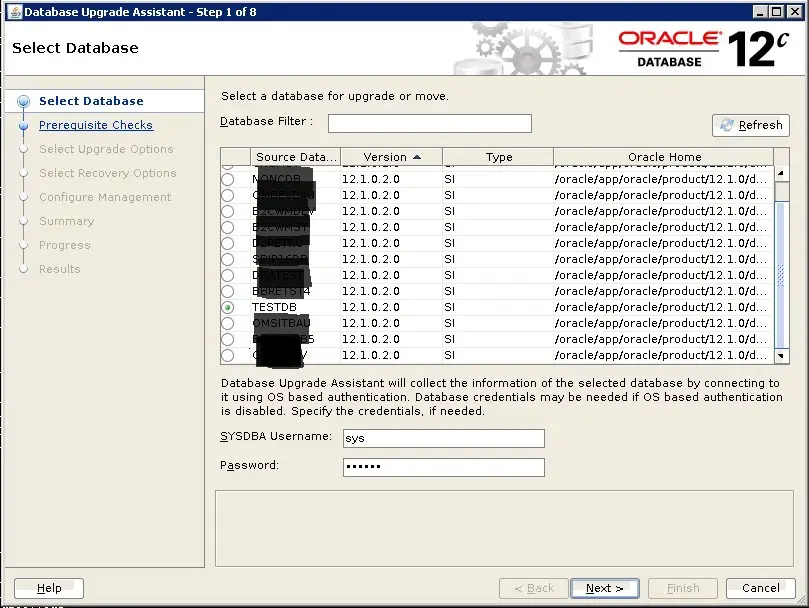
Now we will proceed with upgrade activity:

DBNAME  – TESTDB CURRENT ORACLE_HOME – /oracle/app/oracle/product/12.1.0/dbhome_1 NEW ORACLE_HOME – /oracle/app/oracle/product/12.2.0.1/dbhome-1
3

PRE-UPGRADE STEPS:

1. Run the preupgrade tool Preupgrade tool is available under new $ORACLE_HOME/rdbms/admin. ls -ltr /oracle/app/oracle/product/12.2.0.1/dbhome-1/rdbms/admin/preupgrade.jar SYNTAX $OLD_ORACLE_HOME/jdk/bin/java -jar $NEW_ORACLE_HOME/rdbms/admin/preupgrade.jar -FILE DIR $OS_DIRECTORY Run the preupgrade_fixups.sql file. Please take necessary again if any issues reported by the precheck script. 2. List down invalid objects present 3. Make sure source db in archivelog mode. 4. Enable flashback mode, to enable restore in case of any failure during upgrade . 5. Set environment variables to NEW ORACLE_HOME(12.2) export ORACLE_HOME=/oracle/app/oracle/product/12.2.0.1/dbhome-1 export PATH=$ORACLE_HOME/bin:$PATH export LD_LIBRARY_PATH=$ORACLE_HOME/lib 6. Run DBUA cd $ORACLE_HOME/bin ./dbua This screen has been changed, compare to previous dbua in 12.1.0.2 . 1. No option to control upgrade parallelism, DBUA pickup parallelism , according to system resource 2. No option to control utlrp.sql compliation parallelism thread. Select FLASHBACK OPTION, It will create a guaranteed restore point. We  have a PAUSE button here.  Let’s click and see if we can resume it later or not. Message shows, Executions will pause after Database Components Upgrade is completed. I.e PAUSE will not stop the upgrade process instantly, It will wait for the current phase to complete. So upgrade continued  until the Database components Upgrade completed. You can monitor the upgrade log at below location. As soon as database upgrade component completed upgrade  stopped due to PAUSE button we have used. Click on Continue to resume the upgrade . Upgrade has been completed successfully.
Step 3

Code/Command (click line numbers to comment):

1
2
3
4
5
6
7
8
9
10
11
12
13
14
15
16
17
18
19
20
21
22
23
24
25
26
27
28
29
30
31
32
33
34
35
36
37
38
39
40
41
42
43
44
45
46
47
48
49
50
51
52
53
54
55
56
57
58
59
60
61
62
63
64
65
66
67
68
69
70
71
72
73
74
75
76
77
78
79
80
81
82
83
84
85
86
87
88
89
90
91
92
93
94
95
96
97
98
99
100
101
102
103
104
105
106
107
108
109
110
111
112
113
114
115
116
117
118
119
120
121
122
123
124
125
126
127
128
129
130
131
132
133
134
135
136
137
138
139
140
141
142
143
144
145
146
147
148
149
150
151
152
153
154
155
156
157
158
159
160
161
162
163
164
165
166
167
168
169
170
171
172
173
174
175
176
177
178
179
180
181
182
183
184
185
186
187
188
189
190
191
192
193
194
195
196
197
198
199
200
201
202
203
204
205
206
207
208
209
210
211
212
213
214
215
216
217
218
219
220
221
222
/oracle/app/oracle/product/12.1.0/dbhome_1/jdk/bin/java -jar /oracle/app/oracle/product/12.2.0.1/dbhome-1/rdbms/admin/preupgrade.jar FILE DIR /export/home/oracle/UPG122
Preupgrade generated files:
    /export/home/oracle/UPG122/preupgrade.log
    /export/home/oracle/UPG122/preupgrade_fixups.sql
    /export/home/oracle/UPG122/postupgrade_fixups.sql

/export/home/oracle# cat /export/home/oracle/UPG122/preupgrade.log
Report generated by Oracle Database Pre-Upgrade Information Tool Version
12.2.0.1.0

Upgrade-To version: 12.2.0.1.0

=======================================
Status of the database prior to upgrade
=======================================

      Database Name:  TESTDB
     Container Name:  TESTDB
       Container ID:  0
            Version:  12.1.0.2.0
         Compatible:  12.1.0.2.0
          Blocksize:  8192
           Platform:  Solaris[tm] OE (64-bit)
      Timezone File:  18
  Database log mode:  ARCHIVELOG
           Readonly:  FALSE
            Edition:  EE

  Oracle Component                       Upgrade Action    Current Status
  ----------------                       --------------    --------------
  Oracle Server                          [to be upgraded]  VALID
  JServer JAVA Virtual Machine           [to be upgraded]  VALID
  Oracle XDK for Java                    [to be upgraded]  VALID
  Oracle Workspace Manager               [to be upgraded]  VALID
  Oracle XML Database                    [to be upgraded]  VALID
  Oracle Java Packages                   [to be upgraded]  VALID


==============
BEFORE UPGRADE
==============

  Run /preupgrade_fixups.sql to complete all
  of the BEFORE UPGRADE action items below marked with '(AUTOFIXUP)'.

  REQUIRED ACTIONS
  ================
   + Adjust TABLESPACE SIZES as needed.
                                                Auto      12.2.0.1.0
     Tablespace                        Size     Extend    Min Size    Action
     ----------                     ----------  --------  ----------  ------

     SYSAUX                             550 MB  DISABLED      500 MB  None
     SYSTEM                             700 MB  ENABLED      1017 MB  None
     TEMP                                20 MB  ENABLED       150 MB  None
     UNDOTBS1                           300 MB  ENABLED       400 MB  None

     Note that 12.2.0.1.0 minimum sizes are estimates.
     If you plan to upgrade multiple pluggable databases concurrently,
     then you must ensure that the UNDO tablespace size is equal to at least
     the number of pluggable databases that you upgrade concurrently,
     multiplied by that minimum.  Failing to allocate sufficient space can
     cause the upgrade to fail.


  INFORMATION ONLY
  ================
   + Ensure there is additional disk space in LOG_ARCHIVE_DEST_1 for at least
     2979 MB of archived logs.  Check alert log during the upgrade that there
     is no write error to the destination due to lack of disk space.  Execute
     'archive log list' and query v$archive_dest for more
     LOG_ARCHIVE_DEST_ destinations to check.

     Archiving cannot proceed if the archive log destination is full during
     upgrade.

     Archive Log Destination:
      Parameter    :  LOG_ARCHIVE_DEST_1
      Destination  :  /archive/TESTDB

     The database has archiving enabled and LOG_ARCHIVE_DEST_ set.  The
     upgrade process will need free disk space in the archive log
     destination(s) to generate archived logs to.

=============
AFTER UPGRADE
=============

  Run /postupgrade_fixups.sql to complete all
  of the AFTER UPGRADE action items below marked with '(AUTOFIXUP)'.

  REQUIRED ACTIONS
  ================
  None

  RECOMMENDED ACTIONS
  ===================
   + Upgrade the database time zone version using the DBMS_DST package.

     The database is using timezone datafile version 18 and the target
     12.2.0.1.0 database ships with timezone datafile version 26.

     Oracle recommends using the most recent timezone data.  For further
     information, refer to My Oracle Support Note 1585343.1.

   + (AUTOFIXUP) Gather dictionary statistics after the upgrade using the
     command:

       EXECUTE DBMS_STATS.GATHER_DICTIONARY_STATS;

     Oracle recommends gathering dictionary statistics after upgrade.

     Dictionary statistics provide essential information to the Oracle
     optimizer to help it find efficient SQL execution plans. After a
     database upgrade, statistics need to be re-gathered as there can now be
     tables that have significantly changed during the upgrade or new tables
     that do not have statistics gathered yet.

SQL> @/export/home/oracle/UPG122/preupgrade_fixups.sql
Executing Oracle PRE-Upgrade Fixup Script

Auto-Generated by:       Oracle Preupgrade Script
                         Version: 12.2.0.1.0 Build: 1
Generated on:            2017-02-21 17:50:51

For Source Database:     TESTDB
Source Database Version: 12.1.0.2.0
For Upgrade to Version:  12.2.0.1.0

                          Fixup
Check Name                Status  Further DBA Action
----------                ------  ------------------
min_archive_dest_size     Failed  Manual fixup recommended.

PL/SQL procedure successfully completed.

SQL> select owner,object_type,count(*) from dba_objects where status='INVALID' group by owner,object_type order by owner,object_type ;

no rows selected

SQL> archive log list
Database log mode              Archive Mode
Automatic archival             Enabled
Archive destination            /archive/TESTDB
Oldest online log sequence     195
Next log sequence to archive   197
Current log sequence           197

SQL> show parameter db_recover

NAME                                 TYPE        VALUE
------------------------------------ ----------- ------------------------------
db_recovery_file_dest                string
db_recovery_file_dest_size           big integer 0
SQL> alter system set db_recovery_file_dest_size=5G scope=both;

System altered.

SQL> alter system set db_recovery_file_dest=^C

SQL> alter system set db_recovery_file_dest='/archive/TESTDB' scope=both;

System altered.

SQL> alter database flashback on;

Database altered.

SQL> select flashback_on from v$database;

FLASHBACK_ON
------------------
YES

upgrade log location:

/oracle/app/oracle/cfgtoollogs/dbua/upgrade2017-02-21_05-55-20-PM/TESTDB
tail -100f Oracle_Server.log
Number of Cpus = 96
Database Name = TESTDB
DataBase Version = 12.1.0.2.0
Parallel SQL Process Count = 4
Components in [TESTDB]
Installed [CATALOG CATJAVA CATPROC JAVAVM OWM XDB XML]
Not Installed [APEX APS CONTEXT DV EM MGW ODM OLS ORDIM RAC SDO

------------------------------------------------------
Phases [0-115] Start Time:[2017_02_21 18:01:57]
------------------------------------------------------
*********** Executing Change Scripts ***********
Serial Phase #:0 [TESTDB] Files:1 Time: 44s
*************** Catalog Core SQL ***************
Serial Phase #:1 [TESTDB] Files:5 Time: 47s
Restart Phase #:2 [TESTDB] Files:1 Time: 1s
*********** Catalog Tables and Views ***********
Parallel Phase #:3 [TESTDB] Files:19 Time: 18s
Restart Phase #:4 [TESTDB] Files:1 Time: 1s
************* Catalog Final Scripts ************
Serial Phase #:5 [TESTDB] Files:6 Time: 19s
***************** Catproc Start ****************
Serial Phase #:6 [TESTDB] Files:1 Time: 20s
***************** Catproc Types ****************
Serial Phase #:7 [TESTDB] Files:2 Time: 17s
Restart Phase #:8 [TESTDB] Files:1 Time: 1s
**************** Catproc Tables ****************
Parallel Phase #:9 [TESTDB] Files:69 Time: 26s
Restart Phase #:10 [TESTDB] Files:1 Time: 1s
************* Catproc Package Specs ************
Serial Phase #:11 [TESTDB] Files:1 Time: 56s
Restart Phase #:12 [TESTDB] Files:1 Time: 0s
************** Catproc Procedures **************
Parallel Phase #:13 [TESTDB] Files:97 Time: 12s
Restart Phase #:14 [TESTDB] Files:1 Time: 1s
Parallel Phase #:15 [TESTDB] Files:118 Time: 20s
Restart Phase #:16 [TESTDB] Files:1 Time: 1s
Serial Phase #:17 [TESTDB] Files:13 Time: 4s
Restart Phase #:18 [TESTDB] Files:1 Time: 1s
***************** Catproc Views ****************
4

POST UPGRADE :

1. Run postupgrade_fixups.sql script 2. Check the latest timezone version: 3. Check the component status: 4. Run the post upgrade validation script: 5. Upgrade tables depends on oracle maintained Type. If above query returns any rows and run the below script. 6. Disable flashback and drop the restore point; If there is no plan to rollback the upgrade, then disable flashback and drop restore point: Now database is ready for use. > NOTE: Currently full version of oracle 12.2. is available in oracle support. NOTE: Currently full version of oracle 12.2. is available in oracle support. ORACLE 12CR2 New features: Conver non-partitioned table to partitioned table online using simple alter command: Datapump new features in oracle 12cR2 release

Code/Command (click line numbers to comment):

1
2
3
4
5
6
7
8
9
10
11
12
13
14
15
16
17
18
19
20
21
22
23
24
25
26
27
28
29
30
31
32
33
34
35
36
37
38
39
40
41
42
43
44
45
46
47
48
49
50
51
52
53
54
55
56
57
58
59
60
61
62
63
64
65
66
67
68
69
70
71
72
73
74
75
76
77
78
79
80
81
82
83
84
85
86
87
88
89
90
91
92
93
94
95
96
97
98
99
100
101
102
103
104
105
106
107
108
109
110
111
112
113
114
115
116
117
SQL> @ /export/home/oracle/UPG122/postupgrade_fixups.sql

Session altered.


PL/SQL procedure successfully completed.


PL/SQL procedure successfully completed.


Package created.

No errors.

Package body created.

No errors.


Package created.

No errors.

Package body created.

No errors.


Executing Oracle POST-Upgrade Fixup Script

Auto-Generated by:       Oracle Preupgrade Script
                         Version: 12.2.0.1.0 Build: 1
Generated on:            2017-02-21 17:50:52

For Source Database:     TESTDB
Source Database Version: 12.1.0.2.0
For Upgrade to Version:  12.2.0.1.0

                          Fixup
Check Name                Status  Further DBA Action
----------                ------  ------------------
old_time_zones_exist      Passed  None
post_dictionary           Passed  None

PL/SQL procedure successfully completed.


Session altered.

SQL> select * from v$timezone_file;

FILENAME                VERSION     CON_ID
-------------------- ---------- ----------
timezlrg_26.dat              26          0

SQL> select comp_id,status,version from dba_registry;

COMP_ID                        STATUS      VERSION
------------------------------ ----------- ------------------------------
CATALOG                        VALID       12.2.0.1.0
CATPROC                        VALID       12.2.0.1.0
JAVAVM                         VALID       12.2.0.1.0
XML                            VALID       12.2.0.1.0
CATJAVA                        VALID       12.2.0.1.0
XDB                            VALID       12.2.0.1.0
OWM                            VALID       12.2.0.1.0

7 rows selected.

SQL> @$ORACLE_HOME/rdbms/admin/utlu122s.sql


Oracle Database 12.2 Post-Upgrade Status Tool           02-22-2017 08:51:39

Component                               Current         Version  Elapsed Time
Name                                    Status          Number   HH:MM:SS

Oracle Server                             VALID      12.2.0.1.0  00:14:59
JServer JAVA Virtual Machine              VALID      12.2.0.1.0  00:05:47
Oracle Workspace Manager                  VALID      12.2.0.1.0  00:00:59
Oracle XDK                                VALID      12.2.0.1.0  00:01:53
Oracle XML Database                       VALID      12.2.0.1.0  00:02:20
Oracle Database Java Packages             VALID      12.2.0.1.0  00:00:19
Final Actions                                                    00:04:59
Post Upgrade                                                     00:02:19
Post Compile                                                     00:02:25

Total Upgrade Time: 00:36:46

Database time zone version is 26. It meets current release needs.

Summary Report File = /oracle/app/oracle/cfgtoollogs/dbua/upgrade2017-02-21_05-55-20-PM/TESTDB/upg_summary.log

COLUMN owner FORMAT A30
COLUMN table_name FORMAT A30
SELECT DISTINCT owner, table_name
FROM dba_tab_cols
WHERE data_upgraded = 'NO'
ORDER BY 1,2;

no rows selected

SET SERVEROUTPUT ON
@utluptabdata.sql

alter database flashback off;

select * from v$restore_point;


drop restore point ;

Comments (0)

Please to add comments

No comments yet. Be the first to comment!