Upgrade Oracle Database from 12.2.0.1 to 19c using DBUA
Upgrade Oracle Database from 12.2.0.1 to 19c using DBUA
oracle Oracle 19cupgradeintermediate
by OracleDba
19 views
Upgrade Oracle Database from 12.2.0.1 to 19c using DBUA
1234567891011
Hostname       		: RAC1.RAJASEKHAR.COM
Database Name  		: VFX
DB VERSION		: 12.2.0.1
CDB			: NON-CDB, Single Instance
DB Home Path 		:
/u01/app/oracle/product/12.2.0/dbhome_1
Datafile Location 	: /u01/app/oracle/oradata/VFX
Target DB VERSION 	: 19c (19.4.0.0.0)
Target DB Path		:
/u01/app/oracle/product/19.0.0/dbhome_1
Upgrade Method : Database Upgrade Assistant12345678910111213141516171819202122232425262728293031323334353637383940414243444546474849505152535455565758596061626364656667
** Database Backup  -- I have it.
** tnsnames.ora
** listener.ora
** sqlnet.ora
** pfile and spfile
** orapw file
DBUA adds the selected listener to the listener.ora file of the target Oracle home, and starts it.

DBUA removes the entry of the upgraded database from the old (source) listener.ora file.

DBUA reloads the listener.ora file in both the source and target Oracle Database environments.
[oracle@rac1 ~]$ cd /u01/app/oracle/product/12.2.0/dbhome_1/network/admin/
[oracle@rac1 admin]$
cp -p listener.ora sqlnet.ora tnsnames.ora /u01/app/backup/
[oracle@rac1 admin]$
ls -ltr /u01/app/backup/*.ora
-rwxrwxr-x. 1 oracle oinstall 743 Jan 27 12:58 /u01/app/backup/listener.ora
-rwxrwxr-x. 1 oracle oinstall 202 Jan 27 12:59 /u01/app/backup/sqlnet.ora
-rwxrwxr-x. 1 oracle oinstall 816 Jan 27 13:02 /u01/app/backup/tnsnames.ora
[oracle@rac1 admin]$

[oracle@rac1 dbs]$ pwd
/u01/app/oracle/product/12.2.0/dbhome_1/dbs
[oracle@rac1 dbs]$
cp -p  spfileVFX.ora orapwVFX /u01/app/backup/

. oraenv  (VFX)

/u01/app/oracle/product/12.2.0/dbhome_1/jdk/bin/java -jar /u01/app/oracle/product/19.0.0/dbhome_1/rdbms/admin/preupgrade.jar TERMINAL TEXT

--- OR ---

/u01/app/oracle/product/12.2.0/dbhome_1/jdk/bin/java -jar /u01/app/oracle/product/19.0.0/dbhome_1/rdbms/admin/preupgrade.jar FILE DIR /home/oracle/preupgrade

[oracle@rac1 ~]$
mkdir -p /home/oracle/preupgrade
[oracle@rac1 ~]$

[oracle@rac1 ~]$
. oraenv
ORACLE_SID = [dell] ?
VFX
The Oracle base remains unchanged with value /u01/app/oracle
[oracle@rac1 ~]$
[oracle@rac1 ~]$
/u01/app/oracle/product/12.2.0/dbhome_1/jdk/bin/java -jar /u01/app/oracle/product/19.0.0/dbhome_1/rdbms/admin/preupgrade.jar FILE DIR /home/oracle/preupgrade
==================
PREUPGRADE SUMMARY
==================
/home/oracle/preupgrade/preupgrade.log
/home/oracle/preupgrade/preupgrade_fixups.sql
  /home/oracle/preupgrade/postupgrade_fixups.sql

Execute fixup scripts as indicated below:

Before upgrade:

Log into the database and execute the preupgrade fixups
@/home/oracle/preupgrade/preupgrade_fixups.sql

After the upgrade:

Log into the database and execute the postupgrade fixups
@/home/oracle/preupgrade/postupgrade_fixups.sql

Preupgrade complete: 2020-01-27T16:04:10
[oracle@rac1 ~]$123456789101112131415161718192021222324252627282930313233343536373839404142434445464748495051525354555657585960616263646566676869707172737475767778798081828384858687888990919293949596979899100101102103104105106107108109110111112113114115116117118119120121122123124125126127128129130131132133134135136137138139140141142143144145146147148149150151152153154155156157158159160161162163164165166167168169170171172173174175176177178179180181
[oracle@rac1 ~]$
cat /home/oracle/preupgrade/preupgrade.log
Report generated by Oracle Database Pre-Upgrade Information Tool Version
19.0.0.0.0 Build: 1 on 2020-01-27T16:04:09

Upgrade-To version: 19.0.0.0.0

=======================================
Status of the database prior to upgrade
=======================================
      Database Name:  VFX
     Container Name:  VFX
       Container ID:  0
            Version:  12.2.0.1.0
     DB Patch Level:  No Patch Bundle applied
         Compatible:  12.2.0
          Blocksize:  8192
           Platform:  Linux x86 64-bit
      Timezone File:  26
  Database log mode:  ARCHIVELOG
           Readonly:  FALSE
            Edition:  EE

  Oracle Component                       Upgrade Action    Current Status
  ----------------                       --------------    --------------
  Oracle Server                          [to be upgraded]  VALID
  JServer JAVA Virtual Machine           [to be upgraded]  VALID
  Oracle XDK for Java                    [to be upgraded]  VALID
  Real Application Clusters              [to be upgraded]  OPTION OFF
  Oracle Workspace Manager               [to be upgraded]  VALID
  OLAP Analytic Workspace                [to be upgraded]  VALID
  Oracle Label Security                  [to be upgraded]  VALID
  Oracle Database Vault                  [to be upgraded]  VALID
  Oracle Text                            [to be upgraded]  VALID
  Oracle XML Database                    [to be upgraded]  VALID
  Oracle Java Packages                   [to be upgraded]  VALID
  Oracle Multimedia                      [to be upgraded]  VALID
  Oracle Spatial                         [to be upgraded]  VALID
  Oracle OLAP API                        [to be upgraded]  VALID

==============
BEFORE UPGRADE
==============

  REQUIRED ACTIONS
  ================
  None

  RECOMMENDED ACTIONS
  ===================
  1.  (AUTOFIXUP) Gather stale data dictionary statistics prior to database
      upgrade in off-peak time using:
EXECUTE DBMS_STATS.GATHER_DICTIONARY_STATS;
Dictionary statistics do not exist or are stale (not up-to-date).

      Dictionary statistics help the Oracle optimizer find efficient SQL
      execution plans and are essential for proper upgrade timing. Oracle
      recommends gathering dictionary statistics in the last 24 hours before
      database upgrade.

      For information on managing optimizer statistics, refer to the 12.2.0.1
      Oracle Database SQL Tuning Guide.

  2.  (AUTOFIXUP) Gather statistics on fixed objects prior the upgrade.

      None of the fixed object tables have had stats collected.

      Gathering statistics on fixed objects, if none have been gathered yet, is
      recommended prior to upgrading.

      For information on managing optimizer statistics, refer to the 12.2.0.1
      Oracle Database SQL Tuning Guide.

  INFORMATION ONLY
  ================
  3.  To help you keep track of your tablespace allocations, the following
AUTOEXTEND tablespaces
are expected to successfully EXTEND during the
      upgrade process.

                                                 Min Size
      Tablespace                        Size     For Upgrade
      ----------                     ----------  -----------
      SYSAUX                             470 MB       500 MB
      SYSTEM                             800 MB       912 MB
      TEMP                                32 MB       150 MB
      UNDOTBS1                            70 MB       439 MB

      Minimum tablespace sizes for upgrade are estimates.

  4.
Ensure there is additional disk space in LOG_ARCHIVE_DEST_1
for at least
      4618 MB of archived logs.  Check alert log during the upgrade that there
      is no write error to the destination due to lack of disk space.

      Archiving cannot proceed if the archive log destination is full during
      upgrade.

      Archive Log Destination:
       Parameter    :  LOG_ARCHIVE_DEST_1
       Destination  :  /u01/app/archive/VFX

      The database has archiving enabled.  The upgrade process will need free
      disk space in the archive log destination(s) to generate archived logs to.

  5.  Check the Oracle Backup and Recovery User's Guide for information on how
      to manage an RMAN recovery catalog schema.

      If you are using a version of the recovery catalog schema that is older
      than that required by the RMAN client version, then you must upgrade the
      catalog schema.

      It is good practice to have the catalog schema the same or higher version
      than the RMAN client version you are using.

  ORACLE GENERATED FIXUP SCRIPT
  =============================
  All of the issues in database VFX
  which are identified above as BEFORE UPGRADE "(AUTOFIXUP)" can be resolved by
  executing the following

    SQL>
@/home/oracle/preupgrade/preupgrade_fixups.sql
=============
AFTER UPGRADE
=============

  REQUIRED ACTIONS
  ================
  None

  RECOMMENDED ACTIONS
  ===================
  6.  Upgrade the database time zone file using the DBMS_DST package.

      The database is using time zone file version 26 and the target 19 release
      ships with time zone file version 32.

      Oracle recommends upgrading to the desired (latest) version of the time
      zone file.  For more information, refer to "Upgrading the Time Zone File
      and Timestamp with Time Zone Data" in the 19 Oracle Database
      Globalization Support Guide.

  7.  (AUTOFIXUP) Gather dictionary statistics after the upgrade using the
      command:

        EXECUTE DBMS_STATS.GATHER_DICTIONARY_STATS;

      Oracle recommends gathering dictionary statistics after upgrade.

      Dictionary statistics provide essential information to the Oracle
      optimizer to help it find efficient SQL execution plans. After a database
      upgrade, statistics need to be re-gathered as there can now be tables
      that have significantly changed during the upgrade or new tables that do
      not have statistics gathered yet.

  8.  Gather statistics on fixed objects after the upgrade and when there is a
      representative workload on the system using the command:

        EXECUTE DBMS_STATS.GATHER_FIXED_OBJECTS_STATS;

      This recommendation is given for all preupgrade runs.

      Fixed object statistics provide essential information to the Oracle
      optimizer to help it find efficient SQL execution plans.  Those
      statistics are specific to the Oracle Database release that generates
      them, and can be stale upon database upgrade.

      For information on managing optimizer statistics, refer to the 12.2.0.1
      Oracle Database SQL Tuning Guide.

  ORACLE GENERATED FIXUP SCRIPT
  =============================
  All of the issues in database VFX
  which are identified above as AFTER UPGRADE "(AUTOFIXUP)" can be resolved by
  executing the following

    SQL
>@/home/oracle/preupgrade/postupgrade_fixups.sql
[oracle@rac1 ~]$1234567891011121314151617181920
** Tablespace Auto extend ON and max size also set, hence no action taken.
http://www.br8dba.com/asm-2/#tspace
TABLESPACE_NAME   AUT FILE_NAME                                 TOTAL_SPACE FREE_SPACE      Free%  MAX_SPACE
----------------- --- ----------------------------------------- ----------- ---------- ---------- ----------
SYSAUX
YES
/u01/app/oracle/oradata/VFX/sysaux01.dbf          470         27       5.78 31.9999847
SYSTEM
YES
/u01/app/oracle/oradata/VFX/system01.dbf          800          4        .49 31.9999847
UNDOTBS1
YES
/u01/app/oracle/oradata/VFX/undotbs01.dbf          70         49      69.64 31.9999847
USERS
YES
/u01/app/oracle/oradata/VFX/users01.dbf             5          4         80 31.9999847
*****************                                               ----------- ----------            ----------
sum                                                                    1345         84            127.999939

SQL>1
In this test scenario, noting to update as per preupgrade.log. Hence no action taken.12345678910111213
SQL> SET ECHO ON;
SQL> SET SERVEROUTPUT ON;
SQL>
EXECUTE DBMS_STATS.GATHER_DICTIONARY_STATS;
PL/SQL procedure successfully completed.

SQL>

SQL>
PURGE DBA_RECYCLEBIN;
DBA Recyclebin purged.

SQL>123456789101112131415161718192021222324252627282930313233343536373839404142434445464748495051525354555657585960616263646566676869707172737475
SQL> declare
list_failures integer(3) :=0;
begin
DBMS_MVIEW.REFRESH_ALL_MVIEWS(list_failures,'C','', TRUE, FALSE);
end;
/

PL/SQL procedure successfully completed.

SQL>

It will run by DBUA, however we are executing manually before start upgrade.
SQL> SET ECHO ON;
SQL> SET SERVEROUTPUT ON;
SQL>
@/home/oracle/preupgrade/preupgrade_fixups.sql
SQL> REM
SQL> REM    Oracle PRE-Upgrade Fixup Script
SQL> REM
SQL> REM    Auto-Generated by:       Oracle Preupgrade Script
SQL> REM                             Version: 19.0.0.0.0 Build: 1
SQL> REM    Generated on:            2020-01-27 16:04:07
SQL> REM
SQL> REM    Source Database:         VFX
SQL> REM    Source Database Version: 12.2.0.1.0
SQL> REM    For Upgrade to Version:     19.0.0.0.0
SQL> REM
SQL>
SQL> REM
SQL> REM    Setup Environment
SQL> REM
SQL> SET ECHO OFF SERVEROUTPUT ON FORMAT WRAPPED TAB OFF LINESIZE 200;
Executing Oracle PRE-Upgrade Fixup Script

Auto-Generated by:       Oracle Preupgrade Script
                         Version: 19.0.0.0.0 Build: 1
Generated on:            2020-01-27 16:04:07

For Source Database:     VFX
Source Database Version: 12.2.0.1.0
For Upgrade to Version:  19.0.0.0.0

Preup                             Preupgrade
Action                            Issue Is
Number  Preupgrade Check Name     Remedied    Further DBA Action
------  ------------------------  ----------  --------------------------------
    1.  dictionary_stats          YES
None
.
    2.  pre_fixed_objects         YES
None
.
    3.  tablespaces_info          NO
Informational only.
Further action is optional.
    4.  min_archive_dest_size     NO
Informational only.
Further action is optional.
    5.  rman_recovery_version     NO
Informational only.
Further action is optional.

The fixup scripts have been run and resolved what they can. However,
there are still issues originally identified by the preupgrade that
have not been remedied and are still present in the database.
Depending on the severity of the specific issue, and the nature of
the issue itself, that could mean that your database is not ready
for upgrade.  To resolve the outstanding issues, start by reviewing
the preupgrade_fixups.sql and searching it for the name of
the failed CHECK NAME or Preupgrade Action Number listed above.
There you will find the original corresponding diagnostic message
from the preupgrade which explains in more detail what still needs
to be done.
PL/SQL procedure successfully completed.
SQL>1234567891011121314151617181920
*** Please verify free space on ALL LOG_ARCHIVE_DEST_ locations including ALL standby destinations
SQL>
archive log list
Database log mode              Archive Mode
Automatic archival
Enabled
Archive destination
/u01/app/archive/VFX <-----
Oldest online log sequence     1
Next log sequence to archive   2
Current log sequence           2
SQL>
SQL>
!df -h /u01/app/archive/VFX
Filesystem      Size  Used Avail Use% Mounted on
/dev/sda5        67G   27G
41G
41% /u01

SQL>1234567891011121314151617181920212223242526272829303132333435363738394041424344454647484950515253545556575859606162636465666768697071727374
*** NO need to enable Flashback Database from 11.2.0.1 onwards
*** Database MUST be in Archive Log mode
*** MUST NOT change the compatible parameter to higher version
SQL>
select flashback_on from v$database;
FLASHBACK_ON
------------------
NO <-----
SQL>
select name,open_mode,log_mode from v$database;
NAME      OPEN_MODE            LOG_MODE
--------- -------------------- ------------
VFX       READ WRITE
ARCHIVELOG <----
SQL>
show parameter compatible
NAME                                 TYPE        VALUE
------------------------------------ ----------- ------------------------------
compatible                           string
12.2.0 <----
noncdb_compatible                    boolean     FALSE
SQL>
SQL>
show parameter recovery
NAME                                 TYPE        VALUE
------------------------------------ ----------- ------------------------------
db_recovery_file_dest                string
db_recovery_file_dest_size           big integer 0
recovery_parallelism                 integer     0
remote_recovery_file_dest            string
SQL>
SQL>
!mkdir -p /u01/app/oracle/fast_recovery_area/VFX
SQL>
alter system set db_recovery_file_dest_size=10G;
System altered.

SQL>
alter system set db_recovery_file_dest='/u01/app/oracle/fast_recovery_area';
System altered.

SQL>
show parameter recovery
NAME                                 TYPE        VALUE
------------------------------------ ----------- ------------------------------
db_recovery_file_dest                string      /u01/app/oracle/fast_recovery_area
db_recovery_file_dest_size           big integer 10G
recovery_parallelism                 integer     0
remote_recovery_file_dest            string
SQL>

SQL>
select * from V$restore_point;
no rows selected
<------
SQL>

SQL>
create restore point pre_upgrade guarantee flashback database;
Restore point created. <-----
SQL>

SQL> col name for a20
col GUARANTEE_FLASHBACK_DATABASE for a10
col TIME for a60
set lines 190
select NAME,GUARANTEE_FLASHBACK_DATABASE,TIME from V$restore_point;
NAME                 GUARANTEE_ TIME
-------------------- ---------- ------------------------------------------------------------
PRE_UPGRADE
YES
27-JAN-20 05.26.20.000000000 PM

SQL>
12345
export DISPLAY=CLIENT_HOST_IP:0.0
example as below:
export DISPLAY=192.168.2.2:0.0
/u01/app/oracle/product/19.0.0/dbhome_1/bin/dbua
Database upgrade has been completed successfully, and the database is ready to use.1234567
After upgrade, ORACLE_HOME location changed to new 19c ORACLE_HOME by DBUA
[oracle@rac1 ~]$
cat /etc/oratab | grep -i VFX
VFX:
/u01/app/oracle/product/19.0.0/dbhome_1
:N
[oracle@rac1 ~]$12345678910111213
SQL>
SELECT version FROM v$timezone_file;
VERSION
----------
32 <-----
SQL>

SQL>
select count(1) from dba_objects where status='INVALID';
COUNT(1)
----------
0 <----
SQL>1234567891011121314151617181920212223242526272829303132333435363738394041
SQL> col COMP_ID for a10
col COMP_NAME for a40
col VERSION for a15
set lines 180
set pages 999
select COMP_ID,COMP_NAME,VERSION,STATUS from dba_registry;
COMP_ID    COMP_NAME                                VERSION         STATUS
---------- ---------------------------------------- --------------- --------------------------------------------
CATALOG    Oracle Database Catalog Views
19.0.0.0.0      VALID
CATPROC    Oracle Database Packages and Types
19.0.0.0.0      VALID
JAVAVM     JServer JAVA Virtual Machine
19.0.0.0.0      VALID
XML        Oracle XDK
19.0.0.0.0      VALID
CATJAVA    Oracle Database Java Packages
19.0.0.0.0      VALID
APS        OLAP Analytic Workspace
19.0.0.0.0      VALID
RAC        Oracle Real Application Clusters
19.0.0.0.0      OPTION OFF
XDB        Oracle XML Database
19.0.0.0.0      VALID
OWM        Oracle Workspace Manager
19.0.0.0.0      VALID
CONTEXT    Oracle Text
19.0.0.0.0      VALID
ORDIM      Oracle Multimedia
19.0.0.0.0      VALID
SDO        Spatial
19.0.0.0.0      VALID
XOQ        Oracle OLAP API
19.0.0.0.0      VALID
OLS        Oracle Label Security
19.0.0.0.0      VALID
DV         Oracle Database Vault
19.0.0.0.0      VALID
15 rows selected.

SQL>123456789101112131415161718192021222324252627282930313233343536373839404142434445464748495051525354555657585960616263646566676869707172737475767778798081828384858687888990919293949596979899100101102103104105106107108
*** This script alreday ran by DBUA under post-upgrade section. However i have executed again.
SQL>
@/home/oracle/preupgrade/postupgrade_fixups.sql
Session altered.


PL/SQL procedure successfully completed.


PL/SQL procedure successfully completed.


PL/SQL procedure successfully completed.


Package created.

No errors.

Package body created.


PL/SQL procedure successfully completed.

No errors.

Package created.

No errors.

Package body created.

No errors.
Executing Oracle POST-Upgrade Fixup Script

Auto-Generated by:       Oracle Preupgrade Script
                         Version: 19.0.0.0.0 Build: 1
Generated on:            2020-01-27 16:04:09

For Source Database:     VFX
Source Database Version: 12.2.0.1.0
For Upgrade to Version:  19.0.0.0.0

Preup                             Preupgrade
Action                            Issue Is
Number  Preupgrade Check Name     Remedied    Further DBA Action
------  ------------------------  ----------  --------------------------------
    6.  old_time_zones_exist      YES
None
.
    7.  post_dictionary           YES
None
.
    8.  post_fixed_objects        NO
Informational only.
Further action is optional.

The fixup scripts have been run and resolved what they can. However,
there are still issues originally identified by the preupgrade that
have not been remedied and are still present in the database.
Depending on the severity of the specific issue, and the nature of
the issue itself, that could mean that your database upgrade is not
fully complete.  To resolve the outstanding issues, start by reviewing
the postupgrade_fixups.sql and searching it for the name of
the failed CHECK NAME or Preupgrade Action Number listed above.
There you will find the original corresponding diagnostic message
from the preupgrade which explains in more detail what still needs
to be done.
PL/SQL procedure successfully completed.
Session altered.

SQL>

SQL> col name for a20
col GUARANTEE_FLASHBACK_DATABASE for a10
col TIME for a60
set lines 190
select NAME,GUARANTEE_FLASHBACK_DATABASE,TIME from V$restore_point;
NAME                 GUARANTEE_ TIME
-------------------- ---------- ------------------------------------------------------------
PRE_UPGRADE
YES
27-JAN-20 05.26.20.000000000 PM

SQL>
SQL>
!ls -ltr /u01/app/oracle/fast_recovery_area/VFX/flashback
total 1433668
-rw-r-----. 1 oracle oinstall 209723392 Jan 27 17:55 o1_mf_h2xc5wy5_.flb
-rw-r-----. 1 oracle oinstall 209723392 Jan 27 18:09 o1_mf_h2xc5zbo_.flb
-rw-r-----. 1 oracle oinstall 209723392 Jan 27 18:12 o1_mf_h2xdwp08_.flb
-rw-r-----. 1 oracle oinstall 209723392 Jan 27 18:30 o1_mf_h2xfq0wh_.flb
-rw-r-----. 1 oracle oinstall 209723392 Jan 27 18:32 o1_mf_h2xfx790_.flb
-rw-r-----. 1 oracle oinstall 209723392 Jan 27 18:32 o1_mf_h2xh1orn_.flb
-rw-r-----. 1 oracle oinstall 209723392 Jan 27 19:06 o1_mf_h2xgxgwj_.flb
SQL>
SQL>
drop restore point PRE_UPGRADE;
Restore point dropped. <-----
SQL>
select NAME,GUARANTEE_FLASHBACK_DATABASE,TIME from V$restore_point;
no rows selected
<----
SQL>
SQL>
!ls -ltr /u01/app/oracle/fast_recovery_area/VFX/flashback
total 0 <-----
SQL>123456789101112131415161718192021222324252627282930313233343536373839404142434445464748495051525354555657585960616263646566676869707172737475767778798081828384858687888990
SQL>
show parameter COMPATIBLE
NAME                                 TYPE        VALUE
------------------------------------ ----------- ------------------------------
compatible                           string
12.2.0 <----
noncdb_compatible                    boolean     FALSE
SQL>

SQL>
ALTER SYSTEM SET COMPATIBLE = '
19.0.0
' SCOPE=SPFILE;
System altered.

SQL>
shut immediate;
Database closed.
Database dismounted.
ORACLE instance shut down.
SQL>
SQL>
startup;
ORACLE instance started.

Total System Global Area 1560277408 bytes
Fixed Size                  8896928 bytes
Variable Size             922746880 bytes
Database Buffers          620756992 bytes
Redo Buffers                7876608 bytes
Database mounted.
Database opened.
SQL>
SQL>
show parameter COMPATIBLE
NAME                                 TYPE        VALUE
------------------------------------ ----------- ------------------------------
compatible                           string
19.0.0 <----
noncdb_compatible                    boolean     FALSE
SQL>
SQL>
select name,open_mode,version from v$database,v$instance;
NAME                 OPEN_MODE            VERSION
-------------------- -------------------- ---------------
VFX                  READ WRITE
19.0.0.0.0 <-----
SQL>

[oracle@rac1 ~]$
ps -ef | grep tns
root        15     2  0 12:32 ?        00:00:00 [netns]
oracle   18145     1  0 18:38 ?        00:00:00
/u01/app/oracle/product/19.0.0/dbhome_1
/bin/tnslsnr
LISTENER_VFX
-inherit
oracle   32707  4398  0 19:51 pts/0    00:00:00 grep --color=auto tns
[oracle@rac1 ~]$
lsnrctl status LISTENER_VFX
LSNRCTL for Linux: Version 19.0.0.0.0 - Production on 27-JAN-2020 19:51:50

Copyright (c) 1991, 2019, Oracle.  All rights reserved.

Connecting to (DESCRIPTION=(ADDRESS=(PROTOCOL=TCP)(HOST=rac1.rajasekhar.com)(PORT=1621)))
STATUS of the LISTENER
------------------------
Alias                     LISTENER_VFX
Version                   TNSLSNR for Linux: Version 19.0.0.0.0 - Production
Start Date                27-JAN-2020 18:38:51
Uptime                    0 days 1 hr. 12 min. 58 sec
Trace Level               off
Security                  ON: Local OS Authentication
SNMP                      OFF
Listener Parameter File   /u01/app/oracle/product/19.0.0/dbhome_1/network/admin/listener.ora
Listener Log File         /u01/app/oracle/diag/tnslsnr/rac1/listener_vfx/alert/log.xml
Listening Endpoints Summary...
  (DESCRIPTION=(ADDRESS=(PROTOCOL=tcp)(HOST=rac1.rajasekhar.com)(PORT=1621)))
  (DESCRIPTION=(ADDRESS=(PROTOCOL=ipc)(KEY=EXTPROC1621)))
Services Summary...
Service "VFX.rajasekhar.com" has 1 instance(s).
  Instance "VFX", status
READY
, has 1 handler(s) for this service...
Service "VFXXDB.rajasekhar.com" has 1 instance(s).
  Instance "VFX", status
READY
, has 1 handler(s) for this service...
The command completed successfully
[oracle@rac1 ~]$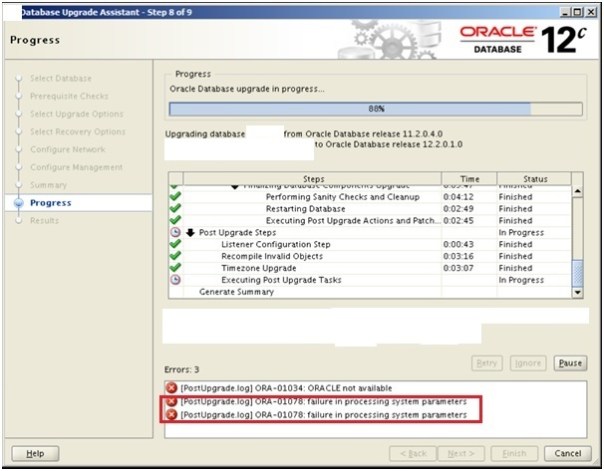
1
Found below error in upgrade log file...Please to add comments
No comments yet. Be the first to comment!