DBA Hub

📋Steps in this guide1/5

upgrading oracle database to 19c using DBUA - ORACLE 19C DBACLASS

Below are the steps for upgrading oracle database from 12c to 19c using DBUA ( graphical method). Do the precheck using preupgrade.jar file

oracle clusteringintermediate
by OracleDba
14 views
1

Important points:

- Direct upgrade to 19  can be performed from 11.2.0.4,12.1.0.2,12.2.0.1 & 18c . - Compatible parameter should be at minimum 11.2.0 - Post upgrade , oracle default accounts ( whose password has not been reset before upgrade), will be locked and set to NO AUTHENICATE MODE. - Post upgrade, you may not be able to login to the existing users with the password, because of new authentication method. To fix this, sqlnet.ora file need to be update(details explained at the end of this article). Current environment details: DATABASE TYPE – STAND ALONE DATABASE NAME – TESTDB DATABASE VESION – 12.1.0.2 CURRENT ORACLE_HOME =/oracle/app/oracle/product/12.1.0.2/dbhome_1 NEW ORACLE_HOME = /oracle/app/oracle/product/19.0.0.0/dbhome_1
2

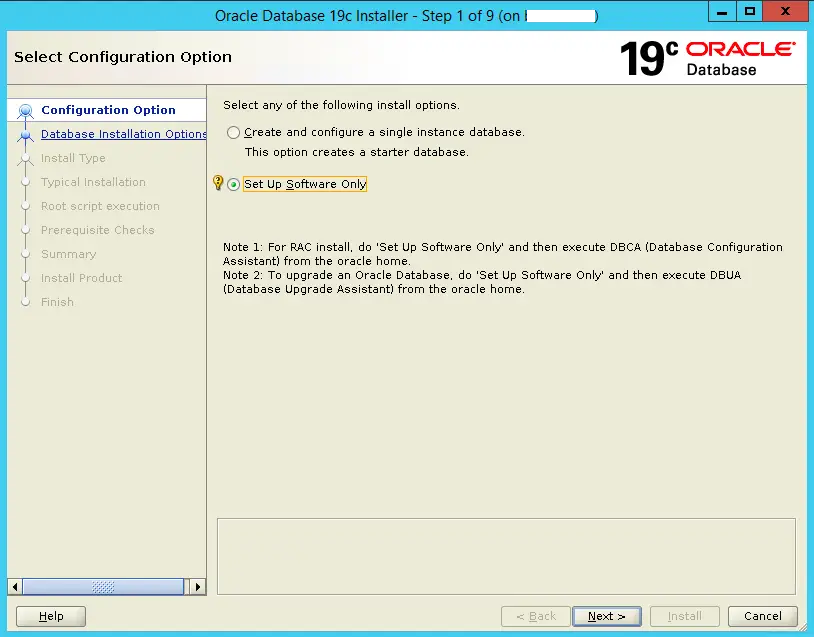
Install oracle 19c ORACLE_HOME:

unzip the binary and run runInstaller.sh mkdir -p /oracle/app/oracle/product/19.0.0.0/dbhome_1 ./runInstaller.sh
Step 2
3

PRE-UPGRADE CHECK :

- Run preupgrade tool script preupgrade.jar tool file is available with the oracle database binary. Run this to do the precheck Run the pre-upgrade fixup script: 2.Run utlrp.sql:( to compile invalid objects) 3.Check database component status: 4.Check timezone version: 5.Check files in backup mode:(should return zero rows) 6.Purge recyclebin: As pre-check is successful . Now we will proceed with the upgrade

Code/Command (click line numbers to comment):

1
2
3
4
5
6
7
8
9
10
11
12
13
14
15
16
17
18
19
20
21
22
23
24
25
26
27
28
29
30
31
32
33
34
35
36
37
38
39
40
41
42
43
44
45
46
47
48
49
50
51
52
53
54
55
56
57
58
59
60
61
62
63
64
65
66
67
68
69
70
71
72
73
74
75
76
77
78
79
80
81
82
83
84
85
86
87
88
89
90
91
92
93
94
95
96
97
98
99
100
101
102
103
104
105
106
107
108
109
110
111
112
113
114
115
116
117
118
119
120
121
122
123
124
125
126
127
128
129
130
131
132
133
134
export ORACLE_HOME=/oracle/app/oracle/product/12.1.0.2/dbhome_1

$ORACLE_HOME/jdk/bin/java -jar /oracle/app/oracle/product/19.0.0.0/dbhome_1/rdbms/admin/preupgrade.jar


==================
PREUPGRADE SUMMARY
==================
  /oracle/app/oracle/product/12.1.0.2/dbhome_1/cfgtoollogs/TESTDB/preupgrade/preupgrade.log
  /oracle/app/oracle/product/12.1.0.2/dbhome_1/cfgtoollogs/TESTDB/preupgrade/preupgrade_fixups.sql
  /oracle/app/oracle/product/12.1.0.2/dbhome_1/cfgtoollogs/TESTDB/preupgrade/postupgrade_fixups.sql

Execute fixup scripts as indicated below:

Before upgrade:

Log into the database and execute the preupgrade fixups
@/oracle/app/oracle/product/12.1.0.2/dbhome_1/cfgtoollogs/TESTDB/preupgrade/preupgrade_fixups.sql

After the upgrade:

Log into the database and execute the postupgrade fixups
@/oracle/app/oracle/product/12.1.0.2/dbhome_1/cfgtoollogs/TESTDB/preupgrade/postupgrade_fixups.sql

Preupgrade complete: 2019-08-26T13:09:51

SQL> @/oracle/app/oracle/product/12.1.0.2/dbhome_1/cfgtoollogs/TESTDB/preupgrade/preupgrade_fixups.sql

Executing Oracle PRE-Upgrade Fixup Script

Auto-Generated by:       Oracle Preupgrade Script
                         Version: 19.0.0.0.0 Build: 1
Generated on:            2019-08-26 13:09:37

For Source Database:     TESTDB
Source Database Version: 12.1.0.2.0
For Upgrade to Version:  19.0.0.0.0

Preup                             Preupgrade
Action                            Issue Is
Number  Preupgrade Check Name     Remedied    Further DBA Action
------  ------------------------  ----------  --------------------------------
    1.  invalid_objects_exist     NO          Manual fixup recommended.
    2.  exclusive_mode_auth       NO          Manual fixup recommended.
    3.  case_insensitive_auth     NO          Manual fixup recommended.
    4.  underscore_events         NO          Informational only.
                                              Further action is optional.
    5.  dictionary_stats          YES         None.
    6.  parameter_deprecated      NO          Informational only.
                                              Further action is optional.
    7.  min_archive_dest_size     NO          Informational only.
                                              Further action is optional.
    8.  rman_recovery_version     NO          Informational only.
                                              Further action is optional.

The fixup scripts have been run and resolved what they can. However,
there are still issues originally identified by the preupgrade that
have not been remedied and are still present in the database.
Depending on the severity of the specific issue, and the nature of
the issue itself, that could mean that your database is not ready
for upgrade.  To resolve the outstanding issues, start by reviewing
the preupgrade_fixups.sql and searching it for the name of
the failed CHECK NAME or Preupgrade Action Number listed above.
There you will find the original corresponding diagnostic message
from the preupgrade which explains in more detail what still needs
to be done.

PL/SQL procedure successfully completed.

SQL> @$ORACLE_HOME/rdbms/admin/utlrp.sql


SQL> select count(*) from dba_objects where status='INVALID';

  COUNT(*)
----------
         0

set pagesize500
set linesize 100
select substr(comp_name,1,40) comp_name, status, substr(version,1,10) version from dba_registry order by comp_name;


COMP_NAME
----------------------------------------------------------------------------------------------------
STATUS      VERSION
----------- ----------------------------------------
JServer JAVA Virtual Machine
VALID       12.1.0.2.0

Oracle Database Catalog Views
VALID       12.1.0.2.0

Oracle Database Java Packages
VALID       12.1.0.2.0

Oracle Database Packages and Types
VALID       12.1.0.2.0

Oracle Multimedia
VALID       12.1.0.2.0

Oracle Text
VALID       12.1.0.2.0

Oracle Workspace Manager
VALID       12.1.0.2.0

Oracle XDK
VALID       12.1.0.2.0

Oracle XML Database
VALID       12.1.0.2.0

SQL> SELECT o.name FROM sys.obj$ o, sys.user$ u, sys.sum$ s WHERE o.type# = 42 AND bitand(s.mflags, 8) =8;

no rows selected

SQL> select * from v$timezone_file;

FILENAME                VERSION     CON_ID
-------------------- ---------- ----------
timezlrg_18.dat              18          0

SQL> SELECT * FROM v$backup WHERE status != 'NOT ACTIVE';

no rows selected

SQL> SELECT * FROM v$recover_file;

no rows selected

SQL> purge dba_recyclebin;
4

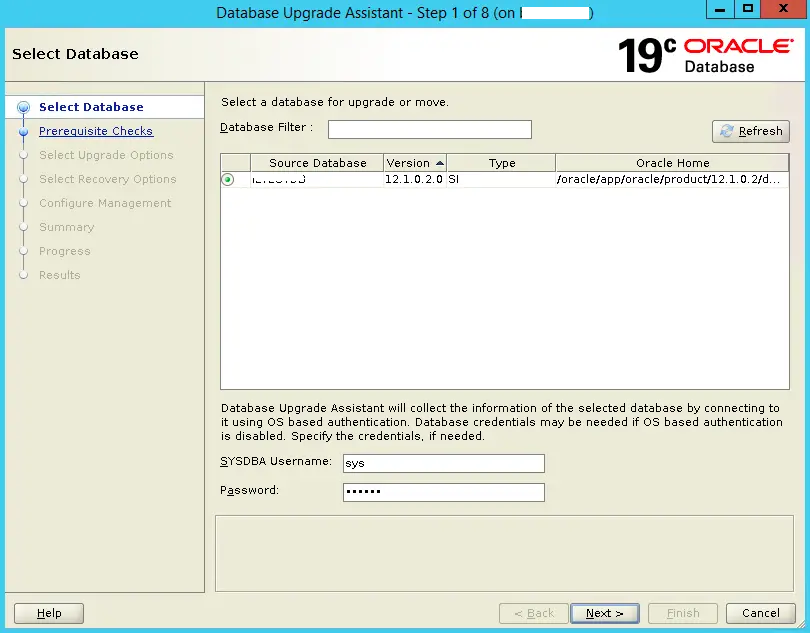
UPGRADE DATABASE:

Enable the flashback on the database. - To enable restore , in case of failure, enable flashback option. 2.Start DBUA export ORACLE_HOME=/oracle/app/oracle/product/19.0.0.0/dbhome_1/ cd $ORACLE_HOME/bin ./dbua We can pause and resume the upgrade during the process also. Upgrade completed successfully.
Step 4

Code/Command (click line numbers to comment):

1
2
3
alter system set db_recovery_file_dest_size=20G scope=both;
alter system set db_recovery_file_dest='/dumparea/FRA/' scope=both;
alter database flashback on;
5

POST CHECK:

3. Updating sqlnet.ora file Post upgrade, you might not be able to connect to the existing users with the passwords. So to fix this add SQLNET.ALLOWED_LOGON_VERSION_SERVER=1 1 to sqlnet.ora file export ORACLE_HOME=/oracle/app/oracle/product/19.0.0.0/dbhome_1 cd $ORACLE_HOME/network/admin 4. Once you have confirmed that upgrade is successful and there is no rollback, you can drop the restore point. 5. Updating compatible parameter post upgrade. Once upgrade is successful , do testing on your database . Once testing is successful you can update the compatible parameter. However once compatible parameter is updated, database cannot be downgraded. So always do proper testing and take a full backup before updating the compatible parameter. - Take fullbackup of the database. - Update compatible parameter

Code/Command (click line numbers to comment):

1
2
3
4
5
6
7
8
9
10
11
12
13
14
15
16
17
18
19
20
21
22
23
24
25
26
27
28
29
30
31
32
33
34
35
36
37
SQL> select comp_id,status from dba_registry;

COMP_ID                        STATUS
------------------------------ -----------
CATALOG                        VALID
CATPROC                        VALID
JAVAVM                         VALID
XML                            VALID
CATJAVA                        VALID
RAC                            OPTION OFF
XDB                            VALID
OWM                            VALID
CONTEXT                        VALID
ORDIM                          VALID

10 rows selected.

SQL> select * from v$timezone_file;

FILENAME                VERSION     CON_ID
-------------------- ---------- ----------
timezlrg_32.dat              32          0

cat sqlnet.ora

SQLNET.ALLOWED_LOGON_VERSION_SERVER=11

select * from v$restore_point;

drop restore point

alter system set compatible='19.0.0' scope=spfile;
shutdown immediate;
startup

SELECT name, value FROM v$parameter
         WHERE name = 'compatible';

Comments (0)

Please to add comments

No comments yet. Be the first to comment!